
Preview
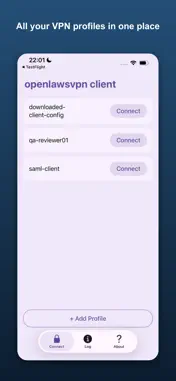


Description
OpenlawsVPN is a secure, independent client for AWS Client VPN endpoints that authenticate with SAML / SSO. Connect to your organization's network using the same single sign-on you already use for work — Google Workspace, Okta, AWS IAM Identity Center, Microsoft Entra ID, and other SAML identity providers. No passwords are ever stored in the app. When you connect, sign-in opens with your identity provider, reuses your existing SSO session where possible, and supports multi-factor authentication. Once you've signed in, the encrypted tunnel is established automatically. FEATURES • SAML / SSO sign-in through your own identity provider — nothing to remember, nothing stored • Import standard .ovpn client configuration files from your administrator • Manage multiple VPN profiles and connect with a single tap • Live connection log for quick diagnostics • Profiles stored encrypted on device • Built on the open-source go-openlawsvpn engine PRIVACY • The app stores no username or password — authentication happens entirely through your identity provider in the browser. • During sign-in the app briefly listens only on your device's private loopback address (127.0.0.1) to receive the secure token. It never accepts connections from the network and does not scan other devices. • No analytics, no tracking, no user data collection. REQUIREMENTS OpenlawsVPN connects to AWS Client VPN endpoints configured for SAML federated authentication. You need a .ovpn profile from your administrator (or your company's VPN portal) and an account with your organization's identity provider. SUBSCRIPTION Full access requires an auto-renewing subscription. A free trial is offered; after the trial it renews monthly until canceled. Manage or cancel anytime in Settings › Apple Account › Subscriptions. Terms of Use: https://openlawsvpn.com/terms/ Privacy Policy URL: https://openlawsvpn.com/privacy/ DISCLAIMER OpenlawsVPN is an independent, third-party client. It is not affiliated with, endorsed by, sponsored by, or supported by Amazon. AWS SAML-based Client VPN connections are officially supported only by the AWS-provided client; for AWS-supported operation, use the AWS VPN Client. "AWS", "Amazon Web Services", and "AWS Client VPN" are trademarks of Amazon.com, Inc. or its affiliates.
What's New
Version 1.0.17 2026-10-23
Clear recovery after connection loss: if the VPN drops because of a network change or outage, the app now shows "Connection interrupted — sign in again" and sta...Clear recovery after connection loss: if the VPN drops because of a network change or outage, the app now shows "Connection interrupted — sign in again" and starts a fresh SSO sign-in when you tap Connect. A manual Disconnect still returns cleanly to idle. More stable connections on weak or changing networks: brief Wi-Fi or mobile data outages no longer end the VPN session immediately. More reliable re-authentication: expired or rejected SAML sign-ins are cleared right away, so reconnecting never reuses old credentials or opens several sign-in pages at once. Better compatibility with AWS Client VPN endpoints: support for AES-192-GCM, improved rekeying, keepalive/ping settings from your .ovpn profile, and AWS's default packet size. Routes and DNS set by the VPN are monitored and restored if they go missing, without touching settings you changed yourself. Subscription screen now shows the free trial length correctly. About screen now includes a notice that openlawsvpn is independent and not affiliated with Amazon Web Services. Technical Analysis
Package Overview Basic metadata
Bundle ID
com.openlawsvpn.ios Current Version 1.0.17
Minimum iOS 16.0
Package Size App Store Size
Package Metadata 0 / 0 version records
Detailed binary, privacy manifest, framework, and Info.plist results have not been indexed for this package yet. The verified App Store and archive metadata above remains available.
Developer Information
Known Version Records
0 version records with stored package metadata
Stored metadata does not guarantee a package is currently available to download.
| Details | Version / IDs | Version date | Action |
|---|