Preview




Description
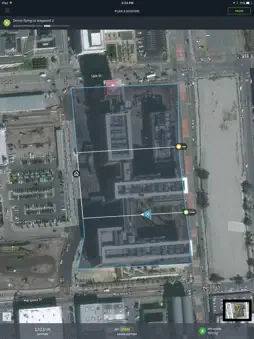
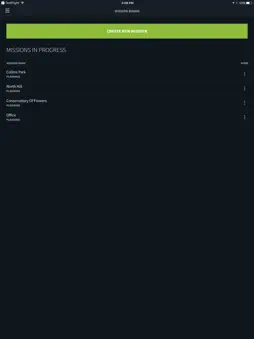
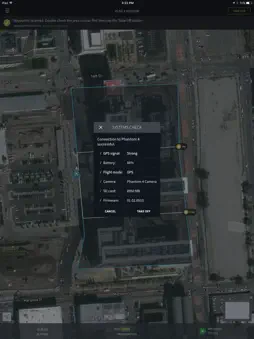
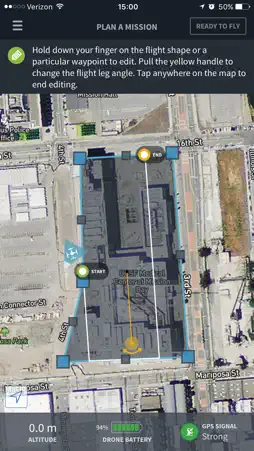
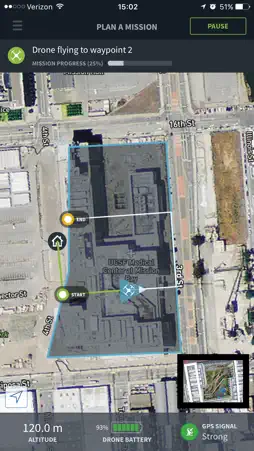
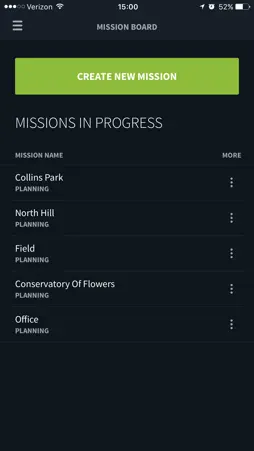
The best drone maps and models come from the best drone flights. Automate aerial mapping with your DJI drone and get high-resolution maps and 3D models in minutes. From takeoff to landing, the Skycatch drone flight app will autonomously fly your DJI drone and perfectly capture photos for 3D mapping. Use with the latest DJI drones: * DJI Phantom 3 Advanced / Pro * Phantom 4 / Pro * Inspire 1 / Pro "Using Skycatch tools helps increase field productivity related to material staging and site logistics by up to 3 hours per week.” — Scott W, DPR Construction How it works: 1. Outline the area you want to map. 2. Tap TAKEOFF to send your mission to your drone. Drone will complete mission autonomously. 3. Upload photos from your drone’s SD card to https://upload.skycatch.com and Skycatch photogrammetry will automatically cloud process into aerial maps and 3D models. It’s that easy! Now you can view and share your processed data online and even markup, measure, overlay BIM & CAD files, and more. Key features: - In-app guidance plus quick access to tutorials, help docs, and chat support. - Select the resolution you want and the app automatically calculates waypoints, altitude, speed, and overlap. - Flight direction control: change the direction/heading of flight path depending on wind, terrain, and obstacles. - Multi-flight missions: plan your entire flight once and if you need to replace your battery mid-flight just hit ‘Continue’ to pick up right where you left off. - Save mission plans without having to re-plan — perfect for multiple sites and recurring data capture. - Watch live video feed of your drone's flight right in the app.
What's New
Version 1.8 2017-01-11
This app has been updated by Apple to display the Apple Watch app icon. New Features! * Added Phantom 4 Pro support! * New altitude slider for more control and... Version 1.7 2016-12-03
New Feature: easy sign in with Google and Facebook! Plus: bug fixes and stability improvements Version 1.6 2016-11-18
- Bug fixes! Stopped some memory leaks, increased overall stability on edge cases. You can now make even larger missions with no slowdowns. App Store User Reviews
Mickey Mary 2017-09-08
Mavic Pro support
Please add support for Mavic Pro
Gazi07 2017-02-01
Love it
This flight planner blows all others I've tried out of the water. Super simple and intuitive and my maps have come out perfect every time so far. Also is the on...
JGreen09 DJIP4P 2017-03-15
Major issues
Attempted two flights. Randomly dropped connection to the drone both times and couldn't reconnect. I had no control over the drone and had to just wait for it t...
JakeEko 2017-07-11
Support for DJI MAVIC
Please add support for DJI MAVIC if possible!!!
Civil Guy 2016-05-11
Needs work, they need to see what the competition has to offer!
Planning a mission is simple but tells you nothing about total flight time, number of batteries, number of pictures. Can't change the flight direction to accom...
Zack_Levandov 2016-05-20
Zachary Adam
Wow, this app is incredibly well designed, I'm very impressed. Such a seamless tool to operate - applicable to anyone! I've been using Commander to plan & execu...
ruben manzanas 2016-05-18
Great tool to not worry about anything else
I don't have much experience with these types of automated missions, so I was pretty nervous from the get go. Being acrophobic and starting a mission from the r...
Drone pilot Dave 2016-05-13
Best mission planner
I’ve tried a lot of mission planners and this is by far the most well design & easy to use! Really wish I can change leg direction, but their support says it’s...
mgwest002 2016-06-16
Too Expensive
The app works very well... I've made a few very cool maps already. Here's the problem: You get a 30 day free trial, and after that, although the map is free, ...
Syed Reza Ali 2016-05-09
The Best User Experience & Features!
I've been using Commander to plan drone flights and fly in the field and it's an amazing app that delivers a clean and very friendly experience. For anyone gett...
Technical Analysis
Package Overview Package analysis available
Bundle ID
com.skycatch.commander Current Version 1.8
Minimum iOS 9.3
Package Size Latest Recorded Package Size
Package Metadata 1 / 11 version records
DJISDK
com.dji-pa.DJISDK v1.0iOS 8.0+30.25 MB
Intercom
io.intercom.ios.Intercom v3.0.8iOS 8.0+4.74 MB
Mapbox
com.mapbox.sdk.ios v3.3.3iOS 8.0+6.0 MB
SAMKeychain
com.samsoffes.SAMKeychain v1.5.0iOS 9.3+178.85 KB
VideoPreviewer
Dji.com.VideoPreviewer v1.0iOS 9.2+4.03 MB
Related Apps


Developer Information
Known Version Records
1 version record with stored package metadata • 11 known version records
Stored metadata does not guarantee a package is currently available to download.
| Details | Version / IDs | Version date | Action |
|---|---|---|---|
 46.83 MB | v1.8 App Store ID: 836902244Build: 176 | 2020-07-17 22:23:26 | Get Version |
| Not archived | v1.8 App Store ID: 820500159Build: 1.8 | 2017-01-11 22:38:17 | Request Version |
| Not archived | v1.7 App Store ID: 820004563Build: 1.7 | 2016-12-04 00:13:37 | Request Version |
| Not archived | v1.6 App Store ID: 819647911Build: 1.6 | 2016-11-19 00:37:39 | Request Version |
| Not archived | v1.5 App Store ID: 818829635Build: 1.5 | 2016-10-27 19:42:34 | Request Version |
| Not archived | v1.4.1 App Store ID: 818799843Build: 1.4.1 | 2016-09-08 23:40:29 | Request Version |
| Not archived | v1.4 App Store ID: 818485956Build: 1.4 | 2016-09-06 21:12:29 | Request Version |
| Not archived | v1.2.0 App Store ID: 817439372Build: 1.2.0 | 2016-05-24 09:18:52 | Request Version |
| Not archived | v1.1.1 App Store ID: 817228590Build: 1.1.1 | 2016-04-30 00:26:27 | Request Version |
| Not archived | v1.1.0 App Store ID: 817161864Build: 1.1.0 | 2016-04-28 00:28:21 | Request Version |
| Not archived | v1.0.0 App Store ID: 816739005Build: 1.0.0 | 2016-04-05 02:31:45 | Request Version |