Preview






Description
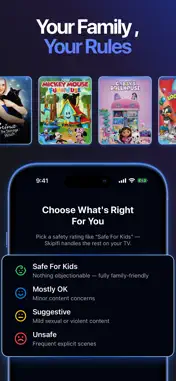
Control what you see. Skipifi turns your iPhone into the remote for the free Skipifi app on your Google TV or Chromecast, automatically skipping explicit scenes and muting profanity on the streaming services you already pay for. Skipifi automatically skips explicit scenes — like kissing and nudity — and mutes profanity in real time on the streaming services you already pay for, so every movie night is comfortable for the whole family. Your iPhone is the remote. The free Skipifi app on your Google TV does the skipping and muting. Pair once by scanning the QR code on your TV screen, then browse, pick, and play — Skipifi handles the awkward parts as you watch. HOW IT WORKS 1. Install the free Skipifi app on your Google TV or Chromecast. 2. Scan the QR code on your TV with your iPhone, then confirm the pairing code shown on your TV — you only do this once. 3. Browse thousands of titles, check the safety rating, and press play. Skipifi skips and mutes automatically. WHY FAMILIES LOVE SKIPIFI • Auto-skip explicit scenes — kissing, nudity, and more • Mute profanity in real time, without pausing the story • Safety ratings on titles: Safe For Kids, Mostly OK, Suggestive, or Unsafe — know before you press play • Filter by movies or shows, safety rating, content rating, or streaming service • Works with Netflix, Prime Video, Hulu, Disney+, Max, Peacock, and more • Smart skipping that learns from your feedback and keeps improving • No new content subscription — Skipifi works with the services you already use WORKS WITH YOUR TV Skipifi works with Google TV and Chromecast devices — including Sony, Hisense, TCL, and more. Requires the free Skipifi app on your TV and both devices on the same Wi-Fi network. If your TV doesn't have Skipifi yet, the iPhone app can open the install page on your TV for you. SUBSCRIPTION Skipifi Premium unlocks auto-skipping, real-time profanity muting, and safety-rating browsing. Choose a monthly or annual plan — both start with a 7-day free trial. Cancel anytime. Terms of Use: https://skipifi.com/terms-of-use Skipifi uses AI and community feedback to identify scenes, so viewer discretion is always advised. Skipifi is not affiliated with Netflix, Amazon, Hulu, Disney, Warner Bros. Discovery, or NBCUniversal; it controls playback of services you're already subscribed to.
What's New
Version 1.03 2026-10-17
Enhancements and bug fixes. Technical Analysis
Package Overview Basic metadata
Bundle ID
com.skipifi.skipifi Current Version 1.03
Minimum iOS 18.0
Package Size App Store Size
Package Metadata 0 / 2 version records
Detailed binary, privacy manifest, framework, and Info.plist results have not been indexed for this package yet. The verified App Store and archive metadata above remains available.
Developer Information
Known Version Records
0 version records with stored package metadata • 2 known version records
Stored metadata does not guarantee a package is currently available to download.
| Details | Version / IDs | Version date | Action |
|---|---|---|---|
| Not archived | App Store ID: 891432842 | Unknown | Request Version |
| Not archived | App Store ID: 887340139 | Unknown | Request Version |