
SKF Multilog IMx Manager App Icon

SKF Multilog IMx Manager

Utilities • SKF
4+ v4.2.0 Recorded price: Free App Store →
★★★★★
★★★★★
(1 App Store ratings)
IPA Analysis
Technical Specs
Bundle ID com.skf.imx8
Version 4.2.0
App Store Size 33.64 MB
Minimum iOS 15.0
Devices iPhone, iPad, iPod touch
Catalog release date 2017-02-24
Latest recorded version date 2026-08-17
Features & Support
Advisory 4+
Languages (1)
EN
Top In App Purchases
No In App Purchases Listed

Preview

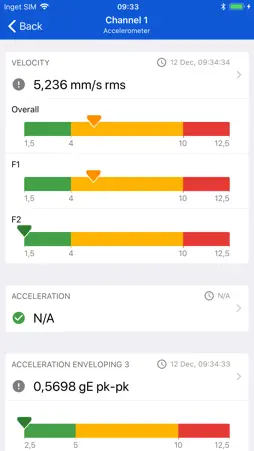
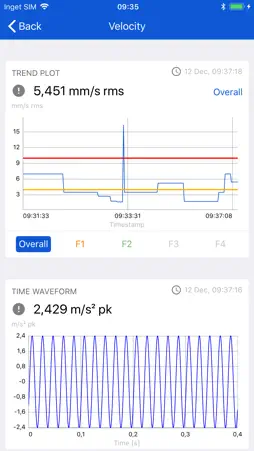
SKF Multilog IMx Manager screenshot 1 SKF Multilog IMx Manager screenshot 2 SKF Multilog IMx Manager screenshot 3 SKF Multilog IMx Manager screenshot 4

Description

SKF Multilog IMx Manager allows you to connect to and configure IMx devices that will monitor the condition of your machines. It allows you also to view live measurements, Perform Site Acceptance Test and generate compliance reports.

What's New

Version 4.2.0 2026-08-17
This release introduces a major update focused on enhanced security, improved device interaction, and increased overall application stability. It also aligns th...This release introduces a major update focused on enhanced security, improved device interaction, and increased overall application stability. It also aligns the application with updated RED2 cybersecurity requirements, ensuring compliance for regulated markets while maintaining flexibility for global users.  What’s New  - Introduced secure TLS/PSK-based communication between the mobile application and IMx devices, ensuring compliance with evolving cybersecurity standards  - Added support for dual operational flows:  - Secure (encrypted) flow for regulated environments  - Non-encrypted flow to support users in non-regulated regions without disrupting existing workflows  - Enhanced compatibility with IMx firmware version 8.1, including improved handling of firmware upgrade scenarios and user guidance  Device Connectivity & Configuration Enhancements  - Improved stability of device connection and TLS handshake process  - Enhanced workflows for:  - Device setup and onboarding  - Editing IMx configurations  - Saving configuration and rebooting devices  - Better support for devices with large configurations and multiple enabled channels  - Improved guidance and messaging during firmware upgrade and connection setup  Measurement & Reporting Improvements  - Increased reliability of SAT (Site Acceptance Test) execution and reporting  - Improved performance when handling large datasets during testing and configuration saving  - Stable IMx report generation and configuration management workflows  Performance & Stability Improvements  - Reduced application crashes in scenarios with high channel configurations and large data loads  - Improved behavior during firmware upgrade flows and configuration updates  - Enhanced responsiveness across key device interaction flows  Additional Updates  - Improved compatibility and synchronization behavior with backend systems  Important Information  - This version is designed to work with IMx firmware v8.1 for full functionality  - Devices using secure TLS communication require IMx Multilog Manager v4.x  - Users may be guided to upgrade firmware to ensure access to all features - Standalone Mode: When an IMx device is used standalone mode, the IMx Manager app generates and transfers a unique PSK (encryption key) to the device. After this process, only the mobile device that generated the PSK can access the IMx device. Other mobile devices cannot connect because they do not possess the generated PSK. Support for sharing the PSK across multiple mobile devices is planned for a future release. - Device & Server Initiated Modes: When an IMx device connects to @ptitude Observer for the first time, the encryption PSK is generated by @ptitude Observer and transferred to the device. Once this process is complete, the IMx Manager app can no longer connect directly to the IMx device because it does not have access to the generated PSK. A future enhancement will allow users to regain access through the device's Rescue Button. - Observer Compatibility: This release has not been tested with @ptitude Observer v13.8. This update delivers a more secure, stable, and reliable experience, especially for users working with advanced configurations and in environments requiring strict cybersecurity compliance.

Technical Analysis

Package Overview Basic metadata
Bundle ID com.skf.imx8
Current Version 4.2.0
Minimum iOS 15.0
Package Size App Store Size
Package Metadata 1 / 11 version records
5.0 / 5.0 (1 ratings)
Detailed binary, privacy manifest, framework, and Info.plist results have not been indexed for this package yet. The verified App Store and archive metadata above remains available.

Developer Information

Known Version Records

1 version record with stored package metadata • 11 known version records

Stored metadata does not guarantee a package is currently available to download.

Details Version / IDs Version date Action
SKF Multilog IMx Manager icon
9.83 MB
v3.2
App Store ID: 838122165Build: 20201008.2
2020-10-08 04:17:38 Get Version
SKF Multilog IMx Manager icon
Not archived
App Store ID: 836695228 Unknown Request Version
SKF Multilog IMx Manager icon
Not archived
App Store ID: 835923800 Unknown Request Version
SKF Multilog IMx Manager icon
Not archived
App Store ID: 834973189 Unknown Request Version
SKF Multilog IMx Manager icon
Not archived
App Store ID: 834427894 Unknown Request Version
SKF Multilog IMx Manager icon
Not archived
App Store ID: 833671173 Unknown Request Version
SKF Multilog IMx Manager icon
Not archived
App Store ID: 833259835 Unknown Request Version
SKF Multilog IMx Manager icon
Not archived
App Store ID: 829614907 Unknown Request Version
SKF Multilog IMx Manager icon
Not archived
App Store ID: 826664719 Unknown Request Version
SKF Multilog IMx Manager icon
Not archived
App Store ID: 821161166 Unknown Request Version
SKF Multilog IMx Manager icon
Not archived
App Store ID: 820986823 Unknown Request Version