Preview




Description
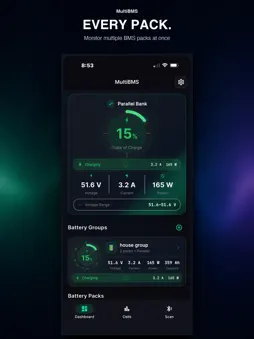
Most battery apps show you one pack. MultiBMS shows you the whole system. Connect every Bluetooth BMS you own, group them the way they're actually wired, and watch the entire bank behave as one — voltage, current, power, state of charge, temperature, capacity and every individual cell, live. SEE THE WHOLE BANK AT ONCE Build a group from any number of packs and MultiBMS aggregates it properly — parallel banks sum their current and capacity, series strings sum their voltage. One gauge for the bank, and every pack underneath it. Six batteries in an off-grid build read as one system instead of six apps you keep switching between. EVERY CELL, FOUR WAYS Bars, heat map, rows or grid. Minimum, maximum and delta across the whole bank or per pack, with the weak cell called out before it becomes a problem. Watch the balancer work in real time. RECORD WHAT ACTUALLY HAPPENED Start a recording and MultiBMS logs the run at one-second resolution. Pick a Battery Bank preset for a house system or a Vehicle preset for a ride, choose exactly which metrics to capture, and add per-cell and per-pack detail when you want the full picture. A live dyno cockpit shows the run as it happens — speed, volts, amps, kilowatts, state of charge, G-force — with peak draw, peak power and energy pulled tracked as you go. REPLAY IT LIKE FOOTAGE Cinema Replay plays any recorded run back as a scrubbing timeline with every channel drawn together. Find the moment the voltage sagged, the moment the pack got hot, the moment you hit peak power. Then export it: CSV for a spreadsheet, a formatted PDF report, or a share card that fits in a message. ON YOUR WRIST The Apple Watch app is a full second screen, not a notification relay. A live dyno cockpit that mirrors the run on your phone. Race Control with lap timing and per-lap energy. Ride profiles for e-bikes, karts and carts with GPS speed, distance and G-force. Fleet and cell views for the whole bank. Start and stop a recording from your wrist and the phone follows. ALERTS THAT MATTER Set your own limits for pack temperature, low pack voltage and low cell voltage. MultiBMS tells you the moment something crosses the line, whether you're looking at the app or not. MAKE IT LOOK LIKE YOUR RIG Thirteen interface skins, from an off-grid instrument bay to a racing cluster, marine, aviation, industrial and a retro terminal. Four dyno themes for the recorder. Four charge-flow animations — rail, orbit, mist and plasma — so charging and discharging read at a glance from across the room. WORKS WITH YOUR HARDWARE MultiBMS speaks 30 Bluetooth Low Energy BMS protocols covering drop-in lithium packs, server-rack storage, active balancers, shunt meters and portable power stations. Support varies by model and firmware — the full, current compatibility list lives at multibms.com. Not sure yours is covered? Email [email protected] with your battery and BMS model. We add protocols, and we're quick about it. READ-ONLY BY DESIGN MultiBMS reads telemetry. It does not write settings, change limits or reconfigure your BMS. Your battery keeps doing exactly what it was doing. NO ACCOUNT, NO SUBSCRIPTION No sign-up, no cloud, no recurring charge. Your data stays on your device. Premium skins are optional one-time purchases.
What's New
Version 1.0.17 2026-09-24
Kilometers are now supported throughout MultiBMS. Choose Miles or Kilometers in Settings > Display. Speed uses km/h, distance uses km, elevation uses meters, an... Technical Analysis
Package Overview Basic metadata
Bundle ID
com.multibms.app Current Version 1.0.17
Minimum iOS 15.0
Package Size App Store Size
Package Metadata 1 / 1 version records
Detailed binary, privacy manifest, framework, and Info.plist results have not been indexed for this package yet. The verified App Store and archive metadata above remains available.
Developer Information
Known Version Records
1 version record with stored package metadata
Stored metadata does not guarantee a package is currently available to download.
| Details | Version / IDs | Version date | Action |
|---|---|---|---|
| 31.8 MB | v1.0.14 App Store ID: 885879639Build: 1.0.14 | 2026-08-27 20:09:02 | Paid / Arcade |