
Preview




Description
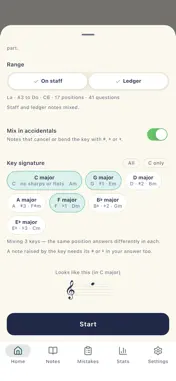
Note Trainer builds the "reading sight" that makes a note's name pop into your head the instant you see it on the staff. Whether you play piano, guitar, ukulele, violin, or sing, how fast you read notation decides how fast you learn and how smoothly you play. When a note appears, name it within 0.5 seconds. This focused flash-quiz drill trains your instant recognition speed (sight-reading), and even a few minutes a day makes your reading noticeably faster. ■ Why train note reading? Counting lines one note at a time breaks your playing and kills momentum. Real fluency comes only when the position and name of a note register the moment you see it. This app trains exactly that automatic reaction speed. ■ Features • Note ID — see a note on the treble or bass clef and name it • Find the note — read the staff and press the same note on a keyboard, linking notation to the keys • Seven key signatures — C through A major and E-flat major. The same position answers differently once a key sits at the left • Mix keys in one session — pick any set and they alternate question to question • Choose the range — turn staff notes and ledger notes on and off separately, so you can drill ledger lines alone • Mix in accidentals — sharps, flats and naturals that cancel or bend the key • Mix both clefs — treble and bass alternate, and switching between them is the part that is actually hard • Do-Re-Mi / CDEFGAB — both note-naming systems, so you practice your way • Time Attack — score as many as you can within the time limit • Survival — one miss and it's over, training focus and accuracy together • Weak-spot focus — records each miss with its position, key and accidental, then replays exactly what was on screen • Stats — reaction time, accuracy and a daily trend over the last 7 days, 30 days or all time, plus your practice streak • Reference sheet — every position in the clefs, range and key you are practising, each one playable so you can hear it ■ Great for • Beginners and self-learners on piano, guitar, ukulele, violin, or voice • Anyone whose playing keeps stalling because reading is slow • Students prepping for music exams, sight-singing, and ear training • Parents helping a child build note-reading basics • Quick practice on a commute or break ■ How to use it 1) Start with treble-clef note ID to build the basics. 2) Once comfortable, turn on ledger notes and mix in the bass clef. 2a) Add key signatures one at a time to feel how a position shifts with the key. 3) Push speed and focus with Time Attack and Survival. 4) Close the gaps with Weak-spot focus on the notes you miss most. No sign-up required and it works offline. All records stay on your device, and can be erased entirely from settings at any time. A few minutes a day is enough — start your sight-reading drills today.
What's New
Version 1.0.6 2026-09-17
• Added a setting to hide the note-name letters on the piano keyboard. In Find Note mode the keys always showed 도레미/CDEFGAB labels, letting you answer without k... Technical Analysis
Package Overview Basic metadata
Bundle ID
com.siwooeo.notetrainer Current Version 1.0.6
Minimum iOS 15.0
Package Size App Store Size
Package Metadata 0 / 3 version records
Detailed binary, privacy manifest, framework, and Info.plist results have not been indexed for this package yet. The verified App Store and archive metadata above remains available.
Developer Information
Known Version Records
0 version records with stored package metadata • 3 known version records
Stored metadata does not guarantee a package is currently available to download.
| Details | Version / IDs | Version date | Action |
|---|---|---|---|
| Not archived | App Store ID: 889186701 | Unknown | Request Version |
| Not archived | App Store ID: 887473608 | Unknown | Request Version |
| Not archived | App Store ID: 886998463 | Unknown | Request Version |