
Preview



Description
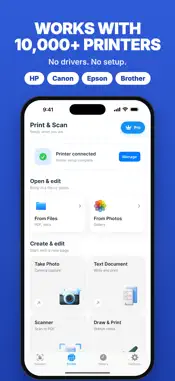
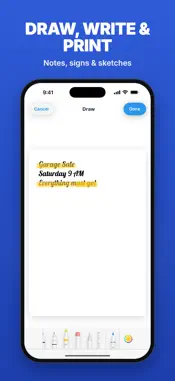
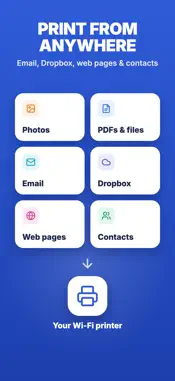
Print & Scan: Your Ultimate Mobile Printing Companion Effortless Select & Print: Easily select and print PDFs or photos directly from your iPhone or iPad's Photos or Files apps. Print & Scan transforms your mobile device into a powerful printing station, allowing you to access documents and images for quick printing anytime, anywhere. Print Word, Excel and PowerPoint: Open Word, Excel, PowerPoint, Pages, Numbers and Keynote files and print them in a few taps. Share an email attachment to Print&Scan from Mail, or pick a file in Files. Files are converted on your device and never uploaded. Create, Scan, & Print on the Go: Capture new photos, scan documents, jot down notes, or unleash your creativity with drawings all within the app. From idea to print, achieve outstanding results in under a minute. Whether it's a last minute document scan or a creative sketch, Print & Scan ensures your content is ready to be printed effortlessly. Wide Printer Compatibility: Boasting support for over 5000 AirPrint compatible printers, Print & Scan stands out as the most versatile printing app. Our extensive compatibility list includes major brands like HP, Brother, Canon, Dell, Epson, and many more, ensuring your printer is likely supported. Simplify your printing tasks with an app designed to work seamlessly with a wide range of printers, including HP, Canon, and others. Key Features: Instant printing from Photos or Files apps Easy document scanning & photo capturing Note-taking and drawing for personalized prints Supports 5000+ AirPrint printers from HP, Canon, Brother, and more Trusted Printer Compatibility: For a complete list of AirPrint-compatible printers, visit our support page: https://support.apple.com/en-us/HT201311 Your Privacy Matters: We're committed to protecting your privacy. For detailed information, please visit our Privacy Policy and Terms of Service Privacy Policy: https://printandscan.net/privacy_policy Terms of service: https://printandscan.net/terms_and_conditions We're Here to Help: For support, feedback, or inquiries, reach out to us at [email protected] Disclaimer: Print & Scan is independently developed and is not affiliated with HP, Canon, Epson, or any other brands mentioned.
What's New
Version 1.1.3 2026-11-20
• Print Word, Excel, PowerPoint, Pages, Numbers and Keynote files: share an email attachment to Print&Scan or open it from Files • SVG images and multi-page TIF...• Print Word, Excel, PowerPoint, Pages, Numbers and Keynote files: share an email attachment to Print&Scan or open it from Files • SVG images and multi-page TIFF files now open • New printer setup: find your printer right in the app and follow clear Wi-Fi steps • Bug fixes and improvements Technical Analysis
Package Overview Basic metadata
Bundle ID
com.boosthub.printandscan Current Version 1.1.3
Minimum iOS 15.6
Package Size App Store Size
Package Metadata 1 / 7 version records
3.7 / 5.0 (6 ratings)
Detailed binary, privacy manifest, framework, and Info.plist results have not been indexed for this package yet. The verified App Store and archive metadata above remains available.
Developer Information
Known Version Records
1 version record with stored package metadata • 7 known version records
Stored metadata does not guarantee a package is currently available to download.
| Details | Version / IDs | Version date | Action |
|---|---|---|---|
 Not archived | v1.1.3 App Store ID: 895511385Build: 1.1.3 | 2026-11-20 08:01:01 | Request Version |
| Not archived | v1.1.2 App Store ID: 894742405Build: 1.1.2 | 2026-11-11 09:31:20 | Request Version |
| Not archived | v1.1.1 App Store ID: 893876832Build: 1.1.1 | 2026-10-26 22:02:05 | Request Version |
| Not archived | v1.1.0 App Store ID: 869195109Build: 1.1.0 | 2026-10-20 11:08:56 | Request Version |
| 20.34 MB | v1.0.9 App Store ID: 863699225Build: 14 | 2024-02-22 20:25:46 | Get Version |
| Not archived | v1.0.1 App Store ID: 852125266Build: 1.0.1 | 2022-09-19 14:44:36 | Request Version |
| Not archived | v1.0 App Store ID: 848869708Build: 1.0 | 2022-09-06 15:24:54 | Request Version |