Preview





Description
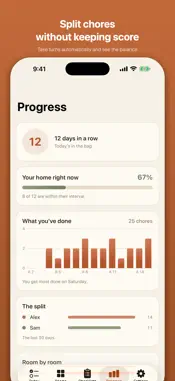
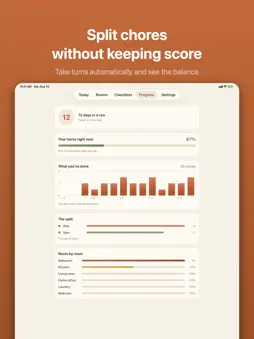
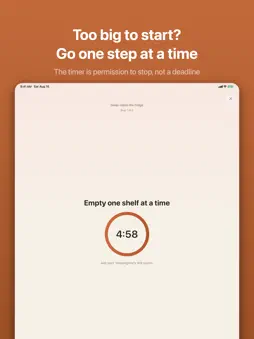
Dustly: Cleaning Schedule is a calm cleaning schedule app for iPhone, iPad, iPhone Duo and Apple Watch, designed for people who feel overwhelmed by housework, ADHD included. No due dates, no guilt, no overdue list. The core is free for good, there is no account, and the App Store privacy label says Data Not Collected. Dustly answers one question: what should I clean right now? Every chore has a rhythm — how often it wants doing — and a bar that fills as time passes. When it reaches the mark, the chore shows up in Today. Skip a week and nothing is "missed"; the list simply reorders itself. Your home doesn't run on a calendar, and neither should your cleaning app. TODAY — A day's share, not a wall: about five chores that are actually ready, with "Show more" one tap away when you're on a roll. When the day's share is done, Today says "That's plenty for today" and lets the rest wait. Tick a chore and you see the tick before it leaves the list. A new home starts with at most three chores ready on day one. YOUR ROOMS — A heat map of your home. Every room colored by the thing that needs you most. SMALL STEPS — For the jobs that feel too big to start. Dustly hands you one step at a time, full screen, with a timer that is permission to stop — not a deadline to fail. Stopping early still counts. SHARE YOUR HOME — Invite the person you live with by link, free. You both see the same rooms and Today, and tick chores off together. It goes through iCloud, with no account to make. Your reminders stay your own. TAKE TURNS (PLUS) — Give a chore to one person, or let everyone take turns, and see who did what, month by month. Invite more people, or add those without Dustly, like children. One Plus covers the whole home. QUIET DAYS — Pick the days you never clean and set when your day ends. On a quiet day Dustly asks for nothing: no list, no reminder. Forgot to pause before a trip? "I was away" puts every chore back where it was when you left. APPLE WATCH, SIRI AND MORE — Today's chores on your wrist, free: tick them off there. Ask Siri what to clean, mark a chore done by voice, find chores in Spotlight, or start Small Steps from Control Center. WIDGETS — See what's next and your room heat map on the home screen, and tick chores off without opening the app. CHECKLISTS — Spring clean, deep clean and moving out, fully written with time estimates. Progress saves as you go, so a weekend job can take a month. On iPhone Duo, Dustly opens into two panes. SYNCS THROUGH YOUR OWN iCLOUD — Free, automatic, and private. Your home appears on your iPad by itself, and your own choices, like quiet days, follow your Apple Account. No sign-up, no analytics, no ads, no third-party code. FREE, PERMANENTLY: unlimited rooms and chores, Today, streaks, Small Steps, both widgets, the Apple Watch app, sharing with one person, gentle reminders (one a day at most), 14 days of history, iCloud sync, and one run of each seasonal checklist. DUSTLY PLUS (subscription, or pay once for lifetime): household turns and the split, three or more people, history beyond 14 days, unlimited checklist runs, your own checklists, and photos on chores. One Plus covers the whole home. Terms of Use (EULA): https://www.apple.com/legal/internet-services/itunes/dev/stdeula/ Privacy Policy: https://frekvens.ai/apps/dustly/privacy
What's New
Version 1.3 2026-11-04
Dustly 1.3 lets you share your home, and puts today's chores on your wrist. • Share your home: invite the person you live with by link. You both see the same r... Technical Analysis
Package Overview Basic metadata
Bundle ID
ai.frekvens.Dustly Current Version 1.3
Minimum iOS 18.6
Package Size App Store Size
Package Metadata 0 / 0 version records
Detailed binary, privacy manifest, framework, and Info.plist results have not been indexed for this package yet. The verified App Store and archive metadata above remains available.
Developer Information
Known Version Records
0 version records with stored package metadata
Stored metadata does not guarantee a package is currently available to download.
| Details | Version / IDs | Version date | Action |
|---|