
Preview


Description
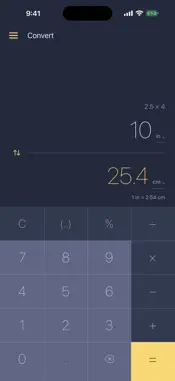
Numera is a calculator for people who do more than add up a shopping list — and who would rather not fight their calculator to do it. BRACKETS, AFTER THE FACT One bracket key that always shows what it will do. Open a group, nest another, close it — or, when you have already typed something and realise it all needed to be multiplied, wrap what is on screen without retyping a character. 12 + 3 becomes (12 + 3), and then × 4 gives 60, not 24. A HISTORY TAPE THAT DOES SOMETHING Every result you commit stays on a tape above the display. Tap a line to copy it. Press and hold to load it straight back into the calculator and carry on. Swipe to delete. The tape survives relaunches and never leaves your phone. CURRENCY THAT WORKS ON A PLANE Rates come from the European Central Bank and are cached on your device, so conversion works with no signal at all. The rate and the date it was published are shown with the result — you always know how current the number is. UNITS, EXACTLY 63 units across length, mass, area, volume, temperature, speed, time and data, converted with exact ratios rather than rounded constants. An inch is exactly 2.54 cm. Arithmetic works here too: type 2.5 × 4 and convert the result. DETAILS THAT ADD UP Decimal arithmetic, so 0.1 + 0.2 is exactly 0.3. Tap any value to copy it. Hold minus to flip the sign of a result. Press equals repeatedly to repeat an operation. Five app icons, optional haptics and key sounds, and separate decimal settings for money and units, including an Auto setting that gives each currency its usual number of decimal places (none for yen, two for euros). QUIET BY DESIGN No ads. No accounts. No purchases. No analytics, no tracking, no data collection of any kind — there is nothing to consent to. Numera is free because it was built to be used, not monetised. iPhone only, and deliberately so.
What's New
Version 1.4 2026-10-01
Bigger, lighter keys that run all the way to the bottom of the screen, separated by hairlines rather than gaps. Money now follows its own currency. A converted... Technical Analysis
Package Overview Basic metadata
Bundle ID
nz.kainga.numera Current Version 1.4
Minimum iOS 17.0
Package Size App Store Size
Package Metadata 0 / 0 version records
Detailed binary, privacy manifest, framework, and Info.plist results have not been indexed for this package yet. The verified App Store and archive metadata above remains available.
Developer Information
Known Version Records
0 version records with stored package metadata
Stored metadata does not guarantee a package is currently available to download.
| Details | Version / IDs | Version date | Action |
|---|