Preview





Description
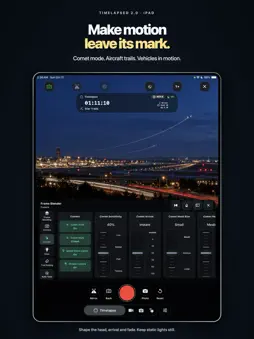
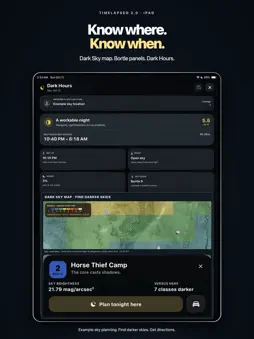
Time. Under your control. Turn passing clouds, a city after dark, aircraft and traffic into motion you can shape. TimeLapsed brings a professional timelapse camera, programmable capture and a powerful frame-blending engine to iPhone and iPad. Start with a profile. Go deeper when the shot demands it. SEE THE TRAILS BUILD Create star trails, rolling trails and comet tails in the live camera preview. Tune trail length, blending, glow and color while you shoot. Use Horizon Mask to keep sky trails off the foreground and Anchor Lock to help correct mounted-camera bumps. CONTROL EVERY DETAIL Set shutter, ISO, focus, white balance, interval and zoom. Keep recording time, exposure and device status visible in the HUD. Save camera profiles and use position recall to guide your framing back to a saved reference. Updated for iOS 27, with aperture controls on supported iPhone 18 Pro and Pro Max lenses and Camera Control integration on supported iPhones. PROGRAM HOW THE SHOT EVOLVES Build camera automations with timed changes and smooth ramps for exposure, interval, color and trail effects. Rehearse your timeline before recording. Scheduled capture requires the camera to stay open in the foreground. CAPTURE NOW. BLEND LATER. Save an effects-free companion movie alongside your processed capture. Open a video in the editor, preview and tune a new blend, then render star trails or comet effects with the same engine. Import still-image sequences from other cameras through Photos or Files and turn them into timelapses. MAKE EVERY TAKE COUNT Pause and resume video recording, flip or mirror the camera, split clips and build a trip into a film. Edit speed, framing, color, titles and audio. Shoot and edit widescreen 16:9 as well as portrait video. Mark Moments to keep the right part of a recording, and save still frames from videos. CREATE IN REAL LIFE Place a framed, translucent reference image over the live camera view while you draw on real paper. Record the artwork taking shape. Explore tilt shift, simulated night vision and simulated thermal effects. KNOW WHERE. KNOW WHEN. Plan with the Sun, Moon and stars in Sky Planner. Find Dark Hours, explore light-pollution maps and Bortle panels, and get directions toward darker skies. Check weather radar and forecast-based rain alerts during your shoot. Air Traffic Watch adds aircraft data and predicted paths using your own flight-provider keys. BUILD YOUR CAMERA SETUP Preview and control capture from Apple Watch or another TimeLapsed device. Remote control also supports compatible Canon cameras. Connect supported external displays, USB-C microphones, Power Delivery hubs and external storage for a mounted recording setup. YOUR TIME. YOUR PROGRESS. Review capture history with exposure, white balance, weather, battery, CPU, memory and thermal-state statistics. Keep personal records or join the optional leaderboard. Discover and share videos, images, camera profiles and automations in the Community. Add music from the integrated catalog. Analyze Scene offers optional AI camera recommendations for you to review and apply. START FREE. GO FURTHER WITH PRO. The core camera, built-in profiles and watermarked 1080p exports are free. Advanced workflows, clean exports and additional planning tools require Pro. Watch preview and record controls are free; advanced Watch controls require Pro. Existing full-version owners keep lifetime Pro through Restore Purchases. Features depend on compatible hardware, accessories and service availability. Aircraft providers may charge for your own keys. Production Display has a separate license. Companion video is effects-free video, not sensor RAW. Thermal and night-vision effects are simulated. EULA / Terms of Service: https://shutterspeedapps.com/timelapsed/tos?language=en Privacy Policy: https://shutterspeedapps.com/timelapsed/privacy?language=en AI Usage Policy: https://shutterspeedapps.com/timelapsed/aiusage?language=en
What's New
Version 2.2 2026-10-21
• Improved memory management on smaller iOS devices with 4 GB of memory. Larger phones were unaffected. • Enabled real-time filters in the camera. • Improved mu... Technical Analysis
Package Overview Basic metadata
Bundle ID
com.shutterspeedapps.timelapsed Current Version 2.2
Minimum iOS 18.0
Package Size App Store Size
Package Metadata 0 / 11 version records
Detailed binary, privacy manifest, framework, and Info.plist results have not been indexed for this package yet. The verified App Store and archive metadata above remains available.
Developer Information
Known Version Records
0 version records with stored package metadata • 11 known version records
Stored metadata does not guarantee a package is currently available to download.
| Details | Version / IDs | Version date | Action |
|---|---|---|---|
| Not archived | App Store ID: 871135030 | Unknown | Request Version |
| Not archived | App Store ID: 870903554 | Unknown | Request Version |
| Not archived | App Store ID: 870573724 | Unknown | Request Version |
| Not archived | App Store ID: 870484536 | Unknown | Request Version |
| Not archived | App Store ID: 866588866 | Unknown | Request Version |
| Not archived | App Store ID: 866481231 | Unknown | Request Version |
| Not archived | App Store ID: 865685750 | Unknown | Request Version |
| Not archived | App Store ID: 865334542 | Unknown | Request Version |
| Not archived | App Store ID: 865321845 | Unknown | Request Version |
| Not archived | App Store ID: 864917524 | Unknown | Request Version |
| Not archived | App Store ID: 864773815 | Unknown | Request Version |