Preview




Description
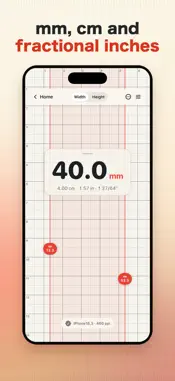
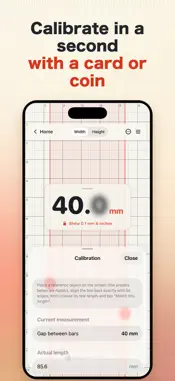
Turn your iPhone into a real-size ruler and caliper. When you don't have a ruler handy, just lay a small object on the screen and pinch it between the two bars - the size is shown in millimetres, big and clear. Great for screws, buttons, batteries, SD cards, sticky notes and other small things. Features - Real-size mm grid (horizontal & vertical) - Two measuring bars with a big millimetre readout - Switch between width and height - Auto-scaled from your device's screen; if it's ever off, calibrate in one tap against a credit card or coin How to use 1. Tap Measure 2. Place an object on the screen 3. Align the two bars to its edges 4. Read the big number Pro (one-time purchase) - Exact 0.1 mm readout (the free version reads to the whole millimetre) - Inches & fractional inches (to the nearest 1/64, shown together with cm) - Share / save the result as an image - Measurement history with labels The grid, calibration and whole-millimetre measuring are always free. Notes - Only objects that fit on the screen can be measured. - Measures flat dimensions (width, diameter, length). - Objects rest directly on the screen - take care not to scratch it.
What's New
Version 1.2.5 2026-11-22
Minor improvements and stability fixes. Technical Analysis
Package Overview Basic metadata
Bundle ID
om.shuheilocale.TouchCaliper Current Version 1.2.5
Minimum iOS 18.0
Package Size App Store Size
Package Metadata 0 / 2 version records
Detailed binary, privacy manifest, framework, and Info.plist results have not been indexed for this package yet. The verified App Store and archive metadata above remains available.
Known Version Records
0 version records with stored package metadata • 2 known version records
Stored metadata does not guarantee a package is currently available to download.
| Details | Version / IDs | Version date | Action |
|---|---|---|---|
| Not archived | App Store ID: 887514236 | Unknown | Request Version |
| Not archived | App Store ID: 886611515 | Unknown | Request Version |