Preview





Description
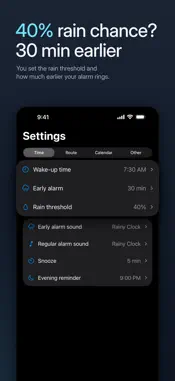
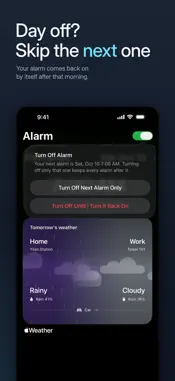
Rainy Clock wakes you earlier when rain is forecast on your commute and shows your next alarm on your Home Screen and Lock Screen. Set your home and work addresses, how you travel and your usual wake-up time, then choose a rain probability threshold and how much earlier to wake up. Forecasts come from Apple Weather. YOUR NEXT ALARM AT A GLANCE See when your next alarm will ring and why: earlier for rain on your route, or skipped for a weekend or, with a paid plan, a holiday, a closure or a day you set to stay silent. The weather card shows home and work forecasts with animated weather. Next Alarm widgets show this on the Home Screen (small or medium) and Lock Screen; the medium one adds home and work weather from Apple Weather. Widgets require iOS 26 or later. ALARM SWITCH Turn off only the next alarm (it comes back on after that morning), or turn the alarm off until you turn it back on. Free on every plan. CALENDAR FEATURES WITH A PAID PLAN Choose Taiwan office holidays or US federal holidays with standard observed dates, and set individual dates to ring or stay silent; your choices take priority. US state, school and employer calendars may differ. TAIWAN TYPHOON AND DISASTER CLOSURES WITH A PAID PLAN When a city or county government in Taiwan suspends work or school for the morning or all day in your home or workplace district, Rainy Clock skips that day's alarm. • Choose work closures, school closures or both. • If no announcement can be confirmed, or the network is down, the alarm rings as usual. • Announcements come from the Directorate-General of Personnel Administration's public data via NCDR; the app shows the source and its update time, and the government's announcement prevails. • Optional notifications about announcement changes are checked against your districts on your phone. • A township map shows today's and tomorrow's announcements; "View map demo" works on any plan. MAKE YOUR OWN AI ALARM VOICE Write what you want to hear and choose a voice. Generated sounds stay on your phone, and replaying one does not use a generation. The free plan includes one initial generation; each extra generation requires a completed rewarded ad. SETTINGS THAT STAY ORGANIZED Time, Route, Calendar and Other keep each setting in one place; changes save automatically. Preview your route with Apple Maps, and pick separate sounds for early and regular alarms. OPTIONAL MEMBERSHIP Monthly subscription and One-time purchase both include: • Remove banner ads. • Calendar features. • Typhoon and disaster closure rules (Taiwan). • One AI generation each day without watching an ad. The monthly plan provides these benefits while it is active; the one-time purchase provides ongoing access without a recurring payment. Owning both does not double the daily allowance; unused daily generations do not carry over. Purchases use Apple's in-app purchase flow; prices and availability come from your App Store. Monthly subscriptions renew automatically unless cancelled in Apple's subscription settings. A one-time purchase does not cancel an existing subscription. No Rainy Clock account is needed; Apple-verified app and purchase information recognizes your membership. Restore purchases and Manage subscriptions are in Settings → Other → Membership & plans, top-right menu. Deleting membership data does not cancel an Apple subscription. ALARMS AND CONNECTIONS On iOS 26 and later, AlarmKit alarms can sound through Silent mode and Focus, with optional snooze. On iOS 17–25, alarms use local notifications and follow notification settings and the silent switch. Forecasts, closure announcements, purchases and AI generation need internet. Background updates and notifications depend on iOS; the app and widget note when today's weather wasn't re-checked. Privacy policy: https://shukaihu.github.io/RainyClock/privacy-policy.html Terms of Use: https://www.apple.com/legal/internet-services/itunes/dev/stdeula/
What's New
Version 1.8.2 2026-10-16
• Alarm sounds: every sound in the list now has its own play button, so you can preview each one without choosing it. • AI Voice: the words you typed are kept a...• Alarm sounds: every sound in the list now has its own play button, so you can preview each one without choosing it. • AI Voice: the words you typed are kept after you watch a video for another generation. • Alarm screen: the snooze button now shows your snooze length, such as "Snooze 9 min". • Alarm screen: after an app update, a ringing alarm could show code-like text such as "alarm_snooze_button". Fixed. Open Rainy Clock once after updating so the alarms you already set pick up both changes. • Settings › Other: a version card shows which version you have and, when a newer one is on the App Store, an Update button. Technical Analysis
Package Overview Basic metadata
Bundle ID
com.shukaihu.RainyClock Current Version 1.8.2
Minimum iOS 17.0
Package Size App Store Size
Package Metadata 0 / 0 version records
Detailed binary, privacy manifest, framework, and Info.plist results have not been indexed for this package yet. The verified App Store and archive metadata above remains available.
Developer Information
Known Version Records
0 version records with stored package metadata
Stored metadata does not guarantee a package is currently available to download.
| Details | Version / IDs | Version date | Action |
|---|