
Preview




Description
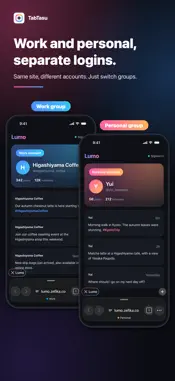
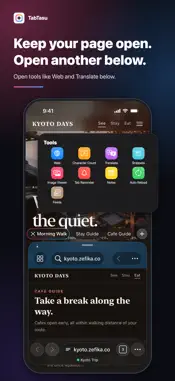
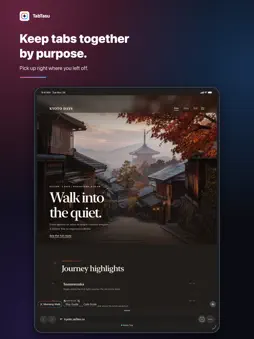
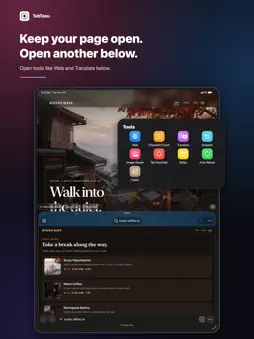
Keep tabs and logins separate for work, personal life, and more, and switch in a tap. TabTasu is a browser for iPhone and iPad that keeps your tabs together in purpose-based groups. It's for people who lose track of pages in a long list of tabs, and for people who use the same site with more than one account, such as work and personal. Switch groups and pick up right where you left off. Give a group its own sign-ins, and you can switch accounts without signing out. ORGANIZE TABS BY PURPOSE • Create groups for work, hobbies, study, shopping, and more • Start with two groups, Personal and Work, so you can try switching groups right after installing • See a group's tabs lined up at the bottom and switch with a tap or swipe • Switch groups fast with the ≡ by the address bar, or touch and hold the tab count button • Search tabs in all groups from the group list • Switch to a tab that's open in another group from the address bar suggestions • Your current pages and tab order are saved, so you can pick up where you left off • Enter a stock ticker or a destination in a template to create a set of tabs with their names and URLs in one go • Select multiple tabs in the tab list to move them to another group or close them at once • Add pages to a group from the Share button in other apps • Make TabTasu your default browser to open links from other apps in the group you choose • Save pages to a group's bookmarks, and open favorites from the Start Page with one tap KEEP LOGINS SEPARATE BY GROUP • Set a group's Browsing Mode to Group Only to keep its sign-ins separate from other groups • Stay signed in to the same site with different accounts, and switch just by switching groups • Give each group a color to see at a glance which account you're using • Open the current page or a link in another group to check it with a different account • Private groups don't save browsing or search history, and their sign-ins and site data are deleted when the app quits • Delete just one Group Only group's site data while your other groups stay signed in PROTECT GROUPS YOU WANT TO KEEP PRIVATE • Choose Tap to Show or Authenticate to Show for each group • Authenticate to Show unlocks with Face ID, Touch ID, or your passcode YOUR BROWSING DATA STAYS ON YOUR DEVICE • No account needed, so you can start right away • Tabs, groups, notes, browsing history, and sign-ins are stored on your device and never sent to TabTasu's servers • To improve the app and show ads, usage data and similar information is sent to Google services (see the Privacy Policy for details) TOOLS WHILE YOU BROWSE • Jot down what you find in notes for the group, with the source page attached, and go back to that tab right where you left off • Open another page below the current one to compare • Count the characters and lines in your text • Take a full-page screenshot, then mark it up, save it, or share it • Translate text you select on a page, right on your device • Save text you type often as snippets and copy it with a tap • Set a time on an open tab to get a notification, and tap it to pick up right where you left off • See a page's images in a list and view each one larger. Save the ones you choose to Photos all at once • See new posts from sites you follow without leaving the page • Auto-reload a tab you choose at an interval you set MORE FEATURES • Read long articles with just the main text, without ads or menus, in Reader View • Set a name and home page for each tab • On devices that support Apple Intelligence, get tab and group name suggestions created on your device • Protect important tabs • Restore tabs you closed by mistake, along with their names and back and forward history • Browsing and search history kept separately for each group • Request the desktop version of a site • Choose your search engine • Scan QR codes and open them in the current group Works on iPhone (including iPhone Duo) and iPad in portrait and landscape, with support for Light and Dark Mode.
What's New
Version 2.17.0 2026-11-26
• New Feeds tool: check the latest posts from sites you visit often without leaving the page you're on. If the page you're viewing offers a feed, add it in one ...• New Feeds tool: check the latest posts from sites you visit often without leaving the page you're on. If the page you're viewing offers a feed, add it in one step, and tap an article to open it in a new tab to the right • New Auto Reload tool: keep reloading a tab you choose, every 5 seconds to every 5 minutes. It keeps going while you view other tabs, and you can start or stop it by touching and holding a tab, without opening the tool • Tools are now split into Favorites and Other Tools. Keep the tools you use often in Favorites to open them quickly. Use Edit Favorites in the … menu at the top right of the list to add, remove, and reorder them • New ≡ button to the left of the address bar: create, edit, and switch groups, and open tools that fit the page you're viewing, such as Translate and Reader View, all from one menu. You can also open the same menu by touching and holding the tab count button, or with the ≡ on the compact bar while you read • When a tool fits the page you're viewing or the text you've selected, a button for it now appears at the right end of the tab row so you can open it with one tap • When you close a tab you opened from a link, you now return to the tab you opened it from. With this change, the Show After Closing a Tab setting has been removed • The menu you get by touching and holding the tab count button now lists up to your 5 most recently used groups. Choose other groups from All groups • Character Count now loads text you select on the page automatically • Tool sheets now show dots at the top for the sheet's height levels • When you open the Image Viewer sheet again after closing it, it now reloads the images on the current page • Fixed an issue in groups that hide their contents where the protection screen could occasionally come off after certain actions in the group list opened from it Technical Analysis
Package Overview Basic metadata
Bundle ID
fun.emag.tracer Current Version 2.17.0
Minimum iOS 26.5
Package Size App Store Size
Package Metadata 0 / 20 version records
0.0 / 5.0 (0 ratings)
Detailed binary, privacy manifest, framework, and Info.plist results have not been indexed for this package yet. The verified App Store and archive metadata above remains available.
Developer Information
Known Version Records
0 version records with stored package metadata • 20 known version records
Stored metadata does not guarantee a package is currently available to download.
| Details | Version / IDs | Version date | Action |
|---|---|---|---|
| Not archived | App Store ID: 877588333 | Unknown | Request Version |
| Not archived | App Store ID: 877547406 | Unknown | Request Version |
| Not archived | App Store ID: 840340123 | Unknown | Request Version |
| Not archived | App Store ID: 840275168 | Unknown | Request Version |
| Not archived | App Store ID: 840228367 | Unknown | Request Version |
| Not archived | App Store ID: 840143094 | Unknown | Request Version |
| Not archived | App Store ID: 840114090 | Unknown | Request Version |
| Not archived | App Store ID: 840095836 | Unknown | Request Version |
| Not archived | App Store ID: 840079186 | Unknown | Request Version |
| Not archived | App Store ID: 840058526 | Unknown | Request Version |
| Not archived | App Store ID: 840033502 | Unknown | Request Version |
| Not archived | App Store ID: 840018217 | Unknown | Request Version |
| Not archived | App Store ID: 839994246 | Unknown | Request Version |
| Not archived | App Store ID: 839932550 | Unknown | Request Version |
| Not archived | App Store ID: 839846180 | Unknown | Request Version |
| Not archived | App Store ID: 839811702 | Unknown | Request Version |
| Not archived | App Store ID: 839700601 | Unknown | Request Version |
| Not archived | App Store ID: 839677349 | Unknown | Request Version |
| Not archived | App Store ID: 839551227 | Unknown | Request Version |
| Not archived | App Store ID: 839386582 | Unknown | Request Version |