
Preview




Description
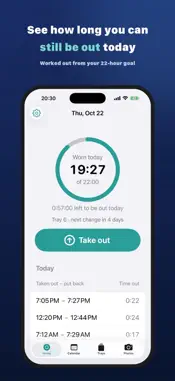
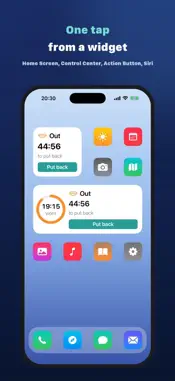
Weartap counts the time your clear aligners are out and tells you when to put them back. During treatment you take your aligners out for every meal and brush. Most plans allow about two hours a day. Weartap works out how many minutes you can still be out today and alerts you when that runs out. ■ Log without opening the app • While they're out, a countdown card sits on your Lock Screen with a Put back button • Home Screen and Lock Screen widgets, Control Center on iOS 18, the Action Button, Siri and NFC tags all log with one tap • You can log from the notification itself • Log from Apple Watch, with the time left on your watch face ■ Stop forgetting to put them back • An alert when today's out-time runs out. With Pro, it repeats every 1 to 30 minutes until you log them back in • Forgot to tap Take out? Move the start back by 5, 15, 30 or 60 minutes, or pick any time ■ Keep the record • A calendar that colors each day met, almost or missed, with monthly and 7-day averages • Tray schedule: change the days for one tray and the rest recalculates, with change-day reminders • Progress photos (smile and close-up), side-by-side compare, share as an image • Automatic iCloud backup that survives a new phone. CSV export too ■ After treatment • Switch to Retainer mode and keep going. Nights-only wearers get an evening reminder to put it in ■ Free and Pro Logging, calendar, photos, iCloud, CSV and tray reminders stay free. The put-back alert is once a day on Free. Pro ($14.99, one-time): repeating alerts until they're in, logging from the Lock Screen, widgets, Control Center and shortcuts, logging from Apple Watch, Live Activities, a custom day boundary, and everything we add later. 7-day free trial. It never charges you automatically. No subscription, no ads. Nothing you've bought is ever taken away. ■ Your data No account. Your records live on your iPhone and in your own iCloud. There is no Weartap server, and we can't see your data. Works with any brand of clear aligner, including Invisalign. Weartap is not a medical device. Follow your orthodontist's instructions for wear time and your treatment plan. Invisalign is a trademark of Align Technology, Inc. Weartap is not affiliated with Align Technology. Privacy Policy: https://weartap.app/privacy_en.html Terms of Use: https://weartap.app/terms_en.html
What's New
Version 1.1 2026-10-30
Apple Watch is here. • Log taking your aligners out and putting them back from your wrist (Pro) • See the time left to put them back, or today's wear time, righ... Technical Analysis
Package Overview Basic metadata
Bundle ID
app.weartap.ios Current Version 1.1
Minimum iOS 17.0
Package Size App Store Size
Package Metadata 0 / 0 version records
Detailed binary, privacy manifest, framework, and Info.plist results have not been indexed for this package yet. The verified App Store and archive metadata above remains available.
Developer Information
Known Version Records
0 version records with stored package metadata
Stored metadata does not guarantee a package is currently available to download.
| Details | Version / IDs | Version date | Action |
|---|