
Preview



Description
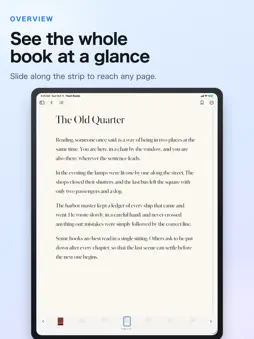
Flash Books gathers your HTML, PDF, ePub, documents, slides, images and more on one bookshelf and lets you read them like printed books. Even HTML documents become books you can page through. ■ Formats - HTML, Markdown, plain text, RTF and web archives - PDF, ePub and CBZ (image archives such as comics) - Documents (.doc, .docx), spreadsheets (.xls, .xlsx) and presentations (.ppt, .pptx), shown as pages and slides - Pages, Numbers and Keynote documents saved as a single file - Images (JPEG, PNG, HEIC, TIFF, GIF, WebP and more) - Add books from Files, open them in Flash Books from another app, add several at once from the share sheet, or use the Add Books shortcut ■ Bookshelf - Switch between a cover grid and a list with titles and authors. Covers show a book's thickness by its page count. - Organize books in collections. A book can belong to several collections. - Label books with colored tags to search, filter and group them. Flag books and show only the flagged ones. - Stack books together, and archive the ones you have finished. - Sort manually, by title reading, recently opened, newest first, oldest first or by tag. - Search by title, author and tag. ■ Reading - Read in two-page spreads in landscape, or in single pages, with the cover on its own page if you like. - Left-to-right, right-to-left and vertical page order. - Turn pages with a page curl, a slide, a slide over, a crossfade or instantly. - The pages you have read and the pages left show as paper edges beside the page. - For ePub, HTML and other text, change the font and text size. PDF and others can scroll as well as page. - Documents (.doc, .docx) can also scroll continuously, keeping only explicit page breaks. - Select and copy text. On supported devices, text in images and scanned pages can be selected too. - Jump with the table of contents, page thumbnails and bookmarks. - Slide along the overview strip to reach any page in the book. - Turn pages with a keyboard or a game controller. - On iPhone Duo, read full screen on the closed display or the large open display. ■ iCloud sync (only when you turn it on) - Sync book details, original files, covers, collections, tags, bookmarks and reading positions between your iPhone, iPad and Mac through your own iCloud. - Books from your other devices show their covers, and download when you open them, or all at once with Download All. - On a cellular connection, the app asks before downloading a large original. - Short on space? Remove a book's download and keep the original in iCloud. ■ Your data - No account needed. The app does not collect data. - Network access from inside books is off by default. You can allow it for a book while you read it. - Imported source files are never changed.
What's New
Version 1.2 2026-10-22
- Switch documents (.doc, .docx) between paper pages and continuous scrolling. Continuous scrolling keeps explicit page breaks and flows through automatic page ...- Switch documents (.doc, .docx) between paper pages and continuous scrolling. Continuous scrolling keeps explicit page breaks and flows through automatic page boundaries. - Improved shapes, lines, gradients, shadows and text layout in presentations (.pptx). Technical Analysis
Package Overview Basic metadata
Bundle ID
dev.nambu.flashbooks Current Version 1.2
Minimum iOS 26.0
Package Size App Store Size
Package Metadata 0 / 0 version records
Detailed binary, privacy manifest, framework, and Info.plist results have not been indexed for this package yet. The verified App Store and archive metadata above remains available.
Developer Information
Known Version Records
0 version records with stored package metadata
Stored metadata does not guarantee a package is currently available to download.
| Details | Version / IDs | Version date | Action |
|---|