
Preview



Description
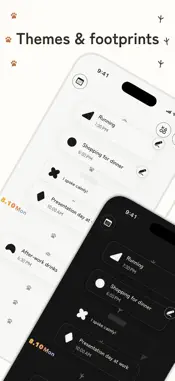
Just one plan can weigh on you until the day arrives. A calendar packed with plans can leave you feeling like there's no room to breathe. Arucocca is a plan-and-journal app for people who would rather not manage life in a calendar grid. ■ A timeline, not a calendar grid Arucocca doesn't treat plans as blocks that fill a calendar grid. They appear as waypoints along a single timeline leading into the future. You mainly see today and what's coming up next. No need to carry every future plan at once — just pass through them one at a time. The space between plans isn't time taken from you. It's room that belongs to you. ■ Add how you feel about a plan When you create a plan, add how you honestly feel about it with a stamp: Excited / Ready / Neutral / Nervous / Gloomy No need to force positivity — pick what's true right now. You can change it as many times as you like. ■ When it's over, leave a quick log Pick a stamp for how it went, jot a quick note, or add photos. ■ Your logs become a diary The stamps, quick notes, and photos you save after plans build into a diary of those moments. “I was dreading it, but I'm glad I went.” Looking back, you can see how you felt before a plan and how it actually went. ■ Made for people who… ・Feel a single appointment can ruin the whole day before it starts ・Feel overwhelmed by month-view calendars ・Haven't been able to stick with planner apps ・Find long-form diaries hard to keep, but still want to save a quick note ・Want to keep the next plan in sight so it doesn't slip their mind ・Want to save how concerts, livestreams, and other anticipated events felt, along with photos ・Want a private place for how they feel before and after plans ■ Features ・A curved timeline flowing into the future ・Feeling stamps for upcoming plans (5 types) ・Custom feeling stamps made from photos you choose or take (1 set on Free) ・After-plan logs (stamp, note, photos) ・Plans without a time, all-day plans, multi-day plans ・Repeating plans (edit or skip a single occurrence) ・Gentle notifications (upcoming plans, an evening reminder to log) ・Light organizing with tags ・Collapse days to keep the view calm ・Import plans from Apple Calendar ・iCloud sync across devices ・Export all your data, photos included, for free ■ Arucocca Premium The essentials — creating plans, logging, looking back — are free. Premium unlocks: ・Look back at your full history beyond the free 60-day window ・See every day in Daily, including days without plans ・Save log photos with no app-side count limit (Free: up to 30) ・Change the footprints on your timeline (dog, cat, birdie) ・Exclusive themes (Mono White and Mono Black) ・Extra app icons ・No app-side limit on custom feeling stamp sets Free includes one custom feeling stamp set. Premium removes Arucocca's set-count limit; the number you can store still depends on available device and iCloud storage. Images used for feeling stamps do not count toward the free plan's 30-photo limit for logs. If Premium ends, the custom set currently in use on that device remains available. Other sets are not deleted: you can still view or permanently delete them, and they continue to appear in past plans and logs. Applying or editing extra sets stays locked until Premium is restored. Plans: ・Monthly (7-day free trial) ・Yearly (14-day free trial) ・Lifetime (one-time purchase) Prices are shown in the app. Subscriptions are billed to your Apple Account and renew automatically unless canceled at least 24 hours before the end of the current period. You can manage or cancel them in iOS Settings after purchase. Terms of Service: https://ojthon-dev.com/company/arucocca/terms-of-service Privacy Policy: https://ojthon-dev.com/company/arucocca/privacy-policy
What's New
Version 1.5.0 2026-09-08
Added language support, making Arucocca available in 28 languages and regions. Technical Analysis
Package Overview Basic metadata
Bundle ID
com.ojthon.arucocca Current Version 1.5.0
Minimum iOS 18.0
Package Size App Store Size
Package Metadata 0 / 5 version records
Detailed binary, privacy manifest, framework, and Info.plist results have not been indexed for this package yet. The verified App Store and archive metadata above remains available.
Known Version Records
0 version records with stored package metadata • 5 known version records
Stored metadata does not guarantee a package is currently available to download.
| Details | Version / IDs | Version date | Action |
|---|---|---|---|
| Not archived | App Store ID: 889232485 | Unknown | Request Version |
| Not archived | App Store ID: 888930809 | Unknown | Request Version |
| Not archived | App Store ID: 888829990 | Unknown | Request Version |
| Not archived | App Store ID: 888706624 | Unknown | Request Version |
| Not archived | App Store ID: 887966277 | Unknown | Request Version |