
Preview





Description
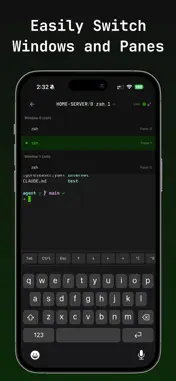
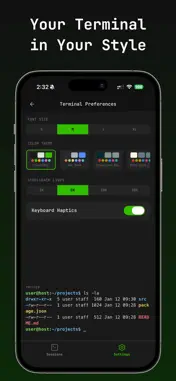
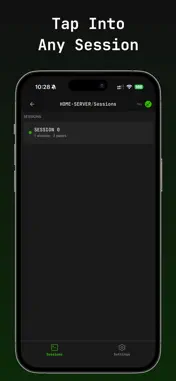
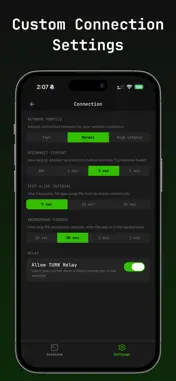
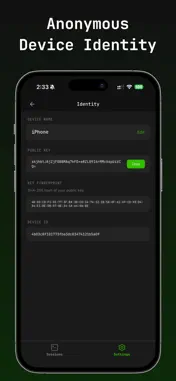
Pocketmux gives you secure, real-time access to your tmux terminal sessions from your device, wherever you are. Whether you're monitoring a long-running build, interacting with an AI coding assistant, or managing a remote server from the couch, Pocketmux keeps your tmux workflow within reach. No VPNs. No open ports. No complicated setup. Just install and setup the free, open-source pmux CLI + Agent on your computer, scan a QR code, and your tmux sessions appear on your phone. - HOW IT WORKS Pocketmux connects your phone directly to your computer using WebRTC peer-to-peer data channels. Terminal data flows between your devices over an encrypted tunnel, the signaling server is just a service which helps your devices find each other. Once connected, the server is out of the picture entirely. 1. Install pmux via Homebrew on your Mac or Linux machine, or WSL 2. Run pmux init to start the background agent 3. Scan the pairing QR code with PocketMux on your phone 4. Access all your tmux sessions instantly Replace tmux with pmux in your workflow. Every tmux command works exactly the same, but now your sessions are accessible from your phone. - PRIVACY BY DESIGN Pocketmux was built from the ground up with a zero-knowledge architecture: * The signaling server NEVER sees your terminal content, session names, commands, or output * All terminal data is end-to-end encrypted with DTLS - Device authentication uses Ed25519 cryptographic key pairs, no passwords, no email accounts, no OAuth - The server stores only the bare minimum needed to facilitate device pairing - The open-source agent and protocol let you verify every claim yourself Your terminal sessions are yours. We don't want to see it, and we built Pocketmux so we can't. - BUILT FOR REAL TERMINAL WORK Not a gimmick or a read-only viewer. A fully interactive terminal client: - Full rendering of colors and cursor positioning, and escape sequences all work correctly - Custom keyboard accessory bar with Ctrl, Alt, Tab, arrow keys, common shortcuts, and customizable inputs optimized for touch - Native session/window/pane navigation, browse your tmux hierarchy as a clean mobile UI, not a compact tiny terminal - One-pane-at-a-time view that makes the most of your screen - Responsive input with minimal latency over direct P2P connections - PERFECT FOR - Checking on long-running builds, deploys, or CI jobs - Answering prompts from AI coding assistants (Claude, Copilot, Cursor) while away from your desk - Tailing logs and monitoring services - Quick SSH hops through your tmux session - Running commands on your home server from anywhere - Any time you think "I wish I could just check my terminal real quick" - OPEN SOURCE CORE The pmux CLI agent, wire protocol, signaling server, and shared libraries are all free and open source under the MIT license. Inspect the code, contribute improvements, or self-host the entire stack. Pocketmux earns your trust through transparency, not promises. - SUBSCRIPTION Pocketmux is available for a subscription fee. Your subscription supports ongoing development, the hosted infrastructure, and a small independent team building tools for users who care about privacy. First-class iPad support coming soon! Payments are processed through the AppStore. You can cancel anytime. Terms of Use (EULA): https://www.apple.com/legal/internet-services/itunes/dev/stdeula/
What's New
Version 1.2.0 2026-10-27
New Features - Text selection handles in the terminal: drag either end to adjust your selection precisely, with automatic scrolling when you drag to the edge of...New Features - Text selection handles in the terminal: drag either end to adjust your selection precisely, with automatic scrolling when you drag to the edge of the screen - A copy hint appears while text is selected, and leading/trailing blank space is trimmed from selections automatically Improvements - Stronger privacy: the app's preview in the app switcher is now hidden on iOS and Android - The biometric lock is more robust: it stays in place when you leave and return to the app, covers full-screen screens, and ignores input while locked - Safer pasting: pasted text is sanitized, and the Paste button now uses the same protected paste mode as your terminal - When pairing with a custom server, the app shows the server's address and asks you to confirm it - Sign-in challenges are now tied to the server that issued them, and unpair/online notices are only accepted from the server the host uses - Fewer Face ID / passcode prompts during reconnects - Busy sessions no longer trigger false disconnects, and connection quality readings are more accurate - More reliable reconnects after a dropped connection - Your subscription stays linked to your account even after the app's device keys change - Newly paired hosts show their online status right away Bug Fixes - Fixed garbled emoji and accented characters in terminal output - Fixed terminal output occasionally missing when a pane first opened - The terminal now recovers automatically if its output stream is interrupted - Fixed long-press text selection clearing itself on iOS - Fixed a stuck selection after the terminal view recovered from a crash Technical Analysis
Package Overview Basic metadata
Bundle ID
com.shiftinbits.pmux Current Version 1.2.0
Minimum iOS 15.1
Package Size App Store Size
Package Metadata 0 / 3 version records
Detailed binary, privacy manifest, framework, and Info.plist results have not been indexed for this package yet. The verified App Store and archive metadata above remains available.
Developer Information
Known Version Records
0 version records with stored package metadata • 3 known version records
Stored metadata does not guarantee a package is currently available to download.
| Details | Version / IDs | Version date | Action |
|---|---|---|---|
| Not archived | v1.0.3 App Store ID: 890658478Build: 1.0.3 | 2026-09-02 09:36:27 | Request Version |
| Not archived | v1.0.2 App Store ID: 890551817Build: 1.0.2 | 2026-08-31 15:23:58 | Request Version |
| Not archived | v1.0.1 App Store ID: 883592138Build: 1.0.1 | 2026-06-26 18:56:00 | Request Version |