Preview




Description
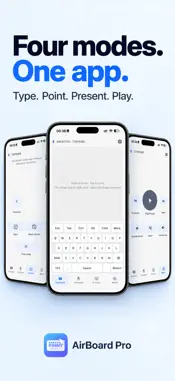
Turn your iPhone or iPad into a wireless keyboard, touchpad, presentation remote, and media controller for your computer with AirBoard Pro. CHOOSE BLUETOOTH OR WI-FI AirBoard Pro provides two independent connection methods for Mac and Windows. Choose the one that fits your setup: • Bluetooth mode — connect directly to a compatible Mac or Windows PC. No AirBoard Receiver or shared Wi-Fi network is required. • Wi-Fi mode — install AirBoard Receiver on a Mac or Windows PC, keep both devices on the same local network, select the computer in AirBoard Pro, and enter the six-digit code shown by the receiver. On Mac, Wi-Fi mode requires macOS 13 or later and Accessibility permission. On Windows, AirBoard Receiver supports Windows 11 and requires a Private network connection and local network access through Windows Firewall. The two connection methods work independently. Bluetooth connects directly without AirBoard Receiver, while Wi-Fi mode uses AirBoard Receiver on Mac or Windows. After a successful Wi-Fi pairing, AirBoard Pro remembers the receiver for faster reconnection. Saved computers can be reviewed or removed from Wi-Fi settings at any time. FOUR CONTROL MODES Keyboard • Type with letters, numbers, function keys, arrow keys, modifiers, Backspace, Enter, and Space • Switch between Mac-style and Windows-style keyboard layouts • Use common actions such as Copy, Paste, Select All, and Undo • Turn your device sideways for a larger keyboard layout Touchpad • Move the pointer with natural touch gestures • Tap to click and use secondary click • Scroll with two fingers • Adjust pointer speed, scroll speed, natural scrolling, and gesture preferences Presentation • Move between previous and next slides • Start or end a presentation • Show a black screen • Return to the first slide • Designed for Keynote on Mac and PowerPoint on Windows Media • Play or pause media • Move to the previous or next track • Adjust volume • Mute or restore sound CUSTOM SHORTCUTS AND TEXT SNIPPETS Create reusable keyboard shortcuts for frequently used actions. Save text snippets, preview them before sending, and cancel when needed. Available text input depends on the supported keyboard layout and characters. CLEAR CONNECTION CONTROL See whether AirBoard Pro is ready for input, switch between Bluetooth and Wi-Fi, select a discovered receiver, and manage saved computers from settings. AirBoard Pro sends keyboard, pointer, presentation, and media-control input. It is not a remote desktop, screen-sharing, cloud-sync, or file-transfer app. TRY BEFORE YOU UNLOCK The 3-day trial begins with your first unpaid input-ready connection. Lifetime access is available through a one-time in-app purchase. If you have already purchased, use Restore Purchase in the app settings. Compatibility depends on the computer, operating system, Bluetooth implementation, firewall configuration, and local network environment. Keep AirBoard Pro open and active for the most reliable input experience. Support: https://airboardpro.com/support Privacy Policy: https://airboardpro.com/privacy
What's New
Version 1.2.1 2026-10-24
• New numeric keypad with left/right docking (Bluetooth mode). • New reading and video-scrolling presets. • French keyboard layouts for Windows (Legacy AZERTY) ... Technical Analysis
Package Overview Basic metadata
Bundle ID
com.wenlit.airboardapp Current Version 1.2.1
Minimum iOS 15.0
Package Size App Store Size
Package Metadata 2 / 12 version records
Detailed binary, privacy manifest, framework, and Info.plist results have not been indexed for this package yet. The verified App Store and archive metadata above remains available.
Developer Information
Known Version Records
2 version records with stored package metadata • 12 known version records
Stored metadata does not guarantee a package is currently available to download.
| Details | Version / IDs | Version date | Action |
|---|---|---|---|
| 25.28 MB | v1.1.7 App Store ID: 891296058Build: 1.1.7 | 2026-09-15 14:29:44 | Get Version |
| Not archived | v1.1.6 App Store ID: 890116075Build: 1.1.6 | 2026-08-22 00:38:03 | Request Version |
| Not archived | v1.1.5 App Store ID: 889666262Build: 1.1.5 | 2026-08-13 06:13:19 | Request Version |
| Not archived | v1.1.3 App Store ID: 889011825Build: 1.1.3 | 2026-07-30 05:33:17 | Request Version |
| Not archived | v1.1.2 App Store ID: 888866993Build: 1.1.2 | 2026-07-27 04:16:34 | Request Version |
| Not archived | v1.1.1 App Store ID: 888627405Build: 1.1.1 | 2026-07-24 04:16:11 | Request Version |
| Not archived | v1.1.0 App Store ID: 888518868Build: 1.1.0 | 2026-07-20 04:16:53 | Request Version |
| Not archived | v1.0.9 App Store ID: 888388979Build: 1.0.9 | 2026-07-17 11:22:24 | Request Version |
| Not archived | v1.0.6 App Store ID: 888123704Build: 1.0.6 | 2026-07-11 05:57:36 | Request Version |
| Not archived | v1.0.2 App Store ID: 887652734Build: 1.0.2 | 2026-07-09 00:10:08 | Request Version |
| 25.28 MB | v1.1.7 App Store ID: 887259930Build: 1.1.7 | 2026-09-15 14:29:44 | Get Version |
| Not archived | v1.0.0 App Store ID: 884462190Build: 1.0.0 | 2026-06-09 12:34:05 | Request Version |