
Preview



Description
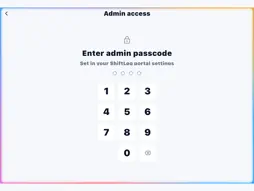
ShiftLog Terminal turns an iPad at reception into your organisation's clock-in station. Employees walk up, look at the camera and are clocked in or out in about a second — no cards to lose, no PINs to share, no buddy punching. This app is the terminal half of ShiftLog, the face recognition time & attendance service for corporates. It works together with your organisation's ShiftLog portal at shiftlog.co.zw, where managers set up shifts, enrol staff and read the reports. You need a ShiftLog organisation account to use it; a free trial is available on the website. HOW IT WORKS • Pair the iPad with your organisation using the code shown in your portal. • Mount it at the door or reception desk. The screen stays dark and readable, day or night. • Enrol each employee's face once, on the terminal, in under a minute. • From then on, staff simply look at the camera to clock in and out. The terminal shows their name, the time, and whether they are on time or late. WHAT MANAGERS GET • Late arrivals, early departures, absences and overtime flagged automatically against each employee's shift. • Live attendance in the portal — who is on site right now. • Timesheets and attendance reports ready for payroll. • Overnight shifts, public holidays and multiple sites handled correctly. BUILT FOR A SHARED TABLET • Keeps working when the internet drops. Punches are stored on the iPad and synced as soon as it reconnects, so a network outage never loses a clock-in. • Runs all day, every day, in a lobby — high-contrast screen, large type, no login prompts for staff. • One tablet serves your whole workforce; there is nothing for employees to install or carry. PRIVACY Face recognition runs entirely on the iPad. Camera frames are processed on the device and are never uploaded; only the attendance record (who, when, in or out) is sent to your organisation's portal. Employees can be removed from the terminal at any time from the portal. REQUIREMENTS • An active ShiftLog organisation account (start a free trial at shiftlog.co.zw). • An iPad with a front camera, mounted where staff enter. • An internet connection for setup and syncing. Support and setup guides: shiftlog.co.zw/support
Technical Analysis
Package Overview Basic metadata
Bundle ID
app.shiftlog.shiftlogTerminal Current Version 1.0
Minimum iOS 16.0
Package Size App Store Size
Package Metadata 0 / 0 version records
Detailed binary, privacy manifest, framework, and Info.plist results have not been indexed for this package yet. The verified App Store and archive metadata above remains available.
Developer Information
Known Version Records
0 version records with stored package metadata
Stored metadata does not guarantee a package is currently available to download.
| Details | Version / IDs | Version date | Action |
|---|