
Preview




Description
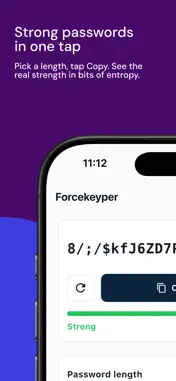
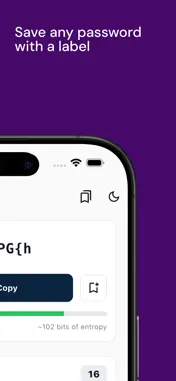
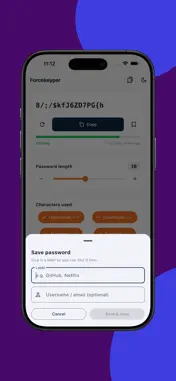
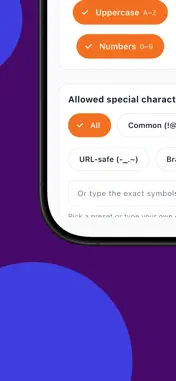
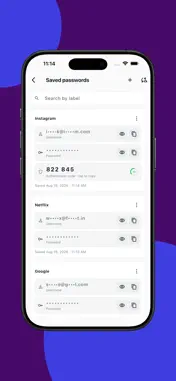
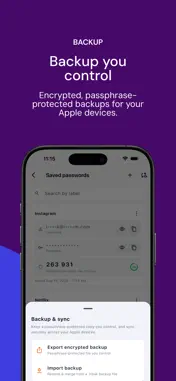
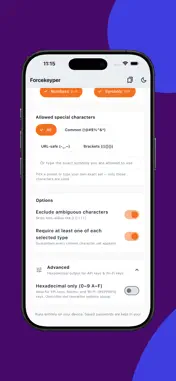
ForceKeyper generates strong, random passwords and stores your passwords, passkeys, and authenticator (2FA/TOTP) codes on your device, behind Face ID. There are no servers, no accounts, and no tracking - the app works fully offline, even in Airplane Mode. SIGN-UP & AUTOFILL • Create strong passwords right inside the iOS sign-up flow: choose Create New Password in the AutoFill picker, and ForceKeyper fills it into the form (iOS/iPadOS 26.2 or later) • Generate another option without leaving the page • Follows a site's password rules when iOS provides them • When sign-up finishes, your username and password are saved together and suggested at your next sign-in • Sign-up didn't complete? Recover the generated password from Saved passwords > Unfinished sign-up • On Mac and older iOS versions, copy a password and use Save for site PASSWORD GENERATOR • Cryptographically secure, unbiased random generation • Full control: length 4–30 (up to 128 in Hex mode), character sets, symbol presets, and a custom symbol option • Live strength meter with entropy estimate • One-tap save, straight into your vault SAVED PASSWORDS & 2FA VAULT • Face ID-gated vault for passwords and authenticator codes together, or separately • Live, auto-refreshing 2FA codes with a countdown timer - no separate authenticator app needed • Search by label or account name • A "previous password" safety net in case a reset didn't take effect on a site before you overwrote it locally • Password activity: see when each password was first saved and last accessed, behind a fresh Face ID, Touch ID or passcode check • Passkeys stay with the right account, linked automatically or by you when several accounts share a site AUTHENTICATOR (TOTP) SUPPORT • Scan any standard setup QR code • Bulk-import your existing Google Authenticator accounts in one scan • Manual entry supported for services without a QR BUILT FOR PRIVACY • No analytics, no ads, no tracking, no crash reporting • Auto-expiring, device-local clipboard - copied secrets clear themselves and never sync to your other devices • Activity history stays on your device and is never synced or included in backups • Optional end-to-end-encrypted iCloud Keychain sync across your own Apple devices, with each account synced separately so edits on one device don't overwrite another account edited elsewhere • Optional passphrase-encrypted backup file that only you can open ForceKeyper doesn't want your data - it just wants to help you stop juggling five different apps for one login.
What's New
Version 2.0 2026-11-10
Sign up faster, with passwords that save themselves. CREATE PASSWORDS IN THE SIGN-UP FLOW • On iOS/iPadOS 26.2 or later, choose Create New Password in the Auto...Sign up faster, with passwords that save themselves. CREATE PASSWORDS IN THE SIGN-UP FLOW • On iOS/iPadOS 26.2 or later, choose Create New Password in the AutoFill picker, and ForceKeyper fills a strong password into the form • Generate another option without leaving the page • Follows a site's password rules when iOS provides them • Works even when iOS gives no website hint. ForceKeyper asks for the site so you can find the password later SAVED WHEN SIGN-UP FINISHES • Your username and password are saved together, linked to the site, and suggested at your next sign-in • A generated password is not added to your vault just because it was shown or filled • An existing account's password is never replaced without your approval • The vault now shows whether ForceKeyper AutoFill is turned on, and flags saved passwords that need a website to appear as site-specific suggestions RECOVER AN UNFINISHED SIGN-UP • If a generated password was filled but the site never completed the save, find it under Saved passwords > Unfinished signup • Save it manually with a username and optional label, or discard it • Tip: finish sign-up on the site before switching back to ForceKeyper, so iOS can send the completed account details SAVE FOR SITE • On Mac and older iOS versions, copying a generated password now offers Save for site, so you can add the domain and username PASSWORD ACTIVITY • See when each password was first saved and when it was last accessed • Opens only after a fresh Face ID, Touch ID, or passcode check, and locks again when you leave the app • Activity history stays on your device. It is not synced or included in backups, and it never shows password values PASSKEYS STAY WITH THE RIGHT ACCOUNT • When several accounts share a site, a new passkey attaches to a saved password only when the site and account name match exactly one entry • Ambiguous passkeys stay on separate cards. Use Link passkey to saved account to choose the right one • Passkeys for different users on the same site no longer merge into one card • Existing passkeys and backups remain compatible SAFER SYNC ACROSS DEVICES • Each password and authenticator account is now stored as its own item in iCloud Keychain, so editing one account on your iPhone no longer overwrites a different account edited on your Mac or iPad • Your existing accounts migrate automatically, keeping their IDs, site links, and backup format • If two offline devices edit the same account, iCloud Keychain may keep only one version when they reconnect • Before updating all your devices, export an encrypted backup IMPROVEMENTS • Clearer save, copy, backup, and error notifications in both light and dark mode • Removed the old passkey diagnostics and logging controls Technical Analysis
Package Overview Basic metadata
Bundle ID
in.forcerocket.passwordgenerator Current Version 2.0
Minimum iOS 17.0
Package Size App Store Size
Package Metadata 0 / 0 version records
Detailed binary, privacy manifest, framework, and Info.plist results have not been indexed for this package yet. The verified App Store and archive metadata above remains available.
Known Version Records
0 version records with stored package metadata
Stored metadata does not guarantee a package is currently available to download.
| Details | Version / IDs | Version date | Action |
|---|