Preview







Description
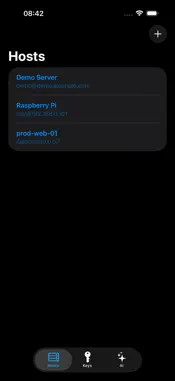
gterm is a real terminal for iOS. It renders with Ghostty's GPU engine for true xterm/VT emulation, connects straight to your servers over SSH, keeps your keys on device, and ships an AI command assistant that writes the commands for you. It's the same renderer and VT parser as the Ghostty desktop app. iOS can't fork/exec a local shell, so gterm drives the terminal straight from the SSH stream through a custom passthru IO backend added to libghostty — giving you a real terminal in a sandboxed iOS surface. GPU-RENDERED TERMINAL Real xterm/VT emulation via Ghostty's libghostty, drawn on Metal. Colors, ligatures, and reflow that feel native — not a web shim. SSH-NATIVE Connects with swift-nio-ssh — password and public-key auth, a PTY shell, live window resizing, and trust-on-first-use host-key verification. KEYS STAY ON DEVICE Import Ed25519 / ECDSA private keys into the iOS Keychain — device-only, never synced. Pick one or more keys to try per host. SHELL-GRADE KEYBOARD A custom accessory keyboard with the keys iOS forgets — Esc, Ctrl, Alt, Tab, arrows, and sticky modifiers for real TUI navigation. AI COMMAND ASSISTANT Describe what you want in plain English. The AI reads your recent commands and visible screen, proposes a command, and shows it to you for review before it runs. AI AUTO-COMPLETION As you type, suggestions surface above the keyboard — from your history and from your provider. Bring your own key; it's stored masked in the Keychain. Open source: https://github.com/madeye/gterm
What's New
Version 1.3 2026-10-22
- New "Attach with Herdr" option per connection: launches or attaches to a Herdr session on the remote host, with taps delivered as mouse clicks and pinch-to-zo... Technical Analysis
Package Overview Basic metadata
Bundle ID
io.github.madeye.gterm Current Version 1.3
Minimum iOS 17.0
Package Size App Store Size
Package Metadata 1 / 3 version records
Detailed binary, privacy manifest, framework, and Info.plist results have not been indexed for this package yet. The verified App Store and archive metadata above remains available.
Developer Information
Known Version Records
1 version record with stored package metadata • 3 known version records
Stored metadata does not guarantee a package is currently available to download.
| Details | Version / IDs | Version date | Action |
|---|---|---|---|
| 48.47 MB | v1.2 App Store ID: 888139597Build: 1.2 | 2026-07-12 01:06:41 | Paid / Arcade |
| Not archived | App Store ID: 886561541 | Unknown | Paid / Arcade |
| Not archived | App Store ID: 886310430 | Unknown | Paid / Arcade |