Preview



Description
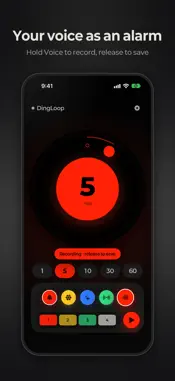
DingLoop is a loop alarm app that makes repeating alarms simple to set up and keep going. With an intuitive dial, color buttons and drag-and-drop, you can build your own alarm loop without any complicated setup. It's a great fit for anything that runs on a steady rhythm — studying, workouts, work routines, breaks, stretching or cooking. 1. **Non-stop repeating alarms** Alarms sound at the interval you set and move on to the next one automatically — no Stop button needed. The loop keeps repeating until you stop it, even when the screen is off, the iPhone is locked, or you're using another app. 2. **Five alarm sounds** Choose from red (Ding), yellow (Pop), blue (Chime), green (Beep), and your own recorded voice (Voice). Each sound keeps its own interval, set in minutes or seconds (up to 360) in Settings. 3. **Your own alarm loop** Drag alarm buttons into the loop box below to repeat up to 4 alarms in order. For example, the red alarm is followed by the yellow one, then the blue one, and around again. 4. **Start with the Play button** Tap the Play button beside the loop box to start from the first slot. While the loop runs, the slot that plays next is highlighted so you can follow along at a glance. 5. **Your voice as an alarm** Press and hold the Voice button to record, and release to save (up to 10 seconds). Your recorded voice can join the loop like any other alarm. 6. **Lock Screen and Dynamic Island** See the running loop on the Lock Screen and in the Dynamic Island. Swipe it away to stop the loop right away. 7. **Korean / English** Switch the app's language anytime in Settings. ※ Alarm sounds follow your media volume, not your ringer volume. They play in Silent mode, but not with media volume at zero. Quitting the app completely also stops the loop.
What's New
Version 2.0 2026-10-29
DingLoop 2.0 • One simple mode: the loop keeps going until you stop it, even when the screen is off or you're using another app. • New Beep sound — you can now... Technical Analysis
Package Overview Basic metadata
Bundle ID
com.baekmac.dingloop Current Version 2.0
Minimum iOS 26.0
Package Size App Store Size
Package Metadata 0 / 2 version records
Detailed binary, privacy manifest, framework, and Info.plist results have not been indexed for this package yet. The verified App Store and archive metadata above remains available.
Known Version Records
0 version records with stored package metadata • 2 known version records
Stored metadata does not guarantee a package is currently available to download.
| Details | Version / IDs | Version date | Action |
|---|---|---|---|
| Not archived | App Store ID: 886610877 | Unknown | Request Version |
| Not archived | App Store ID: 886362445 | Unknown | Request Version |