Preview




Description
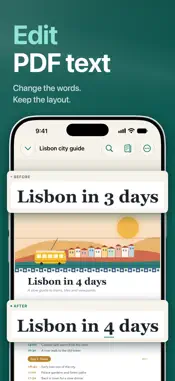
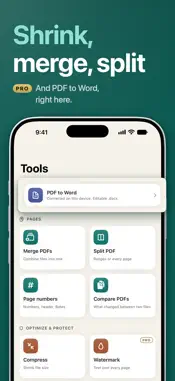
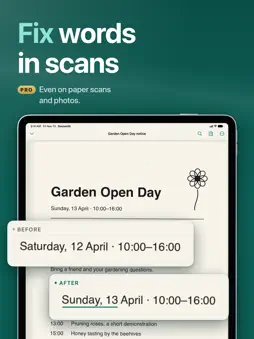
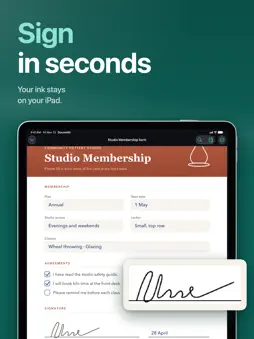
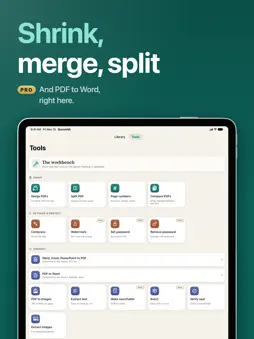
Fix a typo, change a date or update a price in a PDF: tap the words and retype them. Docsmith edits the real text on the page, in the document's own font where it can, right on your iPhone or iPad. Your files never leave your device. No account. No cloud. No ads. Free every day; Docsmith Pro removes the limits. EDIT THE TEXT ITSELF • Retype a word, a line or a whole paragraph • Keeps the original size and color • Justified text stays justified: both edges stay straight • Papers made with LaTeX: edited words match the paper's own typeface • Add text that becomes part of the page, not a sticker on top • Right-to-left Arabic and Hebrew, too FIX WORDS IN SCANS • Fix a word in a scanned page, fax or photo, and it keeps the look of the scan • Scan paper with the camera into a clean, sharp PDF • Make scans searchable with on-device OCR (Pro) CONVERT ON YOUR DEVICE • Turn a PDF into a Word file • Word, Excel, PowerPoint and RTF to PDF; Word headers and footers stay • Save pages as images, or pull out the text and pictures SIGN & FILL • Draw, type or photograph your signature • Your signature stays in your Keychain, never on a server • Fill in forms • Share a flattened copy with forms and markup baked in (Pro) 20+ TOOLS IN ONE PLACE • Merge PDFs, or split one apart • Compress to make files smaller • Add page numbers, or Bates numbering (Pro) • Compare two PDFs and see what changed • Redact sensitive areas (Pro) • Add a watermark (Pro) • Set or remove a password (Pro) • Run one tool on many files at once (Pro) READ & MARK UP • Highlight, underline and strike through • Draw, add text and sticky notes • Shapes, stamps and images (Pro) PRIVATE BY DESIGN • Everything runs on your device: no servers, no tracking, no data collected • Share a clean copy without hidden metadata • Lock the app with Face ID • Seal a finished PDF so anyone can check it hasn't been changed (Pro); checking a seal is always free WORKS WHERE YOU DO • iPhone and iPad, and ready for iPhone Duo • Shortcuts and Siri: scan, merge or compress from an automation • Home Screen widgets: scan or import in one tap FREE AND PRO Free: • Read, highlight, draw and add notes as much as you like • Add new text to a page • 1 text edit and 1 tool run every day • Scan up to 5 pages every day • Sign 1 document every month Docsmith Pro: • Unlimited text edits (in scans too), tool runs, signing and scanning • Everything marked (Pro), including OCR and batch Start the free trial and Docsmith can remind you before it ends. — Docsmith Pro is a weekly, monthly or yearly subscription. The yearly plan starts with a free trial for eligible new subscribers. Payment is charged to your Apple Account. Subscriptions renew automatically unless cancelled at least 24 hours before the end of the current period. Manage or cancel any time in your Apple Account settings. Terms of Use: https://sites.google.com/view/docsmith/terms Privacy Policy: https://sites.google.com/view/docsmith/privacy
What's New
Version 1.4 2026-11-15
• Edit text right inside your PDF: words, lines and whole paragraphs, in the document's own font where it can. • Justified text stays justified: an edited line ...• Edit text right inside your PDF: words, lines and whole paragraphs, in the document's own font where it can. • Justified text stays justified: an edited line keeps both edges straight. • Papers made with LaTeX: edited words match the paper's own typeface. • Fix a word in a scanned page, fax or photo, and it keeps the look of the scan. • New: turn a PDF into a Word file on your device. Word to PDF now keeps headers and footers. • Add text that becomes part of the page, not a sticker on top. • Ready for iPhone Duo. • A clearer Docsmith Pro screen, plus many fixes across the reader and tools. Technical Analysis
Package Overview Basic metadata
Bundle ID
com.serhii.docsmith Current Version 1.4
Minimum iOS 17.0
Package Size App Store Size
Package Metadata 0 / 0 version records
Detailed binary, privacy manifest, framework, and Info.plist results have not been indexed for this package yet. The verified App Store and archive metadata above remains available.
Developer Information
Known Version Records
0 version records with stored package metadata
Stored metadata does not guarantee a package is currently available to download.
| Details | Version / IDs | Version date | Action |
|---|