
Preview






Description
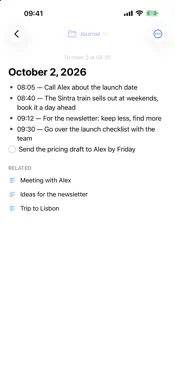
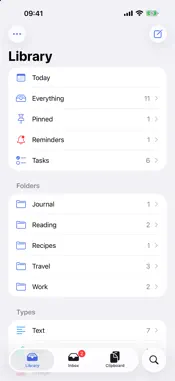
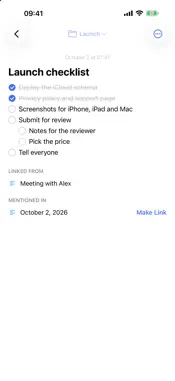
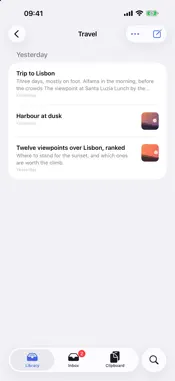
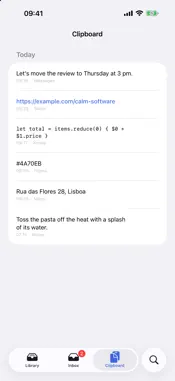
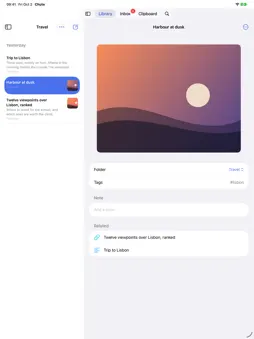
Copy something on your Mac. It's on your iPhone within seconds. Chute keeps everything you copy, helps you file what's worth keeping, and finds all of it with one search. One purchase for Mac, iPhone and iPad. No subscription, no account, no ads. YOUR CLIPBOARD ON EVERY DEVICE • Everything you copy on your Mac is kept: text, links, pictures, files. ⌘⇧V brings the history back, Return pastes. • Your latest copies appear on your iPhone and iPad within seconds. On the same Wi-Fi your devices talk directly, encrypted with a key only they share. • What you copy on your iPhone or iPad joins the same list when you open Chute. • Tap a copied link on your iPhone to open it. Touch and hold to copy it. • Anything a password manager marks as secret is never recorded. NEVER LOSE WHAT MATTERS • One swipe keeps a copy in your library. On the Mac it is one keystroke; ⌘⇧Space writes down a thought from anywhere. • New things land in the Inbox. Chute suggests a folder; one tap files it, or keep it loose. • Links arrive with their title and picture, files with a preview. • Drag a note onto a folder, a tag or the Trash; drag a file from the Finder straight into a folder. FIND IT IN SECONDS • One search over everything, in any form of a word, with the words highlighted. • What you copied and never kept is found too, in the same list. • On the Mac, ⌘⇧V finds things in your library as well: type three letters, press Return, and a note is pasted anywhere. • Spotlight finds your notes too. SAY IT, AND IT'S WRITTEN DOWN • Press the Action button and speak. The words go into today's note with the time, heard on the phone itself, in the language you choose. • On Apple Watch, tap Speak and say it. It reaches today's note on your iPhone, even if the phone was out of reach when you spoke. NOTES THAT WRITE LIKE NOTES • Checklists, bullets, numbered lists and headings that continue themselves. Tab nests, undo goes back step by step. • Markdown reads like a page: bold, quotes, code and links are shown as such, their marks out of sight until you write in the line. • Type [[ to link a note to another. Every note shows what links to it and what is like it. • Pictures inside notes. Share a page from Safari with a passage selected, and it is kept as a quote with its link. TASKS AND REMINDERS WITHOUT ANOTHER APP • Every unticked checklist item from every note, in one Tasks list, each note under its folder. Tick it there and it is ticked in the note. • Set a reminder on anything: later today, this evening, tomorrow, or any date. It sounds on every device. PRIVATE BY DESIGN • Everything stays on your devices and in your own iCloud. No account, no tracking, no ads. • Sorting suggestions are made on your device. MADE FOR IPHONE DUO AND IPAD • Open the Duo and your list and your note stand side by side. Open Beside keeps one note on the first page while you write another on the second; on iPad too. • Stand the Duo on a table to think aloud: the wave on the half that stands, your words on the half under your hand. • Drag a passage, a link or a picture across from the app beside Chute, and it is kept. BRING WHAT YOU ALREADY HAVE • On the Mac, import from Apple Notes (with pictures), Obsidian and Notion. • Works with AI assistants through MCP, so the one you already use can read and add to your Chute. One purchase for Mac, iPhone and iPad.
What's New
Version 1.3.2 2026-10-14
• Settings has a way to rate Chute in the App Store. A rating helps other people find it. Technical Analysis
Package Overview Basic metadata
Bundle ID
net.alienminds.chute Current Version 1.3.2
Minimum iOS 26.0
Package Size App Store Size
Package Metadata 0 / 0 version records
Detailed binary, privacy manifest, framework, and Info.plist results have not been indexed for this package yet. The verified App Store and archive metadata above remains available.
Developer Information
Known Version Records
0 version records with stored package metadata
Stored metadata does not guarantee a package is currently available to download.
| Details | Version / IDs | Version date | Action |
|---|