
Preview



Description
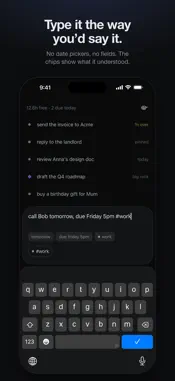
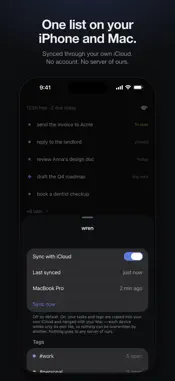
Stop holding it in your head. wren shows five things — the five that matter right now. One tap to add something. Everything else waits quietly until it's actually time. TYPE IT THE WAY YOU'D SAY IT "call Bob tomorrow", "renew the passport by friday", "draft the roadmap #work 2h". No date picker, no priority dropdown, no project field. wren reads what you wrote and shows what it understood before you add it — so it's never a surprise. Parsing runs on your phone; it works on a plane. FIVE THINGS. THE REST CAN WAIT. Most lists punish you for using them: every task makes the thing longer, until opening it feels worse than forgetting. wren shows five. Add as much as you like — only what's actually next comes to the top, and every row says why it's there. Everything else sits behind a quiet "+12 later" until its turn. Nothing is lost. A DATE IS A PLAN UNLESS YOU SAY "BY" "deploy it tomorrow" means not today — it waits, then sits quietly for as long as the work takes. "submit taxes by april 15" is a deadline, and only a deadline can ever turn amber. Both at once works too. DONE IS A SWIPE. SO IS LATER. Swipe left to finish. Swipe right to push it out — later today, tomorrow, next week, someday — and again to push it further. Shake to undo. NO BADGES. NO STREAKS. NO RED. When a few things have sat untouched for a week, one row turns into a question: keep, later, or drop. Ten seconds and your list is honest again. That's the only time wren asks you for anything. ONE TASK IN THE DYNAMIC ISLAND Pin the thing you're doing and it sits in the Dynamic Island while you work, counting how long you've been on it. Tap it to let go. YOUR FIVE, ON YOUR HOME SCREEN The widget shows the same five, in the same order, with the same reasons. YOUR MAC AND YOUR IPHONE, ONE LIST wren for Mac lives in the menu bar. Turn on sync and both devices share one list through your own iCloud — each device writes only its own file, so nothing can be overwritten. No account. No server of ours. DELIBERATELY MISSING No projects, boards or sub-tasks. No streaks, scores or completion percentages. No notifications that interrupt you. No teams or sharing. No red badge counting what you didn't do. Each was considered and cut — a list that makes you anxious is a list you stop opening. It's on the list. You can stop thinking about it. Terms of Use: https://wren.sergedevs.com/terms
Technical Analysis
Package Overview Basic metadata
Bundle ID
com.sergedevs.wren Current Version 1.0
Minimum iOS 17.0
Package Size App Store Size
Package Metadata 0 / 0 version records
Detailed binary, privacy manifest, framework, and Info.plist results have not been indexed for this package yet. The verified App Store and archive metadata above remains available.
Known Version Records
0 version records with stored package metadata
Stored metadata does not guarantee a package is currently available to download.
| Details | Version / IDs | Version date | Action |
|---|