
Preview




Description
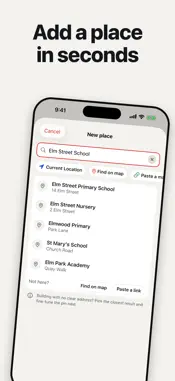
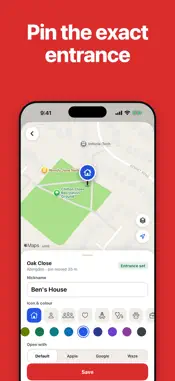
Your places, one tap away. Save the places you go most, put them on your Home Screen or Lock Screen, and tap one to start directions right away in Apple Maps, Google Maps or Waze. No opening a map app, no searching, no typing the address again. How it works • Add a place: search for an address, use your current location, paste a map link, or share it from Apple Maps, Google Maps or Waze. • Drag the pin to the exact entrance, so directions take you to the right door, not just the right street. • Add a widget. Tap a place and your map app opens with directions to it already running. Widgets for every screen • Small Home Screen widget: one place, the whole widget is the button. Add a few for your top places. • Medium and large widgets: four or six places at a glance. • Lock Screen widgets: circular, rectangular and inline, so directions are one tap from your Lock Screen. Your map app, your way • Choose Apple Maps, Google Maps or Waze. • Drive, walk, take transit or cycle, wherever your map app supports it. • Avoid tolls with Apple Maps and Waze. • Give each place its own map app and travel mode: Waze to work, walking directions to the gym. Make every place your own • 30 icons and 15 colors, so you can tell your places apart at a glance. • Reorder, rename, move the pin or change a place any time. • Your places sync across your devices with iCloud. Private by design • No account and no sign-up. • Your places, addresses and location stay on your iPhone and in your own iCloud. I never see them. • No ads, and no tracking. One Tap Map Unlimited One Tap Map is free for your two most important places, with the small Home Screen widget and every Lock Screen widget. Unlimited is a one-time purchase, not a subscription: • Add as many places as you like. • Medium and large widgets. • A different map app and travel mode for each place. • Avoid tolls. Made by an independent developer. Questions or ideas? Settings › Send feedback, or onetapmap.serenalambert.com/support. Privacy policy: https://onetapmap.serenalambert.com/privacy Terms of use: https://onetapmap.serenalambert.com/terms
Technical Analysis
Package Overview Basic metadata
Bundle ID
com.serenalambert.onetapmap Current Version 1.0
Minimum iOS 18.0
Package Size App Store Size
Package Metadata 0 / 0 version records
Detailed binary, privacy manifest, framework, and Info.plist results have not been indexed for this package yet. The verified App Store and archive metadata above remains available.
Developer Information
Known Version Records
0 version records with stored package metadata
Stored metadata does not guarantee a package is currently available to download.
| Details | Version / IDs | Version date | Action |
|---|