Preview




Description
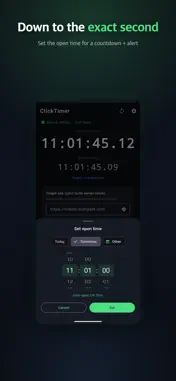
When 0.01 seconds decides everything — ticketing, course registration, limited drops — your phone's clock isn't enough. ClickTimer syncs to standard server time down to the millisecond, so you hit the exact moment a sale opens. ■ Features • Millisecond-precise sync — measures multiple time servers in parallel and corrects for round-trip delay • Sync directly to your target site — match the actual server clock of the site you're booking on • Floating PiP timer — keep the clock on screen while you use the booking site • Target-time countdown — see exactly how long until open, to the second • Countdown vibration & sound — 3·2·1 cues right before open, no need to watch the screen • Site presets — save the booking sites you use most For ticketing, concert sales, course registration, and any moment where a second counts. ■ Notes • This app is a time-reference aid and does not guarantee booking/registration success. • No personal data is collected.
What's New
Version 1.2.4 2026-08-04
Fixed the countdown drifting away from the real time after the app had been in the background for a while. Lock your screen, come back much later, and the remai... Technical Analysis
Package Overview Basic metadata
Bundle ID
com.hedvion.gwangclock Current Version 1.2.4
Minimum iOS 15.0
Package Size App Store Size
Package Metadata 0 / 0 version records
Detailed binary, privacy manifest, framework, and Info.plist results have not been indexed for this package yet. The verified App Store and archive metadata above remains available.
Developer Information
Known Version Records
0 version records with stored package metadata
Stored metadata does not guarantee a package is currently available to download.
| Details | Version / IDs | Version date | Action |
|---|