
Preview




Description
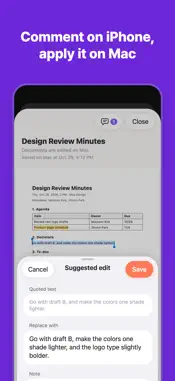
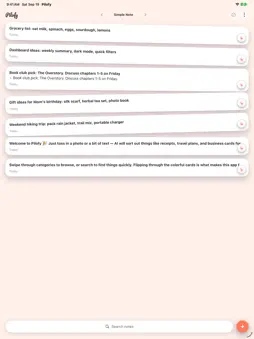
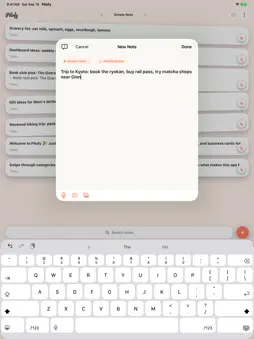
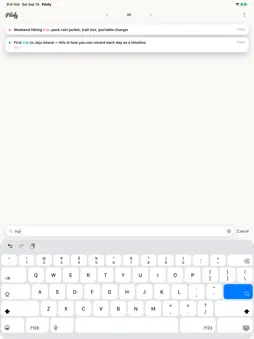
Your pocket office. Meeting to receipt, all in one flow. Pilofy keeps your own work records together: the appointment, the business card, the meeting notes and the receipt. Snap a photo or type a line, and Pilofy files it in the right place. ONE MEETING, START TO FINISH • Set it up: type "Lunch with Dana, Nov 6 at 12:30". Pilofy finds the date, asks if you want to save it as an event, and adds it to your calendar. • Meet: snap their business card. Name, company, phone and email are filled in, and you can save them to Contacts. • Talk: start a note from the meeting notes template, with attendees, agenda, decisions, to-dos and next meeting. • Pay: snap the receipt. Pilofy reads the store, date and amount, and the Receipt category shows this month's total. Splitting the bill or adding a tip? The calculator puts the result straight into your note. TRIPS AND TICKETS Flights, hotels and event tickets are saved as tickets, and Pilofy offers to group them with an event on the same dates. A booking confirmation with flights, hotels and a schedule is split into tickets and day-by-day events. FIND IT AGAIN Search your notes, browse by category, and pin the ones you need most to the top. LOCK WHAT'S PRIVATE Lock a note with Face ID, Touch ID or your passcode. Lists and search show only its title, and its content stays out of notifications, the calendar and AI. Locking hides the content on screen; it does not encrypt it. YOUR RECORDS, YOUR TOOL Team apps hold the team's records. Pilofy holds yours: a personal app for your share of the work. ON-DEVICE AI FIRST Sorting runs on your iPhone with Apple Intelligence, so your notes, photos and voice recordings stay on the device. Online AI is optional and runs only when you choose it and agree. On-device AI needs an iPhone that supports Apple Intelligence. SYNCED WITH ICLOUD Your notes sync through your own iCloud account. No separate sign-up. PILOFY FOR MAC Back at your desk, open the same notes on your Mac. Write documents with tables and images, import and export Word files, save as PDF, and ask the AI chat about all your notes. On iPhone, you can comment on those documents or suggest edits. The Mac app starts with a 90-day free trial. Free to download, with ads. Ad removal and tickets for online AI are available as in-app purchases.
What's New
Version 1.1.0 2026-10-31
• Meeting notes template: start a note with date, attendees, agenda, decisions, to-dos and next meeting. Long-press + or open the ⋯ menu in a note. • The calcul... Technical Analysis
Package Overview Basic metadata
Bundle ID
com.pilofy.app Current Version 1.1.0
Minimum iOS 27.0
Package Size App Store Size
Package Metadata 0 / 0 version records
Detailed binary, privacy manifest, framework, and Info.plist results have not been indexed for this package yet. The verified App Store and archive metadata above remains available.
Developer Information
Known Version Records
0 version records with stored package metadata
Stored metadata does not guarantee a package is currently available to download.
| Details | Version / IDs | Version date | Action |
|---|