Preview


Description
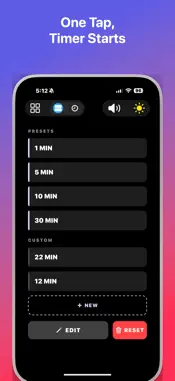
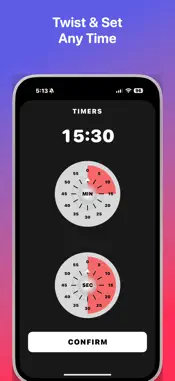
Your timer should be running before you even think about it. Quick Timer does one thing and does it ruthlessly well: it gets a countdown on your screen in a single tap. No loading screens. No sign-up walls. No "are you sure?" confirmations. You open it, you tap it, it is already counting down. Done. ONE TAP. ZERO FRICTION. The main screen greets you with preset timers — 1 minute, 5 minutes, 10 minutes, 30 minutes — ready to fire. Tap once and the countdown starts instantly. Not in two steps. Not after a transition. Instantly. This is the fastest timer on your phone, and it is not even close. A COUNTDOWN YOU CAN READ FROM ACROSS THE ROOM Big, bold, high-contrast numbers fill the screen so you never have to squint, walk over, or pick up your phone. Whether you are across the kitchen with flour on your hands or halfway through a plank, you will always know exactly how much time is left. YOUR TIME, YOUR WAY Need something that is not on the preset list? Tap New, spin the minute and second dials, and confirm. That is it — your custom timer is saved permanently and waiting for you with a single tap next time. Build a collection for cooking, workouts, study sessions, meditation, or whatever your life demands. LIST VIEW. GRID VIEW. YOUR CALL. Switch between a clean list layout and a compact grid with one button. Organize your timers the way your brain works, not the way some designer decided you should. PICK YOUR ALARM SOUND Choose from multiple built-in tones so you actually notice when your timer goes off. Your selection is saved across sessions — set it once and forget it. IT WORKS EVEN WHEN YOU WALK AWAY Lock your phone. Switch to another app. Close the screen entirely. Quick Timer keeps counting in the background and delivers a push notification with your chosen alarm sound the moment time is up. No more burnt pasta because you forgot to check your phone. DARK MODE THAT ACTUALLY LOOKS GOOD Toggle between light and dark themes with a single tap. Your preference is remembered every time you open the app. Late-night timers never have to blind you again. RESTART IN ONE TAP Timer finished? Hit Restart and the same countdown begins immediately. Perfect for interval training, repetitive tasks, or back-to-back cooking steps. No scrolling back to find it. No re-entering the time. WHAT WE LEFT OUT ON PURPOSE No ads. No subscriptions. No accounts. No analytics pop-ups. No "rate this app" interruptions. No features you will never use. Quick Timer was built for people who are tired of apps that waste their time while pretending to save it. Open it. Tap it. Get on with your life.
What's New
Version 1.21 2026-09-01
bug fixed. Technical Analysis
Package Overview Basic metadata
Bundle ID
com.ever8.quicktimer Current Version 1.21
Minimum iOS 26.2
Package Size App Store Size
Package Metadata 0 / 1 version records
Detailed binary, privacy manifest, framework, and Info.plist results have not been indexed for this package yet. The verified App Store and archive metadata above remains available.
Developer Information
Known Version Records
0 version records with stored package metadata • 1 known version records
Stored metadata does not guarantee a package is currently available to download.
| Details | Version / IDs | Version date | Action |
|---|---|---|---|
| Not archived | App Store ID: 884261549 | Unknown | Request Version |