
Preview





Description
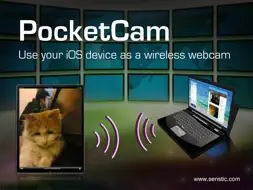
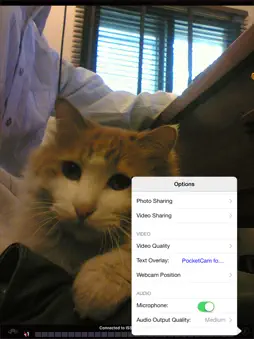
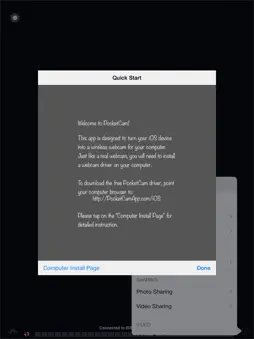
** UPDATE ** Support for FaceTime, iChat/Messages on macs added! ** YouTube Video: http://www.youtube.com/watch?v=A69c4HHok3U ** IMPORTANT ** Please turn off Bluetooth on the device (Settings->General->Bluetooth) before using PocketCam. Otherwise, you may experience frame drops/freeze. Why paying for an expensive webcam when you can use your awesome iOS device for video conference? Better yet, your iOS webcam is wireless! Now you can use your iOS device to show around your house/apartment on your favorite webcam applications such as FaceTime, iChat/Messages, Windows Live or Skype. PocketCam lets you use your iPhone/iPod Touch/iPad as a wireless webcam for your Windows-based computer or Mac (OS X 10.7 or above). PocketCam automatically forwards video captured by your iOS camera, which can then be used as if they come from a virtual webcam. PocketCam works with any Windows-based webcam or video conferencing applications, including instant message applications such as MSN Live Messenger, Skype, AIM, etc. For Mac users, PocketCam works with any Mac applications such as FaceTime, iChat/Messages, GTalk, Skype and aMSN. You can even record the live video from your iOS cam using a webcam recorder such as QuickTime Pro. INSTRUCTIONS: 1. If you have not already done so, download and install the PocketControl for Windows or Mac software from our website: http://www.senstic.com/iPhone/PocketCam/PocketCam.aspx 2. On Windows, run PocketControl for Windows and make sure the PocketCam service is running on your computer. On Mac, run PocketControl, and run any application that uses webcam and select PocketCam as your preferred webcam. 3. Start PocketCam on iOS device, and the app will automatically connect to your computer. The bottom of your iOS screen should display "Connected to your_computer_name:port." 4. Start any program on your computer that uses webcam, and select "PocketCam" as your virtual webcam. Enjoy live feed from your iOS camera as your webcam source! Step-by-step instructions can be found at http://www.senstic.com/iphone/pocketcam/Support.aspx LIMITATIONS: 1. Currently, PocketCam supports Windows XP/Vista/7/8, Mac OS X 10.7 (Lion) or above. 2. There is a half second delay before the images are shown up on the computer. 3. PocketCam Lite (free version) is limited to monochrome feed. Audio is not supported.
What's New
Version 3.0 2017-01-16
This update from Apple will improve the functionality of this app. No new features are included. Support newer devices. Version 2.14 2015-06-29
* Added connection by scanning QR code. Version 2.13 2014-11-12
* Added an option to pause the camera stream. You can use this option to temporarily sto the camera's audio/video. This is particularly useful to override the... App Store User Reviews
imperfectboi 2010-10-13
Worked
Worked for about 2 hours and worked fairly good then something happened and it recognized the video in the pocket player but nothing else. The app did crash a f...
Ridiculous Rob 2011-04-18
Do they HATE us?
Aside from issuing new versions to hide all poor reviews from past versions, the company seems to have gotten scores of people to write bogus positive reviews s...
Gustamatt 2013-06-13
Unacceptable
I downloaded this app to try and avoid buying and waiting for an actual webcam. But when I followed the instructions on how to download and install to use on my...
Casper8572 2010-01-18
Great idea
This is an excellent app for those that do not have a webcam on their computer and want to save money and like to skype..... the problem however is that there i...
iPhun 2010-03-17
This is really free????
I have been considering getting a cam and have been shopping around. To my suprise my iPhone can do the trick. This app works perfectly! They leave a few things...
Bla bla bla ._. 2016-05-20
Works Great!
This app is exactly what it says it is. It's perfect for when I have to get in group skype calls on my laptop (since I don't have a webcam) The only downside is...
Afjones46 2010-08-11
Worked fine for me.
Not including audio isn't a problem because you can change the microphone input in Skype. Only 4 stars though because it's in black and white. Make it ad suppor...
Mick@nite 2014-01-12
Seems to work as advertised.
I'm using it with Google + hangouts and it seems to work just fine. I think I'll spring for the paid version and get color and audio. This will make a great bab...
Agent 36 2010-04-19
Easy and worked
Easy and worked in 3 mins I was up on stickam. I was just wonder if it would work, thinking of buying the full version.
Jegamer 2011-10-28
Great but extra download
Great and works very well. The colors are black and white and you have to download pocket can control on you computer and type in the ip address from the comput...
Technical Analysis
Package Overview Basic metadata
Bundle ID
com.yourcompany.CamSourceLite Current Version 3.0
Minimum iOS 9.1
Package Size Latest Recorded Package Size
Package Metadata 1 / 23 version records
Detailed binary, privacy manifest, framework, and Info.plist results have not been indexed for this package yet. The verified App Store and archive metadata above remains available.
Related Apps


More by Senstic


Developer Information
Known Version Records
1 version record with stored package metadata • 23 known version records
Stored metadata does not guarantee a package is currently available to download.
| Details | Version / IDs | Version date | Action |
|---|---|---|---|
 1.58 MB | v3.0 App Store ID: 841385464Build: 3.0.1 | 2021-04-14 18:56:34 | Get Version |
| Not archived | v3.0 App Store ID: 820558404Build: 3.0 | 2017-01-16 23:55:53 | Request Version |
| Not archived | v2.14 App Store ID: 812688914Build: 2.14 | 2015-06-29 18:15:57 | Request Version |
| Not archived | v2.13 App Store ID: 795353005Build: 2.13 | 2014-11-12 23:13:37 | Request Version |
| Not archived | v2.12 App Store ID: 655492653Build: 2.12 | 2014-08-01 23:35:15 | Request Version |
| Not archived | v2.11 App Store ID: 632802646Build: 2.11 | 2014-07-19 22:35:43 | Request Version |
| Not archived | v2.10 App Store ID: 579942679Build: 2.10 | 2014-05-07 22:43:17 | Request Version |
| Not archived | v2.9 App Store ID: 562522636Build: 2.9 | 2014-04-24 07:48:38 | Request Version |
| Not archived | v2.8 App Store ID: 84043748Build: 2.8 | 2013-10-22 14:22:12 | Request Version |
| Not archived | v2.7 App Store ID: 15355156Build: 2.7 | 2013-05-10 21:17:12 | Request Version |
| Not archived | v2.6 App Store ID: 14267270Build: 2.6 | 2013-02-26 19:55:52 | Request Version |
| Not archived | v2.4 App Store ID: 11678922Build: 2.4 | 2012-10-26 21:56:00 | Request Version |
| Not archived | v2.3 App Store ID: 10626298Build: 2.3 | 2012-09-19 05:45:58 | Request Version |
| Not archived | v2.2 App Store ID: 5145963Build: 2.2 | 2011-12-03 00:33:23 | Request Version |
| Not archived | v2.1 App Store ID: 4078579Build: 2.1 | 2011-08-29 22:57:50 | Request Version |
| Not archived | v2.0 App Store ID: 3602585Build: 2.0 | 2011-04-19 02:52:17 | Request Version |
| Not archived | v1.8 App Store ID: 3316889Build: 1.8 | 2011-01-13 06:24:12 | Request Version |
| Not archived | v1.7 App Store ID: 3162785Build: 1.7 | 2010-11-22 19:52:05 | Request Version |
| Not archived | v1.6 App Store ID: 2992541Build: 1.6 | 2010-09-23 02:34:53 | Request Version |
| Not archived | v1.5 App Store ID: 2745736Build: 1.5 | 2010-06-23 23:45:28 | Request Version |
| Not archived | v1.4 App Store ID: 2420994Build: 1.4 | 2010-03-05 21:09:19 | Request Version |
| Not archived | v1.3 App Store ID: 2283202Build: 1.3 | 2010-01-22 16:43:16 | Request Version |
| Not archived | v1.2 App Store ID: 2230062Build: 1.2 | 2010-01-14 00:11:04 | Request Version |