
Preview





Description
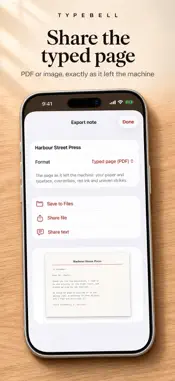
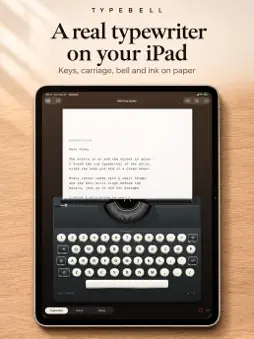
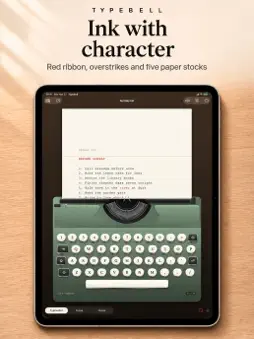
Turn everyday notes into a writing ritual. Typebell brings the character of a classic typewriter to iPhone and iPad, with mechanical keys, moving typebars and letters that appear as they strike the paper. WRITE WITH CHARACTER Tap the carriage-return paddle or slide it to start the next line. Turn the paper-feed knob, choose a black or red ribbon, and adjust margins and line spacing. Enable automatic line return when you want to keep writing without pausing at the margin. Every key, return and margin bell plays a recording of a real manual typewriter, and sounds can be turned off. MAKE THE MACHINE YOURS Choose one of five finishes (charcoal, sage green, cream, signal red or midnight blue) with ivory or ebony keys. Type in Pica, Elite, Bold, Modern or Script; each typeface has its own sound. Letters land slightly uneven and the ribbon slowly fades until you fit a new one, or turn ink character off for crisp type. PAPER FOR EVERY NOTE Give each note its own paper: white bond, cream laid, ruled, letterhead or index card. When a page is done, pull it out of the machine and a fresh sheet feeds in with the same settings. SPACE FOR YOUR WORDS Capture quick ideas, keep a journal, draft a story or write a poem. Switch to Focus for a simple text editor and word count. Create, rename and search notes by title or content. Use portrait or landscape layouts on iPhone and iPad, with support for a physical keyboard. A DAILY WRITING HABIT Set a daily word goal and watch your streak grow. Widgets for the Home Screen and Lock Screen show today's progress, and the New page widget opens a fresh sheet in one tap. EXPORT AND SHARE Save your writing as PDF, editable DOCX or plain text. Or export the typed page itself as a PDF or image, with every strike, red ink and paper stock just as you typed it. Share with the system share sheet. YOUR NOTEBOOK, ON YOUR DEVICE Notes save locally and writing works offline. No account is required. Typebell does not provide its own cloud sync. Classic keys. Modern notes. Your next page is waiting.
What's New
Version 1.4 2026-11-23
A new look and a machine that is more your own. • Five machine finishes: charcoal, sage green, cream, signal red and midnight blue, with ivory or ebony keys. •...A new look and a machine that is more your own. • Five machine finishes: charcoal, sage green, cream, signal red and midnight blue, with ivory or ebony keys. • Five typefaces: Pica, Elite, Bold, Modern and Script, each with its own sound. • Ink that varies from letter to letter, and a ribbon that slowly fades until you fit a new one. • Paper for each note: white bond, cream laid, ruled, letterhead or index card. • Pull the page: slide a finished sheet out and a fresh one feeds in. • Export the typed page as a PDF or image, exactly as you struck it. • Set a daily writing goal and keep your streak going. • New widgets for the Home Screen and Lock Screen: writing goal and New page. • A refreshed desk, keys and paper on iPhone and iPad. Technical Analysis
Package Overview Basic metadata
Bundle ID
com.fmozcelik.todoplus Current Version 1.4
Minimum iOS 18.0
Package Size App Store Size
Package Metadata 0 / 0 version records
Detailed binary, privacy manifest, framework, and Info.plist results have not been indexed for this package yet. The verified App Store and archive metadata above remains available.
Price History (USA store)
2 recorded price change points. These are historical observations, not a guarantee of the current price.
| Recorded at | Price | Currency |
|---|---|---|
| 1.99 | USD | |
| 0.0 | USD |
Known Version Records
0 version records with stored package metadata
Stored metadata does not guarantee a package is currently available to download.
| Details | Version / IDs | Version date | Action |
|---|