
Preview







Description
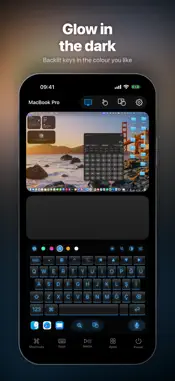
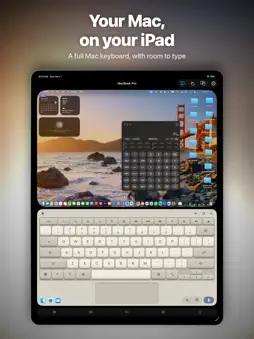
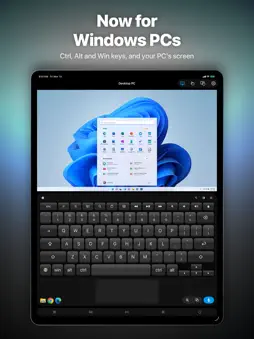
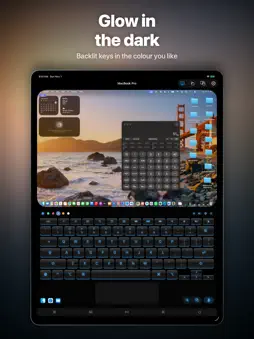
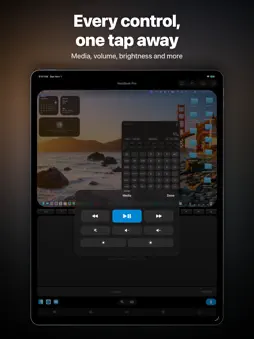
See your Mac or PC. Control it from your iPhone or iPad. Turn your device into a remote control, wireless mouse and keyboard for your Mac or Windows PC. View the computer's live screen, open apps, type and control playback from the sofa, your desk or across the room. Both devices connect over the same Wi-Fi network. SEE AND CONTROL YOUR COMPUTER • View your Mac's or PC's screen directly on your device. • Tap to click, drag items, scroll with two fingers and pinch to zoom into details. • Use the trackpad for pointer control, right-clicks, scrolling and gestures. NOW FOR WINDOWS PCS TOO • Works with Windows 10 and Windows 11 through the free Mouse for Windows companion. • Connected to a PC, the keyboard shows Ctrl, Alt and Windows keys. • Windows shortcuts are one tap away: Search, Task View, Close App, Task Manager, virtual desktops and more. A KEYBOARD THAT FEELS YOURS • Type text and emoji with a full keyboard, modifier keys, arrows and F1–F12. • Choose six styles: Dark, Light, Backlit, Platinum, Ocean and Aluminium. • Set the backlight colour and brightness. Add optional key sounds, 3D keys, key pop-ups and ripple lighting. EVERYDAY CONTROLS, ONE TAP AWAY • Open apps from their icons and use shortcuts for copy, paste, undo, Spotlight or Windows Search, and more. • Control playback, volume, mute and display brightness. • Lock or sleep your computer. Restart, shut down and log out when enabled in the companion app. MADE FOR YOUR SCREEN Layouts for iPhone, iPad and iPhone Duo. On iPad, the live screen and keyboard share an aligned workspace, with controls within easy reach. PAIR ONCE, CONNECT SECURELY Confirm the matching code on both devices. The connection between your device and computer is encrypted. No account and no ads. GET STARTED Download the free Mouse companion for Mac or Windows from theappverdict.com and open it. Connect both devices to the same Wi-Fi, choose your computer and complete pairing. On a Mac, allow Accessibility for input control and Screen Recording to view the screen. On a PC, allow Mouse on private networks when Windows asks. Requires the free companion app on a Mac with macOS 13 or later (Apple silicon or Intel), or a PC with Windows 10 or Windows 11 (64-bit).
What's New
Version 2.2 2026-11-14
Version 2.2 adds Windows PCs. • Control a Windows 10 or 11 PC with the free Mouse for Windows companion: trackpad, keyboard, media keys, app launching, power c...Version 2.2 adds Windows PCs. • Control a Windows 10 or 11 PC with the free Mouse for Windows companion: trackpad, keyboard, media keys, app launching, power controls and the PC's live screen. • Connected to a PC, the keyboard shows Ctrl, Alt and Windows keys, and the Shortcuts panel has Windows shortcuts like Search, Task View, Close App and Task Manager. • PCs appear in the list with their own icon, and setup help now covers both Mac and Windows. • Both companions are now on our new page: theappverdict.com Both devices must be on the same Wi-Fi network. Technical Analysis
Package Overview Basic metadata
Bundle ID
Sensonet.mouse Current Version 2.2
Minimum iOS 17.0
Package Size App Store Size
Package Metadata 1 / 3 version records
0.0 / 5.0 (0 ratings)
Detailed binary, privacy manifest, framework, and Info.plist results have not been indexed for this package yet. The verified App Store and archive metadata above remains available.
Price History (USA store)
2 recorded price change points. These are historical observations, not a guarantee of the current price.
| Recorded at | Price | Currency |
|---|---|---|
| 0.99 | USD | |
| 2.99 | USD |
Known Version Records
1 version record with stored package metadata • 3 known version records
Stored metadata does not guarantee a package is currently available to download.
| Details | Version / IDs | Version date | Action |
|---|---|---|---|
| 8.15 MB | v1.2 App Store ID: 835541483Build: 1.2 | 2020-04-16 18:12:26 | Paid / Arcade |
| Not archived | App Store ID: 835414602 | Unknown | Paid / Arcade |
| Not archived | App Store ID: 820761034 | Unknown | Paid / Arcade |