
Preview






Description
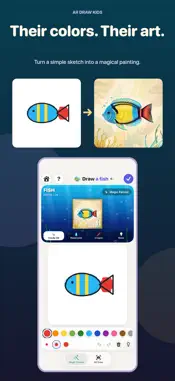
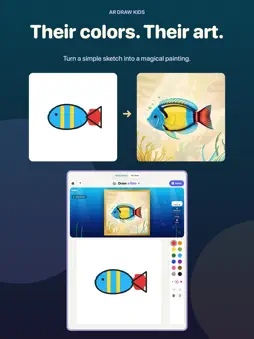
Two ways to draw in one app. In Magic Painter, a simple doodle turns into a beautiful painting in seconds. In AR Draw, your child traces a picture onto real paper with a pencil, and can then paint that drawing with magic too. MAGIC PAINTER Your child draws a simple doodle with a finger and watches it become a storybook-style painting while they draw. The colours they choose stay where they painted them, so every picture is truly theirs. • 42 fun things to draw in 5 worlds: animals, sea life, flowers, vehicles and space • Four art styles: Candy 3D, Watercolour, Crayon and Neon • A friendly voice reads what to draw when the speaker button is tapped • Stars and confetti for every finished picture FROM PAPER TO PAINTING When a drawing on paper is finished in AR Draw, tap "Paint It with Magic". The photo of your child's own drawing is painted in the style they pick and shown next to the original. PICK, ALIGN, DRAW Choose from more than 50 built-in pictures, including animals, rockets, castles and cupcakes, or use your own photo. Secure your iPhone or iPad above the paper, align the image and start tracing. The app saves your unfinished session so you can return to it later. TRY IT FREE Paint Cat as often as you like, and complete one other magic painting free. Browsing subjects and unfinished drafts do not use your bonus. You can return to that completed project. Try two AR drawing sessions too. Your free allowance is stored on this device. TOOLS THAT HELP Adjust opacity, use a grid, lock the image in place and try 14 image filters. Record a time-lapse of the camera view, save finished artwork in the gallery and share it after a grown-up check. CHOOSE YOUR ACCESS After the free tries, a grown-up can choose unlimited magic painting, unlimited drawings and all tools: • Yearly access: US $2.99 per year. Eligible subscribers receive 3 days free, then the annual subscription renews automatically until cancelled. • Lifetime access: US $5.99 in a single payment. No subscription. Prices vary by country; your local price is shown before purchase. Payment is charged to your Apple Account after confirmation or when an eligible free trial ends. Cancel at least 24 hours before the current period ends to avoid renewal. Manage or cancel your subscription in your App Store account settings. ALREADY A PAID CUSTOMER? If you bought the original paid app, you retain permanent access to all drawings and tools without further payment. Restore Purchases with the same Apple Account if needed. FOR FAMILIES No ads, sign-up or third-party analytics. Drawings, photos and paintings are processed and stored on your device; nothing is uploaded, and magic painting works offline. Apple handles purchases and billing. Purchases, sharing and external links are protected by a parental gate. GOOD TO KNOW Magic painting uses Apple Intelligence where available and a built-in painting model on other devices, so the download is about 1 GB. The first time, the magic brush takes a few minutes to get ready. Devices with less than 6 GB of memory need iOS 26 or later for magic painting; AR Draw works on iOS 17 or later. Privacy Policy: https://sebaexhibits.com/privacy/ardraw Terms of Use (EULA): https://www.apple.com/legal/internet-services/itunes/dev/stdeula/
What's New
Version 1.4 2026-11-06
MY ART BOOK Your drawings save automatically on this device. Keep the original and painted result together, reopen a project to keep drawing, and share with a g...MY ART BOOK Your drawings save automatically on this device. Keep the original and painted result together, reopen a project to keep drawing, and share with a grown-up. Paint Cat as often as you like, and complete one other magic painting free. Browsing subjects and unfinished drafts do not use your bonus. You can return to that completed project. Try two AR drawing sessions too. Your free allowance is stored on this device. Improved iPhone Duo layouts, clearer drawing controls, and fixes for saved artwork and localised messages. Technical Analysis
Package Overview Basic metadata
Bundle ID
com.sensonet.ardraw Current Version 1.4
Minimum iOS 17.0
Package Size App Store Size
Package Metadata 0 / 0 version records
Detailed binary, privacy manifest, framework, and Info.plist results have not been indexed for this package yet. The verified App Store and archive metadata above remains available.
Price History (USA store)
2 recorded price change points. These are historical observations, not a guarantee of the current price.
| Recorded at | Price | Currency |
|---|---|---|
| 1.99 | USD | |
| 0.0 | USD |
Known Version Records
0 version records with stored package metadata
Stored metadata does not guarantee a package is currently available to download.
| Details | Version / IDs | Version date | Action |
|---|