
Preview



Description
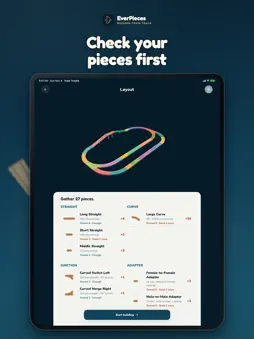
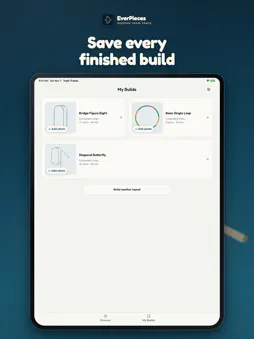
BUILD MORE WITH THE TRACKS YOU ALREADY OWN EverPieces: Wooden Train Track helps parents and children turn familiar train-track pieces into nearly 50 complete railway layouts. Each design is a connected track plan with clear piece counts and a guided build sequence. DISTINCT COMPLETE LAYOUTS Start with simple loops, then move into figure eights, junctions, yards, hubs, bridges, and multi-level railways. These are complete layouts, not disconnected track studies. CHECK YOUR PIECES See which straights, curves, switches, crossings, supports, and other parts each layout uses before you begin. BUILD STEP BY STEP Follow a calm 3D build sequence that shows what to add next. Rotate the railway and inspect raised sections from the angle that makes sense. KEEP YOUR BUILDS Mark layouts complete and save an optional photo of the real railway. Photos and saved progress stay on your device; photos are never uploaded. MADE FOR WOODEN TRAIN TRACK SETS The app focuses on common wooden toy train-track shapes. Exact fit can vary by brand and set, so check your pieces before building. A starter collection is included free. A one-time purchase unlocks the complete layout library permanently. No account. No ads. No cross-app tracking. Layout photos stay private on your device. Anonymous usage analytics is on by default and never includes photos; you can turn it off or delete it anytime in Settings. Privacy-minimized crash reports help us fix bugs. Toy train tracks are not included. Adult guidance and age-appropriate supervision are recommended for physical play. Terms of Use (EULA): https://www.apple.com/legal/internet-services/itunes/dev/stdeula/
What's New
Version 1.3.0 2026-11-11
• Made for bigger screens: pages now adapt to iPad, iPhone in landscape, and iPhone Duo. Turn your device sideways to see the 3D layout next to the steps, and e...• Made for bigger screens: pages now adapt to iPad, iPhone in landscape, and iPhone Duo. Turn your device sideways to see the 3D layout next to the steps, and each page now has one smooth, continuous background. • Touch the layout directly: drag to turn it, pinch to zoom in or out, and double-tap to return to the starting view. • After you save a build, you now land on its completion page. Add a photo there, or tap Share to create a picture of the 3D layout. The picture is made on your device and only goes where you choose to send it. • Larger text sizes work better: pages, buttons, and piece lists stay readable without being cut off. • One step fewer to start: the piece list is now right on the layout's details page. Start building, or continue where you left off. Back and Continue work the same in all EverPieces apps, and your progress stays saved. • New in Settings: a small EverPieces family section with our apps for magnetic tiles and magnetic sticks. Technical Analysis
Package Overview Basic metadata
Bundle ID
com.everpieces.traintracks Current Version 1.3.0
Minimum iOS 16.4
Package Size App Store Size
Package Metadata 0 / 0 version records
Detailed binary, privacy manifest, framework, and Info.plist results have not been indexed for this package yet. The verified App Store and archive metadata above remains available.
Developer Information
Known Version Records
0 version records with stored package metadata
Stored metadata does not guarantee a package is currently available to download.
| Details | Version / IDs | Version date | Action |
|---|