
Preview




Description
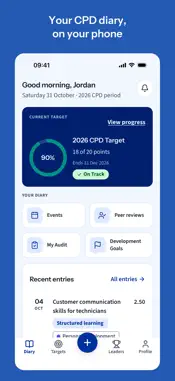
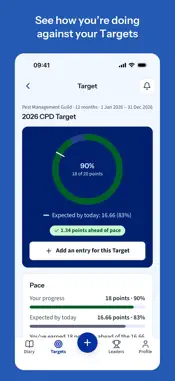
RiverCPD is the continuing professional development (CPD) diary that professional bodies and employers provide for their members and staff. The app puts your diary on your phone, so you can record your learning when and where it happens. WHO IT'S FOR The app is for members whose professional body or employer uses RiverCPD. You sign in on your organisation's own sign-in page, with the same details you use for your CPD diary on the web. RiverCPD never sees your password. If you're not sure whether your organisation uses RiverCPD, please ask them. RiverCPD is for people aged 18 and over. GETTING STARTED Your organisation's CPD scheme has its own QR code and scheme code. You'll find both in the bottom-left corner of your CPD diary on the web, under "Get the mobile app". Scan the QR code or type in the code, then sign in on your organisation's own page. RECORD YOUR CPD • Add an entry in four steps: the basics, your reflection, themes and evidence. It saves as a draft while you type, and you publish it when it's ready. • Add evidence by taking a photo, recording a short video, scanning a document into a PDF, choosing from your photos or files, or adding a link. • Share a photo or PDF to RiverCPD from another app. Start an entry from it, or keep it in My Files for later. • Location details are removed from photos before they upload. SNAP TO CPD ENTRY Scan or photograph a certificate from the + button, or press and hold the app icon. If AI Coach is switched on for you, it drafts the details for you to check. If not, the scan or photo is added to a new entry for you to fill in. AI COACH, IF YOUR ORGANISATION HAS SWITCHED IT ON • Drafts details such as the title, provider and date from your evidence. You check and confirm each one. • Asks questions to help you reflect. It never writes your reflection for you. • Can look over an entry before you publish it and suggest how to improve it. • AI Coach sees only the evidence file you choose and the entry's text. These are not used to train AI models. You can switch AI assistance off in your profile. WORK WITHOUT A SIGNAL • Write a new entry, with its evidence, when you have no signal. It's kept on your phone as a draft and uploads when you're back online, ready for you to publish. • Screens you've opened recently stay readable offline. • Your drafts and saved screens are encrypted on your phone. KEEP TRACK • Targets: see your progress and whether you're on track, and find and join optional Targets. • Development Goals: set yourself goals and see how you're getting on. • Events: browse upcoming events, and book them on the provider's own website. • Peer review: ask a colleague to review an entry, and review entries colleagues send you. • Audit: if you're selected for audit, choose your entries and submit them from your phone, then see the outcome. • Leaderboards: see this month's leaderboard, or hide yourself from it. • Competencies: see the competencies you hold and when they expire. STAY UP TO DATE • Your notifications and your organisation's announcements, in one inbox. • Choose which notifications reach your phone. Critical announcements can't be switched off. YOUR PROFILE • Lock the app with Face ID, Touch ID or your phone's passcode. • Keep reusable evidence in My Files, and organise entries with your own tags. • Delete your account from within the app. • The app follows your phone's text size. WHAT YOU'LL SEE Your organisation decides which features its scheme includes, and may use its own words for some of them, so your app may not show everything described here. A few things, such as exporting your CPD record, are done on the web. HELP AND PRIVACY Help: rivercpd.com/help Privacy notice: rivercpd.com/privacy Email: [email protected]
Technical Analysis
Package Overview Basic metadata
Bundle ID
com.rivercpd.app Current Version 1.0.0
Minimum iOS 16.4
Package Size App Store Size
Package Metadata 0 / 0 version records
Detailed binary, privacy manifest, framework, and Info.plist results have not been indexed for this package yet. The verified App Store and archive metadata above remains available.
Known Version Records
0 version records with stored package metadata
Stored metadata does not guarantee a package is currently available to download.
| Details | Version / IDs | Version date | Action |
|---|