Preview










Description
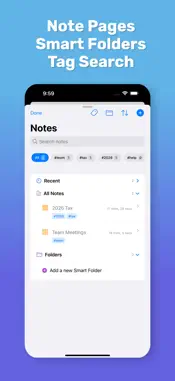
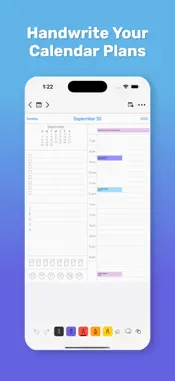
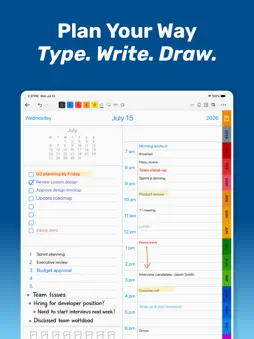
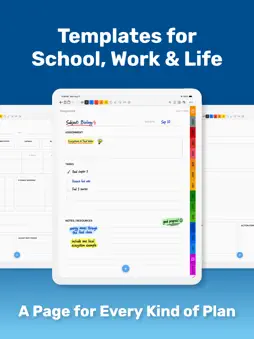
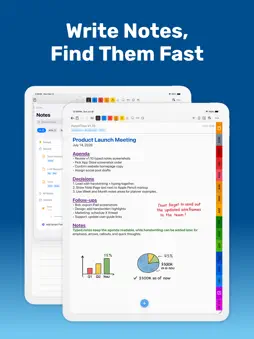
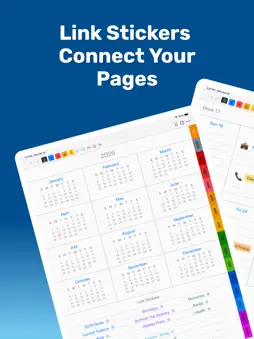
Plan by hand. Type what matters. Find it again. PencilTime brings a handwritten planner and a flexible notebook together on iPad and iPhone. Write with Apple Pencil on iPad, sketch with your finger, or type in supported text areas. Plan across Day, Week, Month, and Year views, and keep projects, classes, meetings, and ideas on dedicated Note pages. SHAPE YOUR DAY Choose when your Day page starts, use 30-minute or hourly time slots, and set how long the schedule runs. The remaining rows are lined for notes. Apply a layout from a chosen date onward or change one Day page while keeping its handwriting in place. PencilTime keeps planner dates and Day timelines in a saved home time zone as you travel. If you relocate, you can choose another zone in Settings. An older page that appears missing after time-zone travel can be previewed and recovered from its expected date. Apple Calendar events appear at the time and date of your selected planner zone. FIND YOUR TYPED NOTES Search typed content across planner and Note pages from the top-bar magnifying glass. Choose All, Planner, or Notes, sort by last updated and other options, and tap a result to open its page. Search can ignore or match capital letters and keeps your query when you return. Search finds typed Note titles, page text, supported Day entries, and Link labels. It does not search handwriting, drawings, printed template labels, attachment contents, or live Apple Calendar events. Text search does not require Premium. WRITE AND TYPE TOGETHER • Write, sketch, and highlight with Apple Pencil or touch. • Type on Note pages, Basic Year/Month/Week Notes areas, and supported Day fields. • Format Note text with size, color, bold, italic, underline, highlighting, alignment, lists, and indentation. • Show or hide the Note background without deleting text. • Use an on-screen or hardware keyboard and scroll to reach lower text while typing. MAKE ROOM FOR YOUR IDEAS Choose bundled Note layouts across Paper, Study, Work, Productivity, Personal, Home & Money, and Creative categories. Plan an assignment, prepare for an exam, capture meeting notes, track a budget, or sketch a project. Change the background while keeping your page content in place. KEEP RESOURCES CLOSE • Connect pages with Page Links and add website, email, phone, and message links. • Attach files and open them with Quick Look. • Add reminders, photos, images, labels, and emoji. • Mark up plans with editable lines, arrows, rectangles, and ellipses. ORGANIZE, REVISIT, AND SHARE • Return to your work with Back, Bookmarks, Recent Pages, and Page Links. • Export completed pages as PDF or PNG. • Choose Fit Page or Fit Width when viewing portrait pages in landscape. • Follow your preferred first day of the week and planner date-label language. START FREE, ADD PREMIUM WHEN YOU NEED IT Start with handwriting, supported typed text, search, bundled Note layouts, and one new Note page per day. Premium adds unlimited Note pages, Tags and Smart Folders, Apple Calendar integration, iCloud sync, and access to future planner dates. Apple Pencil is supported on compatible iPads. iPhone supports touch and keyboard input. iCloud sync requires Premium and the same Apple Account on your devices. --- Privacy Policy: https://semore-software.com/penciltime-privacy-policy.html Support: [email protected] By using this app, you agree to Apple’s standard End User License Agreement: https://www.apple.com/legal/internet-services/itunes/dev/stdeula/
What's New
Version 1.14.0 2026-11-08
Plan the day on your own timeline in PencilTime 1.14.0. • Set the start time, choose 30-minute or hourly slots, and adjust the schedule length of your Day page...Plan the day on your own timeline in PencilTime 1.14.0. • Set the start time, choose 30-minute or hourly slots, and adjust the schedule length of your Day page. The space below the schedule stays lined for notes. • Apply Day page settings from a chosen date onward, or change one page. Pages with saved content keep their own layout unless you change that page. • Keep planner dates and Day timelines in your saved home time zone when your device travels. You can change that zone in Settings if you relocate; existing drawings stay in place. • If a page created in an older version seems missing after time-zone travel, open its expected date and choose More > Recover This Page to preview and confirm a match. • Photo and Files sticker imports now use less memory for large images and PDF pages while keeping their placement on the page. Apple Calendar events retain their event times and appear in the planner's selected time zone, so their displayed hour or date may change when you change that setting. Technical Analysis
Package Overview Basic metadata
Bundle ID
com.semoresoftware.PencilTime Current Version 1.14.0
Minimum iOS 17.4
Package Size App Store Size
Package Metadata 1 / 21 version records
Detailed binary, privacy manifest, framework, and Info.plist results have not been indexed for this package yet. The verified App Store and archive metadata above remains available.
Developer Information
Known Version Records
1 version record with stored package metadata • 21 known version records
Stored metadata does not guarantee a package is currently available to download.
| Details | Version / IDs | Version date | Action |
|---|---|---|---|
| 21.29 MB | v1.13.1 App Store ID: 888206648Build: 1.13.1 | 2026-09-27 18:46:30 | Get Version |
| Not archived | App Store ID: 888023972 | Unknown | Request Version |
| Not archived | App Store ID: 887818726 | Unknown | Request Version |
| Not archived | App Store ID: 887351851 | Unknown | Request Version |
| Not archived | App Store ID: 886744879 | Unknown | Request Version |
| Not archived | App Store ID: 886491988 | Unknown | Request Version |
| Not archived | App Store ID: 886301987 | Unknown | Request Version |
| Not archived | App Store ID: 886064644 | Unknown | Request Version |
| Not archived | App Store ID: 884857412 | Unknown | Request Version |
| Not archived | App Store ID: 884425513 | Unknown | Request Version |
| Not archived | App Store ID: 883839928 | Unknown | Request Version |
| Not archived | App Store ID: 883283495 | Unknown | Request Version |
| Not archived | App Store ID: 883023932 | Unknown | Request Version |
| Not archived | App Store ID: 881545326 | Unknown | Request Version |
| Not archived | App Store ID: 880876182 | Unknown | Request Version |
| Not archived | App Store ID: 880570493 | Unknown | Request Version |
| Not archived | App Store ID: 879654611 | Unknown | Request Version |
| Not archived | App Store ID: 879523575 | Unknown | Request Version |
| Not archived | App Store ID: 879428127 | Unknown | Request Version |
| Not archived | App Store ID: 878776419 | Unknown | Request Version |
| Not archived | App Store ID: 877288754 | Unknown | Request Version |