
Preview


Description
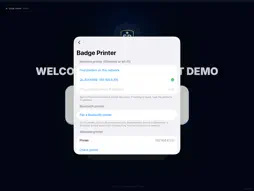
SecurePoint Kiosk turns an iPad into the check-in kiosk for SecurePoint Visitor, visitor management for regulated facilities. Visitors check themselves in at the kiosk. SecurePoint screens each visit using the screening your organization has set up, applies your site's rules, and prints a visitor badge only after the check-in is approved. At the kiosk • Guided self check-in: name, company, host and purpose of visit • ID and headshot capture, NDA and safety acknowledgements, and export-control questions when your site requires them • Check-out with the badge QR code Badge printing • Prints to a Brother QL-820NWB with DK-2251 labels, over your network or Bluetooth • Set up the printer on the iPad: find it on the network, or pair it over Bluetooth, then print a test label • Each kiosk can have its own badge printer • Each badge prints once. If the printer or network drops, the kiosk waits and prints the badge when they're back, or reports it to staff For staff • Kiosk settings are behind a PIN • Diagnostics for support calls Requirements • A SecurePoint Visitor account. An administrator pairs the iPad from Admin → Kiosks. • For badges: a Brother QL-820NWB label printer with DK-2251 labels. Check-in works without a printer.
Technical Analysis
Package Overview Basic metadata
Bundle ID
com.securepointusa.kiosk Current Version 1.0.0
Minimum iOS 17.0
Package Size App Store Size
Package Metadata 0 / 0 version records
Detailed binary, privacy manifest, framework, and Info.plist results have not been indexed for this package yet. The verified App Store and archive metadata above remains available.
Developer Information
Known Version Records
0 version records with stored package metadata
Stored metadata does not guarantee a package is currently available to download.
| Details | Version / IDs | Version date | Action |
|---|