Preview

Description
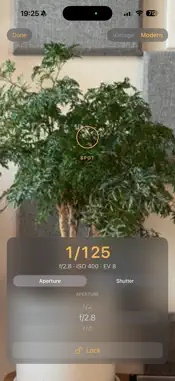
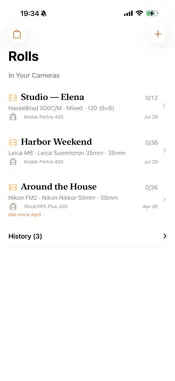
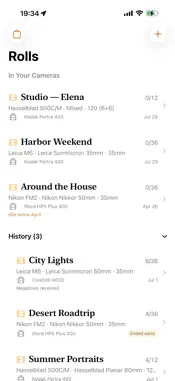
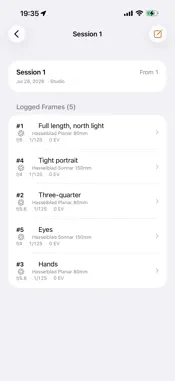
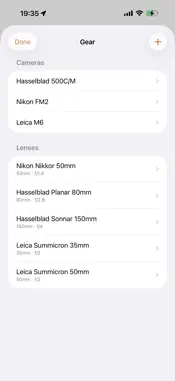
Rolls Logger is a fast, glanceable notebook for shooting analog film. Load a roll, record what you shoot frame by frame in the field, and when the roll's done, export it to the Rolls app on your Mac — so the metadata a scanner can't recover (which lens, what aperture, where you were, what you metered) travels with your scans. It's built for the moment of shooting: one-handed, quick, and honest about what it is. Everything stays on your device and works fully offline. WHY IT'S DIFFERENT A physical roll has real structure, and Rolls Logger mirrors it exactly — Roll → Session → Segment → Frame. Log only the frames you care about; the roll still knows its full length. Frame numbers are always the real camera counter, never renumbered behind your back. Change lenses mid-roll and it records the switch forward-only, so it never rewrites a frame you already shot. BUILT-IN SPOT METER A reflected spot meter is built right into the log. Aim the on-screen ring at the tone you want rendered mid-grey — it meters that spot, not a frame average — and reads the exposure against your roll's ISO. Two modes: • Vintage — a warm analog match-needle: dial aperture and shutter and watch the needle show how far you are from mid-grey. Center it, or place a tone on purpose. • Modern — pick aperture or shutter priority; the app solves the other and warns you when a scene is beyond range. Meter straight from the frame sheet and drop both values into your log with one tap. MADE FOR THE FIELD • Bracketing made quick — Save & Duplicate carries settings to the next frame so you change only what differs. • Optional reference snaps — a quick low-res photo as a memory aid, kept on your device. • Interruption-proof — a call, a dead battery, or a force-quit never loses your place. • Sensible defaults — format sets the frame count; your most-used gear is one tap away. AFTER THE SHOOT • Track where each roll is — at the lab (or "Home" for self-development), negatives received, scanned, exported — right on the shelf. • A quiet reminder surfaces rolls you loaded and forgot. • Full gear management for cameras and lenses, including zoom ranges. EXPORT & THE MAC Completed rolls export as a .rolls file via the standard share sheet — AirDrop it or save to Files, so you keep a clean, portable record of everything you logged. Direct import into the Rolls app on the Mac is coming soon. PRIVATE BY DEFAULT No account, no sign-in, no network, no analytics. Your data lives on your device; the .rolls file is the only thing that leaves, when you choose to share it. The camera is used only for the spot meter and optional reference photos — nothing is uploaded. Rolls Logger is the companion capture app for Rolls on the Mac. It is not a scan manager or a calibrated light meter — it's the structured, per-frame record you'd otherwise keep in a notebook, ready for your Mac library when the roll is done.
Technical Analysis
Package Overview Basic metadata
Bundle ID
film.rolls.Rolls-Logger Current Version 1.0
Minimum iOS 17.6
Package Size App Store Size
Package Metadata 0 / 0 version records
Detailed binary, privacy manifest, framework, and Info.plist results have not been indexed for this package yet. The verified App Store and archive metadata above remains available.
Developer Information
Known Version Records
0 version records with stored package metadata
Stored metadata does not guarantee a package is currently available to download.
| Details | Version / IDs | Version date | Action |
|---|