
Preview



Description
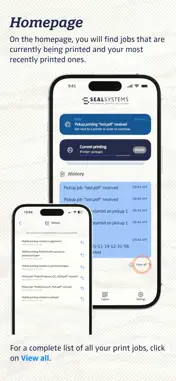
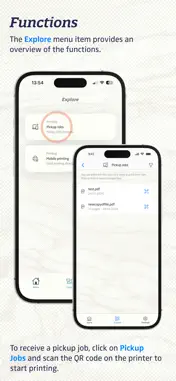
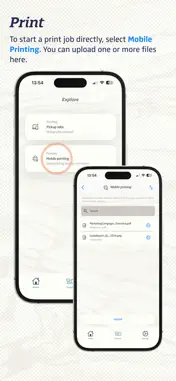
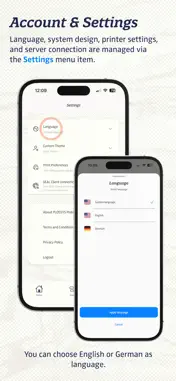
With the PLOSSYS® Mobile Client you can use your PLOSSYS® Output Engine (fka PLOSSYS® 5) even more flexibly. The app enables you to start print jobs directly from your mobile device via the PLOSSYS® Output Engine and PLOSSYS® Print Client. This allows you to design your mobile printing processes efficiently and securely. The focus here is on seamless integration into your existing company infrastructure and meeting modern security and user-friendliness requirements. Key Features • Mobile Printing: Send print jobs directly from your mobile device to corporate printers. PLOSSYS® Mobile Client supports smartphone local files as well as printing from other apps via the Share… feature. • Pickup Printing: Print jobs are retained and released only at the printer once the user authenticates. Pickup Printing enhances the security of confidential documents and reduces unnecessary prints. Additional Features • Job-Management: PLOSSYS® Mobile Client provides status information for every output job in real time. Jobs can be canceled or repeated as required. • Save Print Preferences: Users can store individual settings such as paper size, color mode, or duplex printing for quick reuse, saving time and minimizing errors. • Favorite Printers: Frequently used printers can be saved as favorites, enabling faster selection and streamlined processes. • Print History: Completed print jobs are stored in a history, providing insights into past printing activities for easy tracking and analysis. • Multilingual Support: The app is currently available in German and English, catering to the needs of international teams. Enterprise Integration The PLOSSYS® Mobile Client is fully compatible with the PLOSSYS® Output Engine and PLOSSYS® Print Client. It helps organizations maximize the efficiency of their printing infrastructure while ensuring document output security. With mobile device support, printing processes become more flexible without compromising central security policies. Use Cases The app is aimed at organizations where mobile printing and/or document security and efficiency in printing processes are critical. It is particularly suitable for industries with high security requirements, such as finance or healthcare, as well as companies supporting hybrid work models. Benefits at a Glance • Mobile Output on the existing corporate infrastructure. • Secure Document Output with Pickup Printing. • Reduction of Print Errors to minimize costs and resource usage. • User-Friendly Interface with intuitive design and practical additional features. • Flexibility for employees working remotely or on the go. The PLOSSYS® Mobile Client provides a well-thought-out solution for enterprises to optimize and secure their printing infrastructure.
What's New
Version 1.3.0 2026-08-31
- The connection error message closes on tap instead of only after a timeout. - The app version number is shown under `Settings` > `About PLOSSYS Mobile Client`...- The connection error message closes on tap instead of only after a timeout. - The app version number is shown under `Settings` > `About PLOSSYS Mobile Client`. - Document verification has been added as an optional feature. Scan the QR codes on an OptiHash-sealed document from Explore to check whether it is authentic, tampered, or inconclusive, fully on-device. An administrator enables the feature via MDM. Technical Analysis
Package Overview Basic metadata
Bundle ID
de.sealsystems.plossysmobileclient.public Current Version 1.3.0
Minimum iOS 15.5
Package Size App Store Size
Package Metadata 0 / 4 version records
Detailed binary, privacy manifest, framework, and Info.plist results have not been indexed for this package yet. The verified App Store and archive metadata above remains available.
Developer Information
Known Version Records
0 version records with stored package metadata • 4 known version records
Stored metadata does not guarantee a package is currently available to download.
| Details | Version / IDs | Version date | Action |
|---|---|---|---|
| Not archived | App Store ID: 886194131 | Unknown | Request Version |
| Not archived | App Store ID: 884054139 | Unknown | Request Version |
| Not archived | App Store ID: 879905333 | Unknown | Request Version |
| Not archived | App Store ID: 879511690 | Unknown | Request Version |