
Preview


Description
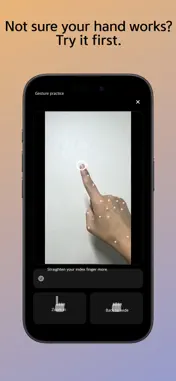
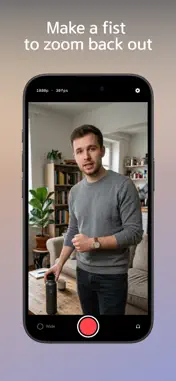
Filming alone means no one to zoom in for you. You want to show one specific part of a product, but the camera stays wide the whole time. So you walk over, pull the zoom, walk back, pick up the sentence again — then cut and crop that section in editing. Handzoom does that with one finger. ■ Three things to know 1. Put the phone on a tripod 2. Point at what you want to show, hold for 1.5 seconds 3. Make a fist to go back wide You never touch the screen while filming. ■ You'll know it worked without looking You're watching the subject, not the phone. So the app signals you — a tone, or a brief pulse of the torch. With headphones connected, the tone goes to your ears only and stays out of the recording. ■ Zooming doesn't cost you quality It films in 4K and crops to 1080p, so 2x is genuinely lossless. The zoomed result is what gets saved. There is no editing step. - 1080p / 4K, 30fps / 60fps - 16:9, 9:16, 1:1 — ready for Shorts and Reels - Landscape filming - Tap to focus - Zoom level adjustable, 1.2x-4.0x ■ One honest thing You have to mean it with your hand. Index finger straight, the other three folded. That's deliberate. If it caught every gesture you make while talking, the frame would lunge around for the whole take. There's a practice screen in Settings. Try your hand before you shoot, and it tells you what to change as you go. This is an early version. Send me feedback and I read it myself.
Technical Analysis
Package Overview Basic metadata
Bundle ID
corpsdh.ReviewCam Current Version 1.0
Minimum iOS 18.6
Package Size App Store Size
Package Metadata 0 / 0 version records
Detailed binary, privacy manifest, framework, and Info.plist results have not been indexed for this package yet. The verified App Store and archive metadata above remains available.
Developer Information
Known Version Records
0 version records with stored package metadata
Stored metadata does not guarantee a package is currently available to download.
| Details | Version / IDs | Version date | Action |
|---|