Preview




Description
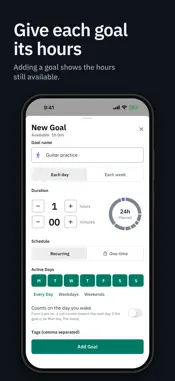
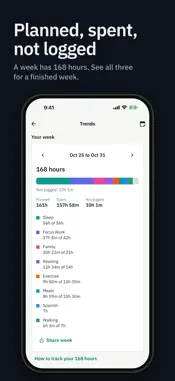
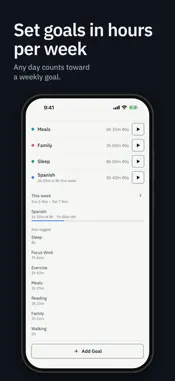
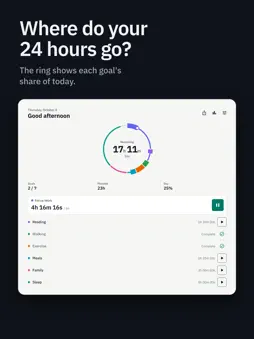
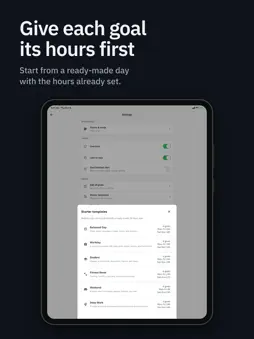
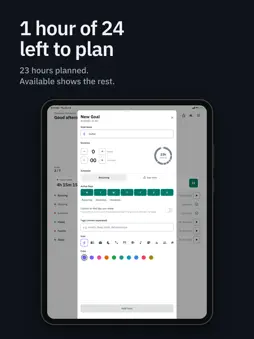
24 Hours turns your day into a budget. Give each goal its share of the 24 hours (sleep 8, work 6, exercise 1), press Start when you begin it, and watch its countdown. One timer runs at a time, so an hour spent on one goal comes out of the day. The ring on the home screen shows each goal's share of the day and what is left. HOW A DAY WORKS • Pick a starter plan (Balanced Day, Workday, Student, Fitness Reset, Weekend, Deep Work) or add your own goals. • Press Start on a goal to begin its countdown, and Pause to stop it. The countdown keeps running when the app is closed or the phone is locked. • At your day start (midnight unless you pick another time in Settings) the day is saved to history and daily goals start full again. With a midnight start, an overnight goal like Sleep, started from 6 pm and on the next day's schedule, counts on the day you wake. FREE • Up to 10 goals, each on the weekdays you choose • Weekly goals, such as 8 hours a week for a language: they count up time from any day of the week. Countdowns, the daily reset and the goal finished alert apply to daily goals • The running countdown on the Lock Screen and in the Dynamic Island • Home Screen and Lock Screen widgets with today's hours left, and a Shortcut to start today's goal • Pause the running goal from a Home Screen widget, or a running daily goal from the rectangular Lock Screen widget (iOS 17 and later) • Log time you already spent, including time that crossed midnight • An alert when a running goal reaches its time (off until you turn it on) • Trends for the last 30 days, and edits to any saved day • A picture of your day to share, and your history as CSV (copied to the clipboard) • A backup file of your goals and history that you save and restore yourself • Navy, Indigo and AMOLED Black themes, each in light and dark SUPPORTER, ONE PAYMENT • Unlimited goals • One-time goals for a single date • Trends for your whole history, custom ranges, and weekday and tag breakdowns • 6 more color themes • Backup to your own Google Drive, by hand or automatically There is no subscription, and the free app keeps working if you never buy it. PRIVATE No account, no ads, no analytics. Goals and history stay on your phone. Google Drive backup, if you turn it on, writes to a hidden app folder in your own Drive.
What's New
Version 1.7.4 2026-11-24
From Dec 26 to Jan 10, Home shows a card with your 2026 in hours. It appears once you've logged 14 days in 2026. Tap it to preview and share your year. The ring...From Dec 26 to Jan 10, Home shows a card with your 2026 in hours. It appears once you've logged 14 days in 2026. Tap it to preview and share your year. The ring says Day complete once today's budget is spent, even while an evening run counts toward tomorrow. A weekly goal on the ring shows time spent out of its target, and under a minute left reads as under a minute. Technical Analysis
Package Overview Basic metadata
Bundle ID
com.scrollingisevil.twentyfourhours Current Version 1.7.4
Minimum iOS 15.0
Package Size App Store Size
Package Metadata 0 / 5 version records
Detailed binary, privacy manifest, framework, and Info.plist results have not been indexed for this package yet. The verified App Store and archive metadata above remains available.
Developer Information
Known Version Records
0 version records with stored package metadata • 5 known version records
Stored metadata does not guarantee a package is currently available to download.
| Details | Version / IDs | Version date | Action |
|---|---|---|---|
| Not archived | App Store ID: 887309950 | Unknown | Request Version |
| Not archived | App Store ID: 887109198 | Unknown | Request Version |
| Not archived | App Store ID: 887058804 | Unknown | Request Version |
| Not archived | App Store ID: 887018287 | Unknown | Request Version |
| Not archived | App Store ID: 886593257 | Unknown | Request Version |