
Preview



Description
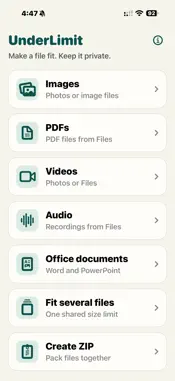
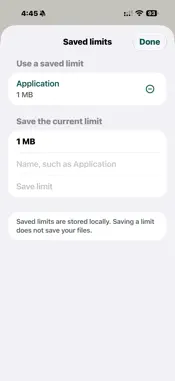
A private file toolkit. One purchase. Seven tools. UnderLimit helps when an email, form or upload portal says your file is too large. Choose a size limit and create a smaller copy on your iPhone or iPad. UnderLimit checks the finished size before reporting success. If a target cannot safely be reached, it tells you. Your originals stay unchanged. SEVEN TOOLS, ONE HOME SCREEN • Images: compress JPEG, HEIC and PNG still images into JPEG copies, individually or in batches. • PDFs: shrink a supported PDF, combine supported PDFs, or scan document pages with your camera. • Videos: import a supported video from Photos or Files and create a smaller MP4 with sound when the source has a compatible audio track. • Audio: reduce supported recordings from Files into M4A copies, then preview and share. • Office documents: reduce embedded JPEG and PNG images in DOCX and PPTX files while keeping text and document structure editable. • Fit several files: give supported attachments one combined size budget, share them separately or create a ZIP within that limit. • Create ZIP: package files into one archive without changing their contents. CHECK, PREVIEW AND SHARE Save named favourite limits and reuse them across tools. See original and new sizes, savings and exact bytes. Check verified trial sizes for supported PDFs, and compare original and compressed pages at the same page and zoom. Preview the copy and share it through iOS. Supported compression targets range from 10 KB to 100 MB, using decimal units. ZIP creation does not promise a smaller file. PDF combining offers an optional size limit, with your confirmation before visual conversion. KNOW WHAT CHANGES Smaller files can lose detail or sound quality. Image compression creates sRGB JPEGs, removes source metadata including GPS, and renders transparency white. Compressed videos use standard-colour MP4 at up to 1080p and 30 fps; HDR and higher frame rates are converted. Compressed audio uses M4A. Supported files that already fit may be kept in their original format in the additional file tools. Single-PDF shrinking offers Keep text for supported PDFs: existing text stays searchable and selectable. Images may lose detail; forms and advanced features may be unsupported. This does not add text to scans. A separate visual-copy option removes searchable text, links, forms, annotations and interactive behaviour. Protected, signed or unsupported PDFs may be rejected. Single-PDF shrinking supports up to 100 pages and 100 MB, subject to memory safety checks. PDF combining accepts 2–10 supported PDFs, up to 50 total pages and 100 MB. When you set a maximum, only verified results within that limit are offered for sharing. Visual conversion may remove accessibility information; the copy may not work with VoiceOver. Document scanning supports up to 30 pages. Single-image and batch-image tools accept still images up to 250 MB, 50 million pixels and 32,768 pixels per edge; batches contain 2–10 images. Videos must be supported, playable MOV, MP4 or M4V files up to 2 GB and 8,192 pixels per edge. Multi-file tools accept up to 20 files totalling 2 GB. Not every codec, document or size target is supported. Office compression changes supported embedded images only. Signed, encrypted and macro-enabled documents are not supported. Some documents cannot shrink enough. ZIPs of already-compressed photos or videos may be slightly larger. Preview important documents before sharing. PRIVATE BY DESIGN Core processing happens locally. No account, subscription, advertising, analytics, tracking or cloud processing. UnderLimit does not collect your files, usage or diagnostics. The camera is used only when you choose to scan pages. Working copies use private temporary storage; you choose when and where to export. Cloud-provider files may need downloading through iOS first. One purchase. No usage quota.
What's New
Version 1.7 2026-10-07
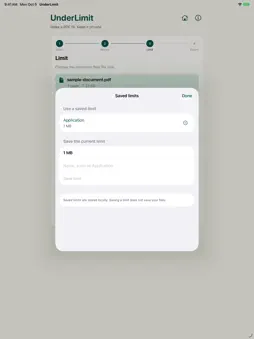
• Shrink supported PDFs while keeping existing text searchable and selectable. • Check verified PDF trial sizes before choosing a limit. • Compare original and ...• Shrink supported PDFs while keeping existing text searchable and selectable. • Check verified PDF trial sizes before choosing a limit. • Compare original and compressed PDFs at the same page and zoom. • Save named favourite size limits and reuse them across tools. • See clearer sizes, savings and exact byte counts. • Share copies with readable filenames. • Improved large-text landscape controls and native iPad layouts. Some PDFs and size limits are unsupported. Smaller images may lose detail; no searchable text is added to scans. Technical Analysis
Package Overview Basic metadata
Bundle ID
ca.scott.underlimit Current Version 1.7
Minimum iOS 18.0
Package Size App Store Size
Package Metadata 0 / 0 version records
Detailed binary, privacy manifest, framework, and Info.plist results have not been indexed for this package yet. The verified App Store and archive metadata above remains available.
Developer Information
Known Version Records
0 version records with stored package metadata
Stored metadata does not guarantee a package is currently available to download.
| Details | Version / IDs | Version date | Action |
|---|