Preview



Description
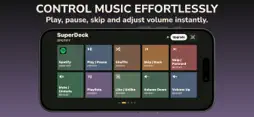
SuperDeck turns your iPhone into a fully customisable control surface for your Mac - no extra hardware needed. Whether you're a developer firing off terminal commands, a designer hitting shortcuts in Fusion360 or Figma, a streamer managing your setup, or a power user who wants instant access to your most-used apps - SuperDeck puts total control right in your hand. YOUR MAC. IN YOUR HAND. SuperDeck pairs your iPhone with your Mac over your local Wi-Fi network, giving you a beautiful, responsive button pad with near-zero latency. No extra hardware. No expensive gadgets. Just your iPhone. LAUNCH ANYTHING, INSTANTLY Open apps, trigger keyboard shortcuts, visit URLs, run system commands - all from beautifully customisable buttons on your iPhone. Organise everything into multiple pages so the right actions are always within reach. HOTKEYS & KEYBOARD SHORTCUTS Map any keyboard shortcut to a single tap. Stop reaching across the desk. Perfect for: - Fusion360: Extrude, Fillet, Line, Rectangle, Circle - Figma: Frame, Component, Auto Layout, Export - Final Cut Pro & Premiere: cut, mark in/out, export - Terminal: custom commands and scripts - Any app with keyboard shortcuts SPOTIFY & MEDIA CONTROL Full media control built right in. Play, pause, skip, shuffle, like tracks, adjust volume, and switch playlists - without ever switching apps or touching your Mac. WIDGETS Add live widgets to your deck: a Pomodoro timer to stay focused, a live Clock, and more coming soon. Keep your workflow humming without breaking your focus. MULTIPLE PAGES Create unlimited pages of buttons - one for coding, one for design, one for music, one for your favourite websites. Swipe to switch. Tap to act. BEAUTIFUL THEMES & SKINS Choose from 10+ stunning skins: Classic, Matrix, Gold, Midnight, Rounded, Blueprint, and more. Your control pad should look as good as it works. POWERFUL MAC COMPANION APP The free SuperDeck Companion app for Mac gives you a full drag-and-drop visual editor. Add buttons, assign actions, pick colours, and sync to your iPhone in one click. What you see on your Mac is exactly what appears on your phone. PERFECT FOR - Developers: terminal shortcuts, git commands, editor hotkeys - 3D Designers: Fusion360, Blender, AutoCAD shortcuts at your fingertips - Content Creators & Streamers: scene switching, media control, browser bookmarks - Productivity Power Users: custom workflows, app switching, URL launching - Anyone who wants a Stream Deck without buying the hardware PRO FEATURES Upgrade to SuperDeck Pro to unlock: - Unlimited deck pages - All premium themes and skins - Advanced widgets - Priority support SuperDeck is the macro pad alternative you have been waiting for - and it is already in your pocket. Download free. Build your deck. Take control. Terms of Use: https://www.apple.com/legal/internet-services/itunes/dev/stdeula/ Privacy Policy: https://superdeck.appiva.app/privacy.html
What's New
Version 1.2 2026-06-09
Updated on boarding for QR code Technical Analysis
Package Overview Basic metadata
Bundle ID
com.scottgoodman.superdeck Current Version 1.2
Minimum iOS 15.1
Package Size App Store Size
Package Metadata 0 / 3 version records
Detailed binary, privacy manifest, framework, and Info.plist results have not been indexed for this package yet. The verified App Store and archive metadata above remains available.
Developer Information
Known Version Records
0 version records with stored package metadata • 3 known version records
Stored metadata does not guarantee a package is currently available to download.
| Details | Version / IDs | Version date | Action |
|---|---|---|---|
| Not archived | App Store ID: 886624831 | Unknown | Request Version |
| Not archived | App Store ID: 886501336 | Unknown | Request Version |
| Not archived | App Store ID: 886027197 | Unknown | Request Version |