
Preview




Description
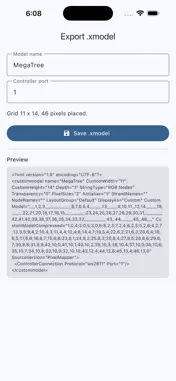
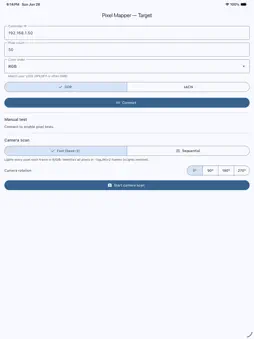
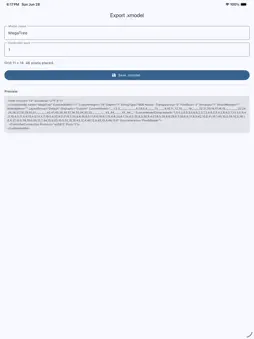
Pixel Mapper turns your iPhone or iPad into an automatic layout tool for xLights. Point your camera at your light display, and the app lights each WS2811 / WS2812 pixel, finds it in the camera image with computer vision, and builds a ready-to-import xLights Custom model — no manual clicking pixel by pixel. Perfect for Christmas light displays, props, matrices, megatrees, and any irregular pixel layout that's painful to map by hand. HOW IT WORKS 1. Target — enter your controller's IP and pixel count. Output goes over DDP or sACN / E1.31, the same protocols xLights and FPP already speak. 2. Scan — choose a mode: • Fast (base-3): every pixel lights in every frame, colored by one base-3 digit of its index, so all pixels are identified in only ~log3(N)+2 frames (about 500 pixels in 8 frames). Two checksum digits reject misreads. • Sequential: light one pixel at a time and find the single bright blob. Slower, but dead simple and rock solid. Both modes subtract a black reference frame to ignore ambient hotspots. 3. Review — see the detected layout over your photo, drop bad points, tap to place or move a node, and re-scan individual pixels. Zoom and pan to fine-tune. 4. Export — save a standard xLights .xmodel file that imports into both old and new versions of xLights. WHY PIXEL MAPPER • No more mapping hundreds of pixels by hand. • Works with the gear you already own — any DDP or sACN/E1.31 pixel controller. • Fast base-3 scan maps large models in seconds of capture. • Checksum-protected so misread pixels get rejected, not placed wrong. • Best results in a dim room; the app locks camera exposure and focus where the device supports it. REQUIREMENTS • A WS2811 / WS2812 (or compatible) pixel controller reachable on your network. • The controller set to receive DDP or sACN / E1.31. • An iPhone or iPad on the same Wi-Fi network as the controller. Pixel Mapper is an independent tool and is not affiliated with or endorsed by the xLights project. xLights is a trademark of its respective owners.
Technical Analysis
Package Overview Basic metadata
Bundle ID
com.sandbdesigns.pixelMapper Current Version 1.0
Minimum iOS 13.0
Package Size App Store Size
Package Metadata 0 / 0 version records
Detailed binary, privacy manifest, framework, and Info.plist results have not been indexed for this package yet. The verified App Store and archive metadata above remains available.
Developer Information
Known Version Records
0 version records with stored package metadata
Stored metadata does not guarantee a package is currently available to download.
| Details | Version / IDs | Version date | Action |
|---|