Preview







Description
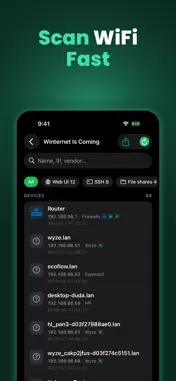
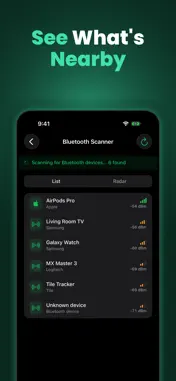
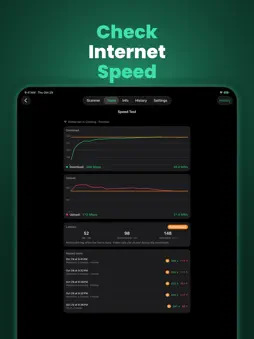
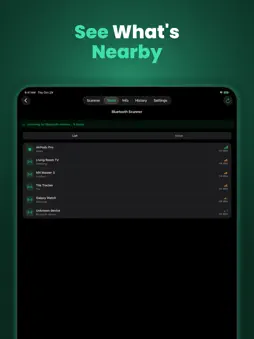
See every device on your WiFi. Free — no ads, no subscription. Now on iPad and built for iPhone Duo. Network Scanner Toolkit finds everything on your network in seconds: name, IP, MAC address and manufacturer (iOS 27+) — even devices that hide from ping. Devices tell you what they are: Apple TV, HomePod, Chromecast, printers, HomeKit and Matter gear, Sonos, Fire TV, Windows PCs, NAS boxes and more. Capability tags show which are pingable, run a web interface, speak Bonjour, UPnP or Matter, or are your gateway. Filter by Web UI, SSH, file shares, printers, TVs, smart home or cameras. Tap a device to ping it, open its admin page, connect over SSH, VNC or SMB, rename or favorite it. New devices are flagged automatically. Made for big screens. On iPad and the iPhone Duo the scanner becomes three columns — past scans, device list and full details side by side — and the tools spread into two panes. Stand the Duo up like a laptop and every tool splits across the hinge: graph, map or results on top, controls below. Fold, unfold or rotate and nothing is lost. A full network toolbox — free: • LAN Scanner — fast sweep with naming over Bonjour, NetBIOS, WS-Discovery and SNMP; models and manufacturers, custom names & icons, new-device badges, filters, quick-connect. Scans Wi-Fi, Personal Hotspot or wired, and keeps going after you leave the app (iOS 26+). • Subnet Tools — IPv4 and IPv6. Type any address with a prefix, netmask or wildcard and get the whole answer on one card: network, broadcast, host range, counts, type with its RFC, binary with host bits highlighted. Then explore: child subnets on a visual map, VLSM planner, overlap checker, supernet, membership test, range-to-CIDR, config lines, IPv6 forms, netmask table. Siri Shortcut included. • Port Scanner — presets, custom ranges, or all 65,535 ports • Traceroute — every hop geolocated on a live map with latency charts • Ping — live graph, configurable payload size and interval • DNS Lookup — A, AAAA, MX, TXT, CNAME, NS, SOA, PTR, SRV, HTTPS & SVCB records, custom resolvers, DNSSEC check • Whois — modern RDAP lookups for domains, IPs and AS numbers, with classic WHOIS referral chasing as the fallback • Bonjour Monitor — watch services appear and disappear live • Network Info — IP, router, DNS, IPv6, data usage, SSID, and a Router card that names your router, shows its WAN address and tells you whether you're Direct, behind Double NAT or on Carrier-grade NAT, in plain English • History — every scan and test saved automatically; reopen scans as fully interactive device lists Toolkit Pro — one purchase, yours forever: • Find Cameras — sweep for security cameras using RTSP, ONVIF, camera web interfaces hree-tier confidence ratings. Know what's watching on any WiFi you join. • MAC Explorer — paste any MAC in any format and see its vendor, IEEE registry block, address bits, reserved uses, every notation and the IPv6 address it implies. Name devices yourself and search the registry by maker. • Speed Test — live download and upload graphs in Mbps and MB/s, your latency idle vs. under load with a bufferbloat grade from A+ to F, and your ISP • Security Audit — find exposed or insecure services on every device and ports your rrnet, with a fix for each finding and an A–F grade • Bluetooth Scanner — see nearby Bluetooth LE devices with signal strength, maker and type; locate one with the hot/cold Find meter or the radar view • Wake-on-LAN — wake your PC or NAS from the couch • Export & share — CSV and PDF reports of any scan or test; Whois and DNS results as text, JSON or CSV • Themes — Phosphor, Amber, Synthwave and more Private by design. No account, no analytics, no tracking. Whether you're a network engineer, a tinkerer, or just want to know what that mystery device is doing... Download free. Upgrade once if you want the Pro tools.
What's New
Version 1.3 2026-10-30
Halloween Update, Part Duo: NetScan unfolds. Built for iPhone Duo and iPad • Open the Duo or pick up an iPad and the scanner becomes three columns: past scans,... Technical Analysis
Package Overview Basic metadata
Bundle ID
com.bigmisiu.wifiscout Current Version 1.3
Minimum iOS 18.0
Package Size App Store Size
Package Metadata 0 / 2 version records
Detailed binary, privacy manifest, framework, and Info.plist results have not been indexed for this package yet. The verified App Store and archive metadata above remains available.
Developer Information
Known Version Records
0 version records with stored package metadata • 2 known version records
Stored metadata does not guarantee a package is currently available to download.
| Details | Version / IDs | Version date | Action |
|---|---|---|---|
| Not archived | App Store ID: 891223672 | Unknown | Request Version |
| Not archived | App Store ID: 888543855 | Unknown | Request Version |