Preview






Description
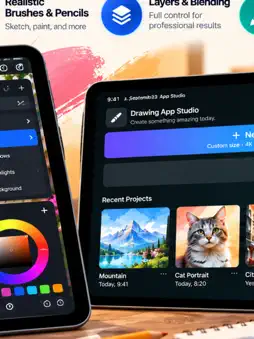
Drawing App Studio is a powerful and professional creative application designed primarily for iPad, delivering an advanced digital art experience for illustrators, designers, artists, students, architects, and creative enthusiasts. Built to take full advantage of the iPad’s large display and precision touch controls, the app transforms the device into a complete portable art studio. At the same time, Drawing App Studio also works seamlessly on iPhone and iMac, allowing users to continue their creative projects across multiple Apple devices with total flexibility and convenience. Users can purchase items within the app to enhance their overall experience. The application combines professional-grade drawing and painting tools with an intuitive and elegant interface, making it suitable for both beginners and experienced digital artists. Whether creating detailed sketches, expressive paintings, concept art, technical illustrations, storyboards, logos, or visual presentations, Drawing App Studio provides the performance and precision required for high-quality creative work. One of the standout features of Drawing App Studio is its advanced brush engine. The app includes a wide variety of carefully designed brushes that simulate real artistic materials such as pencils, inks, markers, charcoal, airbrushes, acrylics, and watercolours. Users can create highly detailed illustrations with realistic textures, smooth strokes, and accurate pressure sensitivity support when using compatible styluses such as Apple Pencil. The result is a natural drawing experience that closely resembles working with traditional artistic tools while benefiting from the flexibility of digital technology. Drawing App Studio was developed with professional workflows in mind. The app supports high-resolution canvases, multiple layers, blending modes, opacity controls, and precision editing tools that allow artists to create sophisticated compositions with exceptional detail and colour accuracy. From quick sketches to complete commercial artwork, the application offers the stability and performance needed for demanding creative projects. Another major advantage is its support for importing external files and resources. Users can easily import images, references, textures, sketches, PDFs, and other compatible files directly into their projects. This functionality makes the app ideal for professional workflows that involve editing existing artwork, creating mixed-media compositions, tracing references, or collaborating with clients and creative teams. Imported files can be integrated smoothly into layered projects, giving artists complete creative control over their work. Sharing artwork is equally simple and efficient. Drawing App Studio allows users to export and share their creations in multiple formats suitable for printing, social media, presentations, portfolios, and professional publishing. Projects can be shared directly with colleagues, clients, friends, or online communities, making collaboration and showcasing work fast and convenient. This cross-device compatibility also ensures that users can start a project on an iPad, refine details on an iMac, and review or present artwork on an iPhone whenever needed. Performance optimisation is another key strength of the app. Drawing App Studio was carefully engineered to provide smooth rendering, responsive controls, and stable performance even when working on complex projects with numerous layers and high-resolution assets. The clean and modern user interface helps artists stay focused on creativity without unnecessary distractions, while still offering access to advanced professional tools whenever required. By combining portability, professional features, cross-device compatibility, file import capabilities, and effortless sharing options, Drawing App Studio delivers a complete digital art solution for modern creators. EULA: https://www.apple.com/legal/internet-services/itunes/dev/stdeula/
What's New
Version 7.0 2026-10-28
Bug Fixes Technical Analysis
Package Overview Basic metadata
Bundle ID
Colombo.Drawing-App-Studio Current Version 7.0
Minimum iOS 17.6
Package Size App Store Size
Package Metadata 0 / 2 version records
Detailed binary, privacy manifest, framework, and Info.plist results have not been indexed for this package yet. The verified App Store and archive metadata above remains available.
Price History (USA store)
2 recorded price change points. These are historical observations, not a guarantee of the current price.
| Recorded at | Price | Currency |
|---|---|---|
| 7.99 | USD | |
| 0.0 | USD |
Known Version Records
0 version records with stored package metadata • 2 known version records
Stored metadata does not guarantee a package is currently available to download.
| Details | Version / IDs | Version date | Action |
|---|---|---|---|
| Not archived | App Store ID: 885836087 | Unknown | Request Version |
| Not archived | App Store ID: 885738504 | Unknown | Request Version |