
Preview



Description
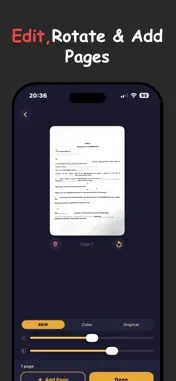
Now with Scannr Pro — search across all scans, merge PDFs, and password-protect your documents with a one-time purchase. Organize everything with smart folders: Receipts, IDs, Contracts, Medical, Finance & more. Create your own custom folders. New: ID Card mode scans front & back on a single page. Color & Original scan modes. Brightness & contrast controls. Scannr turns your iPhone into a fast, intelligent document scanner. Capture any document — receipts, notes, contracts, IDs, whiteboards — and instantly convert it into a clean, searchable PDF. No account needed. No cloud uploads. Everything stays on your device. SMART SCANNING Point your camera at any document and Scannr automatically detects the edges in real-time. Fine-tune with draggable corner handles if needed, then tap confirm. Your document is instantly perspective-corrected and enhanced with a high-contrast scan filter for crystal-clear results. MULTI-PAGE DOCUMENTS Scanning a multi-page document? Just keep adding pages. Drag to reorder, tap to preview, swipe to delete. When you're done, everything is combined into a single PDF. SEARCHABLE PDF WITH OCR Every scan is processed with on-device text recognition (OCR). The result is a fully searchable PDF — find any word, copy text, or select passages. All processing happens on your iPhone. Your documents never leave your device. SMART FILENAMES Scannr reads the first line of your document and uses it as the filename. No more "Scan_001" — your files are named after what they actually contain. SHARE ANYWHERE Export your scanned PDF to WhatsApp, Telegram, Mail, Google Drive, AirDrop, Files, Print — or any app that accepts files. Choose your preferred compression level (low, medium, or high) to balance quality and file size. SCAN HISTORY Every scan is saved locally on your device. Browse your past scans, view them anytime, and re-share with a single tap. Your scans are always at your fingertips. KEY FEATURES Auto edge detection with real-time camera overlay Draggable corner handles for precise cropping Perspective correction and document enhancement Multi-page scanning with drag-to-reorder On-device OCR for searchable, selectable text in PDFs Smart filename generation from document content PDF compression options (Low / Medium / High) Flashlight toggle for low-light scanning Gallery import — scan from existing photos Full share sheet — WhatsApp, Telegram, Mail, Drive, AirDrop, Print, Files Local scan history with re-share capability Dark theme designed for comfortable scanning Zero data collection — 100% private, 100% offline No account required — just open and scan
What's New
Version 2.0.3 2026-06-11
• Tighter Scanning — What you frame is what you scan. No more unexpected off-screen edges appearing after capture. • Smarter Edge Detection — Powered by Apple'...• Tighter Scanning — What you frame is what you scan. No more unexpected off-screen edges appearing after capture. • Smarter Edge Detection — Powered by Apple's advanced document segmentation ML model. Corners now snap more accurately to your document, even with wrinkles, folds, or shadows. • Faster Capture Processing — Enjoy a quicker shutter-to-crop experience with reduced delay after taking a photo. • Everything from v2.0.2 — Includes per-page rotation, larger page previews, and significantly faster PDF export. Technical Analysis
Package Overview Basic metadata
Bundle ID
com.sharma.Scanny Current Version 2.0.3
Minimum iOS 16.0
Package Size App Store Size
Package Metadata 0 / 6 version records
Detailed binary, privacy manifest, framework, and Info.plist results have not been indexed for this package yet. The verified App Store and archive metadata above remains available.
Known Version Records
0 version records with stored package metadata • 6 known version records
Stored metadata does not guarantee a package is currently available to download.
| Details | Version / IDs | Version date | Action |
|---|---|---|---|
| Not archived | App Store ID: 886830707 | Unknown | Request Version |
| Not archived | App Store ID: 885509105 | Unknown | Request Version |
| Not archived | App Store ID: 885054328 | Unknown | Request Version |
| Not archived | App Store ID: 883938448 | Unknown | Request Version |
| Not archived | App Store ID: 883836120 | Unknown | Request Version |
| Not archived | App Store ID: 883458773 | Unknown | Request Version |