Preview





Description
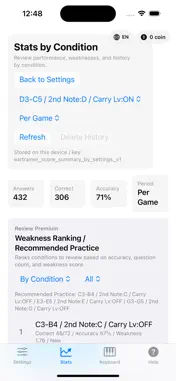
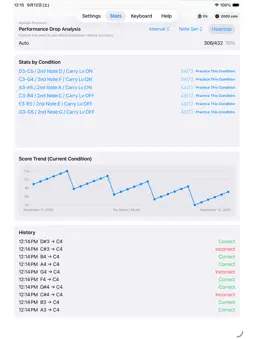
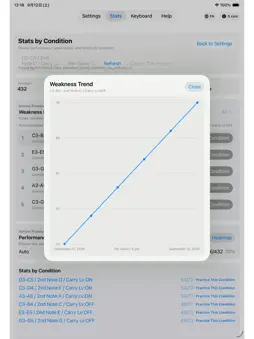
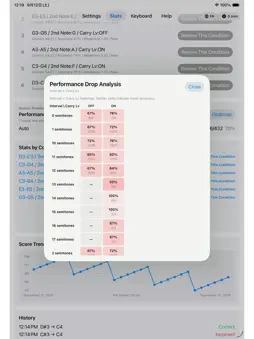
Listen to two notes, tell them apart, and find them on the keyboard. J.Sugar Ear Training is an ear-training app where you listen to two notes and identify them using a piano keyboard. Start with Trial Play and try the actual note-identification training as many times as you like for free. Absolute pitch is the ability to identify a single note without a reference tone, while relative pitch is the ability to recognize pitch relationships between notes. In this app, you train relative pitch by listening to two notes and answering directly on the keyboard. By turning off the BGM, you can reduce the clues provided by accompaniment and focus more directly on the notes themselves, making the app useful for absolute-pitch training as well. ■ Try it free Even before unlocking any fixed notes, Trial Play lets you experience the actual keyboard-based training for free as many times as you like. Trial Play gives you 30 seconds of practice with fixed note C, Level 1, white keys only, and a C3–C4 range. Your score is displayed, but Trial Play does not award coins, save results, or count toward unlock progress. ■ Unlock fixed notes and progress step by step In normal play, you begin by practicing with the second note fixed to a specific pitch. A fixed note is a reference note that keeps the second note the same in every question. Starting with a fixed note makes it easier to understand the relationship between the two notes. You can select fixed notes directly in the unlock dialog and see the required number of coins and purchase price before unlocking them. Use coins to unlock fixed notes one by one. You can also earn coins based on your score in normal play. Once all 12 notes are unlocked, you can practice with no fixed note. In this mode, the second note is also randomized, allowing you to take on more challenging listening exercises. ■ Practice with settings that suit you ・Set the keyboard range freely and choose the pitch range you want to practice ・Choose white keys only, black keys only, or both white and black keys ・Select a difficulty level from 1 to 6 ・Fix the interval between the two notes for focused practice ・Set a fixed note and practice using a specific pitch as your reference ・Use the Carry Over feature to continue from your previous level By combining different settings, you can focus on weak pitch ranges or conditions, or increase the difficulty of areas you are already comfortable with. ■ Track your results and identify strengths and weaknesses Your results from normal play are recorded and analyzed so you can see where you are strong and where you need more practice. With Review Premium, you can use weakness rankings, recommended review sessions, and performance breakdown analysis. You can also compare your own incorrect answers with the correct answers in both the current game’s mistake list and your review history, helping you practice weak areas more efficiently. Whether you want to improve your ability to distinguish pitches, add ear training to your instrument or vocal practice, or develop your musical skills, you can train at a level and pace that match your goals.
What's New
Version 1.7 2026-09-12
- Added support for switching the app display between Japanese and English. - Added English localization across the entire app, including Settings, Stats, Keybo...- Added support for switching the app display between Japanese and English. - Added English localization across the entire app, including Settings, Stats, Keyboard, Help, and various modals. - Added a global `AUTO / JP / EN` language selector at the top of the screen. - Improved the placement of the language selector and coin balance so they no longer overlap, even when the coin count becomes large. - Improved layouts in English to prevent clipped text and awkward line breaks. - Expanded English support on the Stats screen, including aggregation periods, conditions, weakness analysis, heatmaps, and history. - Updated aggregation labels to clearer wording such as “Per Game.” - Revised the Review Premium description to better explain recommended review, weakness analysis, and comparing your incorrect answers with the correct answers in both the current mistake list and review history. - Moved the Free Trial button from the keyboard itself to the control area and redesigned it to better match the standard play controls. - Fixed an issue where the keyboard and other controls could extend off-screen in landscape mode on iPhone. - Adjusted keyboard, control, language, and coin layouts for both portrait and landscape orientations on iPhone and iPad. - Updated the fixed-note unlock flow so that unlocking a fixed note from Settings no longer unexpectedly navigates to the Keyboard screen. Technical Analysis
Package Overview Basic metadata
Bundle ID
com.sherlockj0807.eartrainer Current Version 1.7
Minimum iOS 17.0
Package Size App Store Size
Package Metadata 1 / 2 version records
Detailed binary, privacy manifest, framework, and Info.plist results have not been indexed for this package yet. The verified App Store and archive metadata above remains available.
Known Version Records
1 version record with stored package metadata • 2 known version records
Stored metadata does not guarantee a package is currently available to download.
| Details | Version / IDs | Version date | Action |
|---|---|---|---|
| 5.33 MB | v1.5 App Store ID: 887465128Build: 1.5 | 2026-09-01 18:27:12 | Get Version |
| Not archived | App Store ID: 886626908 | Unknown | Request Version |