
Preview




Description
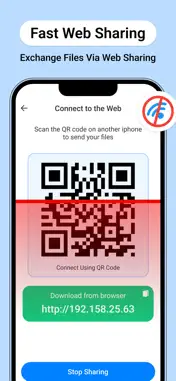
FileFlow: Transfer and Convert is the all-in-one utility designed for high-speed data movement and instant file transformation. Move your photos, videos, and documents without cables, size limits, or slow upload speeds. WHY USERS CHOOSE FILEFLOW: • Ultra-Fast Transfers: Use local WiFi or Hotspot to move heavy 4K videos and large photo libraries at speeds far beyond standard Bluetooth. • Universal Web Sharing: Transfer files from your iPhone to any PC, Mac, or Tablet instantly. Simply scan the QR code displayed in the app to start downloading on the receiving device via a web browser. • Professional Converter: Transform your images into JPEG, HEIC, PNG, BMP, or TIFF format in seconds. • Camera to PDF: Turn your physical documents or gallery photos into high-quality PDFs with the built-in creator. • Precise Quality Selection: Take control of your storage. Choose to send files in Original quality, High Quality, or Compressed to save space. CORE FEATURES: • Cross-Platform Support: Seamlessly connect iPhone to Windows, Linux, or other mobile devices via web browser. • Nearby Discovery: Quickly find and connect to devices around you for instant, secure sharing. • Offline Sharing: Use the Hotspot Transfer mode to move data even when no internet connection is available. • Modern Design: A clean, intuitive interface designed for maximum efficiency and speed. • Transfer History: Keep a detailed log of your sent and received items for easy access. Stop struggling with email attachments and slow cloud uploads. Join the FileFlow community and move your data at the speed of thought. Privacy Policy : https://iosapp2025.blogspot.com/2026/04/privacy-policy-for-fileflow-transfer.html Terms of Condition : https://sites.google.com/view/fileflow-terms/home
What's New
Version 1.1 2026-07-11
• Improved transfer speed and reliability. • Better user experience across the app. • Fixed minor issues and improved stability. Technical Analysis
Package Overview Basic metadata
Bundle ID
com.fileflow.transferconvert Current Version 1.1
Minimum iOS 15.6
Package Size App Store Size
Package Metadata 0 / 2 version records
Detailed binary, privacy manifest, framework, and Info.plist results have not been indexed for this package yet. The verified App Store and archive metadata above remains available.
Developer Information
Known Version Records
0 version records with stored package metadata • 2 known version records
Stored metadata does not guarantee a package is currently available to download.
| Details | Version / IDs | Version date | Action |
|---|---|---|---|
| Not archived | App Store ID: 888042653 | Unknown | Request Version |
| Not archived | App Store ID: 884263023 | Unknown | Request Version |