
Preview





Description
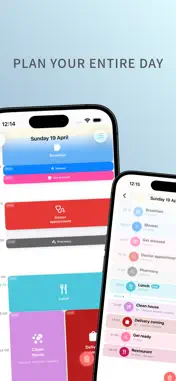
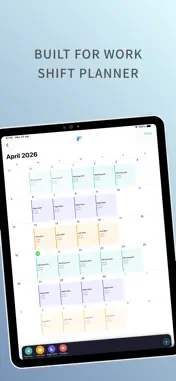
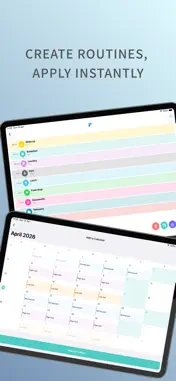
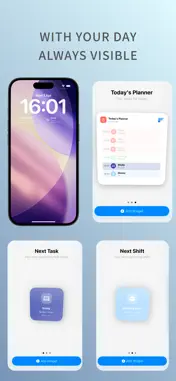
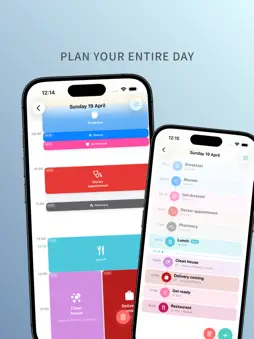
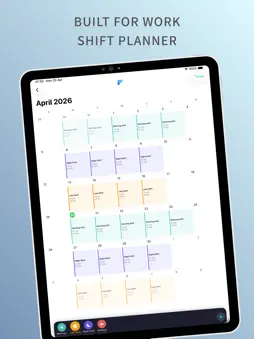
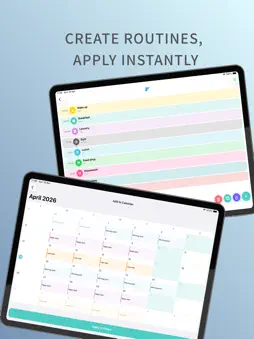
Framework – Daily Planner Take control of your entire day with one clear timeline. No subscriptions. No clutter. Just a simple, visual way to plan your time. Feel in control of your day again. See exactly where you are, what’s next, and how your day flows — all in one place. Why people choose Framework – No subscriptions or hidden costs – Your entire day in one clear timeline – Built for real life, including shift work – Works offline, with optional iCloud sync – Clean, fast, and distraction-free A Clear View of Your Day Your Home View brings everything together: – A live timeline of today that updates in real time – Instantly see what’s active, what’s next, and what’s done – Built-in calendars for both tasks and shifts – Quick access to your routines and saved plans Plan Your Day with Precision – Full 24-hour timeline for complete control – Tasks shown as visual blocks, scaled to their duration – Overlapping tasks automatically organised – All-day tasks and shifts kept separate and clear – Add, edit, or clear your day in seconds No guesswork — just a clear structure from morning to night. Built for Real Life (Including Shift Work) – Create custom shift types with roles, times, colours, and icons – Assign shifts to any day in seconds – View shifts alongside your daily tasks – Adjust your schedule at any time Balance work and life — without the stress. Routines That Save You Time – Build your ideal day once – Apply it to any date instantly – Manage and edit all saved routines Spend less time planning, more time doing. Full Calendar Overview – Scroll through past and future months – See all tasks directly inside each day – Open any day for a full detailed timeline Always know what’s coming next. Works with Apple – Import Apple Calendar events (read-only) – Export your tasks and shifts to a dedicated calendar – Full control over what syncs Optional iCloud Sync keeps everything updated across your devices — privately and securely. Widgets That Keep You on Track – See your day at a glance from your Home Screen or Lock Screen – View upcoming tasks and shifts instantly – Stay updated without opening the app – Clean, minimal designs that match your planner perfectly Your schedule — always within reach. Stay on Track – Set reminders for any task – Choose alert or silent notifications – See your next task or shift at a glance Built Around You – 12 or 24-hour time format – Custom start day of the week – Light, Dark, or System appearance – Full control over your data No Subscriptions. No Lock-ins. Framework is a one-time purchase. Everything is included — no monthly fees, no locked features. Pay once. Plan forever. Your data stays yours.
What's New
Version 1.5 2026-10-11
Framework has been redesigned from the ground up. It's cleaner and softer, and your day is easier to take in at a glance. New Home screen • Swipe through your ... Technical Analysis
Package Overview Basic metadata
Bundle ID
com.samuelogden.DailyPlanner Current Version 1.5
Minimum iOS 26.2
Package Size App Store Size
Package Metadata 0 / 5 version records
Detailed binary, privacy manifest, framework, and Info.plist results have not been indexed for this package yet. The verified App Store and archive metadata above remains available.
Known Version Records
0 version records with stored package metadata • 5 known version records
Stored metadata does not guarantee a package is currently available to download.
| Details | Version / IDs | Version date | Action |
|---|---|---|---|
| Not archived | App Store ID: 885560881 | Unknown | Paid / Arcade |
| Not archived | App Store ID: 885380302 | Unknown | Paid / Arcade |
| Not archived | App Store ID: 885203981 | Unknown | Paid / Arcade |
| Not archived | App Store ID: 884989061 | Unknown | Paid / Arcade |
| Not archived | App Store ID: 884879936 | Unknown | Paid / Arcade |